







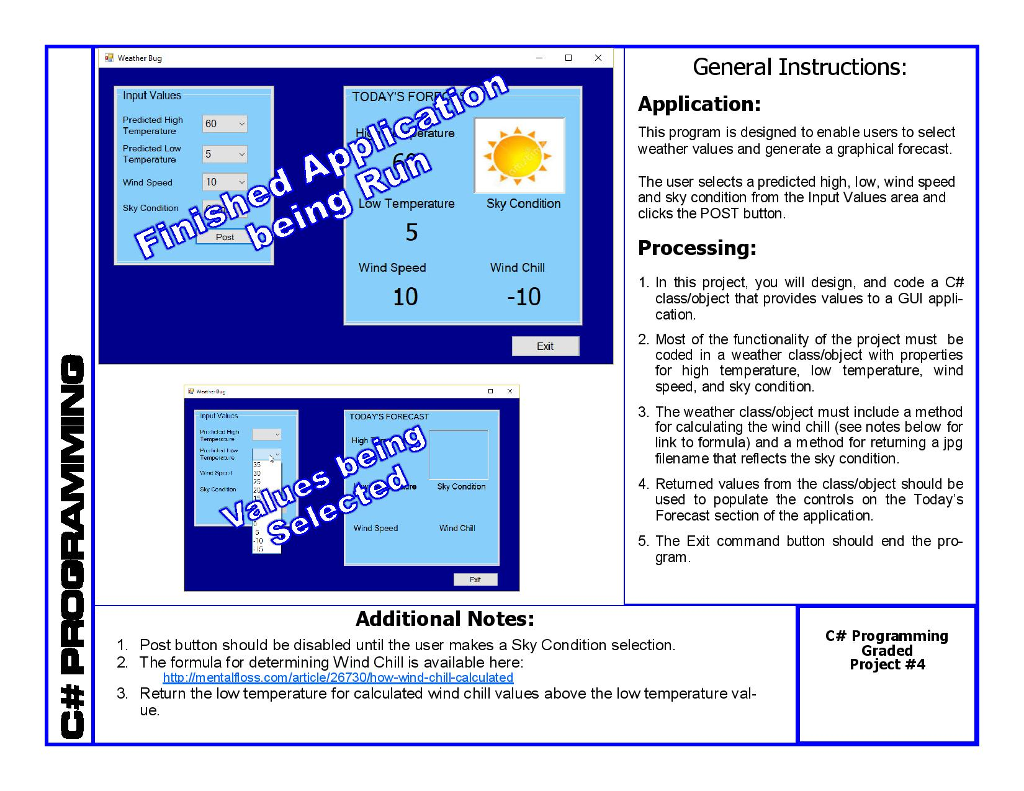
Question: Project has two components: 1) Windows GUI that enables the user to select input values from drop-down comboboxes and then click a button (POST) that
Project has two components:
1) Windows GUI that enables the user to select input values from drop-down comboboxes and then click a button (POST) that
2) instantiates a weather object designed from a separate class file.
The Windows POST button's click event should instantiate the weather object, send all values from the GUI to the properties in the object and call the object's methods for calculating and returning Wind Chill and the correct filename to be displayed for sky condition. The returned file name for sky condition should be used in the Image.FromFile method to load the file in the picturebox control in the "forecast" area of the GUI. Other returned values from the object will be used to populate the other controls of the "forecast" area.
 The formula for determining Wind Chill is available here:
http://mentalfloss.com/article/26730/how-wind-chill-calculated
Name of the jpg used:
clear.jpg
cloudy.jpg
partlycloudy.jpg
rain.jpg
Step by Step Solution
There are 3 Steps involved in it

Get step-by-step solutions from verified subject matter experts
 Study Help