







Question: PROJECT (Module 5) Include Screenshots at Every Step Configuring a Windows Server Operating System (WS 2012) INTRODUCTION Advanced Consulting Solutions has been awarded a contract
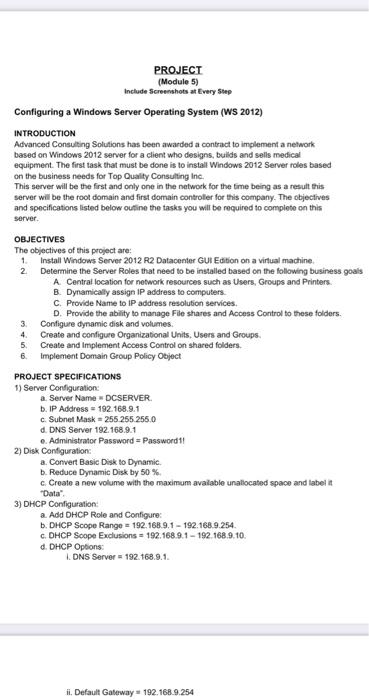
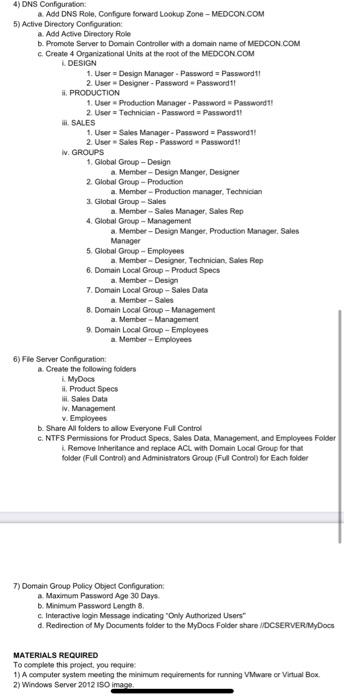
PROJECT (Module 5) Include Screenshots at Every Step Configuring a Windows Server Operating System (WS 2012) INTRODUCTION Advanced Consulting Solutions has been awarded a contract to implement a network based on Windows 2012 server for a client who designs, bulids and sells medical equipment. The first task that must be done is to install Windows 2012 Server roles based on the business needs for Top Quality Consulting Inc. This server will be the first and only one in the network for the time being as a result this server will be the root domain and first domain controller for this company. The objectives and specifications listed below outline the tasks you will be required to complete on this server. OBJECTIVES The objectives of this project are: 1 Install Windows Server 2012 R2 Datacenter GUI Edition on a virtual machine 2 Determine the Server Roles that need to be installed based on the following business goals A Central location for network resources such as Users Groups and Printers. B. Dynamically assign IP address to computers C. Provide Name to IP address resolution services D. Provide the ability to manage File shares and Access Control to these folders. Configure dynamic disk and volumes 4 Create and configure Organizational Units. Users and Groups 5. Create and implement Access Control on shared folders. 6 Implement Domain Group Policy Object PROJECT SPECIFICATIONS 1) Server Configuration: a Server Name DCSERVER b. IP Address 192.168.9.1 c. Subnet Mask = 255.255.255.0 d. DNS Server 192.168.9.1 Administrator Password = Password 11 2) Disk Configuration: a. Convert Basic Disk to Dynamic b. Reduce Dynamic Disk by 50% Create a new volume with the maximum available unallocated space and labelit Data" 3) DHCP Configuration: a. Add DHCP Role and Configurer b. DHCP Scope Range = 192.168.9.1 - 192.168.9.254 c. DHCP Scope Exclusions = 192.168.9.1 - 192.168.9.10. d. DHCP Options: DNS Server = 192.168.9.1. ii. Default Gateway 192.168.9.254 4) DNS Configuration: a. Add DNS Role Configure forward Lookup Zone - MEDCON.COM 5) Active Directory Configuration: a. Add Active Directory Role b. Promote Server to Domain Controller with a domain name of MEDCON.COM Create 4 Organizational Units at the root of the MEDCON.COM DESIGN 1. User Design Manager Password = Passwordt 2 User Designer - Password Password 1! H. PRODUCTION 1. User Production Manager - Password Password 1! 2 User = Technician - Password = Password 1! 1. SALES 1. User = Sales Manager - Password = Password!! 2 User Sales Rep - Password Passwordt! W. GROUPS 1. Global Group - Design a Member - Design Manger Designer 2 Global Group - Production a. Member - Production manager, Technician 2. Global Group - Sales a. Member-Sales Manager, Sales Rep 4. Global Group - Management a. Member - Design Manger. Production Manager. Sales Manager 5. Global Group - Employees a Member - Designer, Technician, Sales Rep 6. Domain Local Group - Product Specs a. Member-Design 7. Domain Local Group - Sales Data a. Member-Sales B. Domain Local Group - Management a Member -Management 9 Domain Local Group - Employees a. Member - Employees 6)Fle Server Configuration a. Create the following folders 1. MyDocs it. Product Specs ii. Sales Data W. Management V. Employees b. Share All folders to a low Everyone Full Control C. NTFS Permissions for Product Specs. Sales Data Management, and Employees Folder Remove Inheritance and replace ACL with Domain Local Group for that folder (Full Control and Administrators Group (Full Control) for Each folder 7) Domain Group Policy Object Configuration: a. Maximum Password Age 30 Days b. Minimum Password Length 8 c. Interactive login Message indicating "Only Authorized Users" d. Redirection of My Documents folder to the MyDocs Folder share /DCSERVERMyDocs MATERIALS REQUIRED To complete this project, you require 1) A computer system meeting the minimum requirements for running VMware or Virtual Box 2) Windows Server 2012 ISO image PROJECT (Module 5) Include Screenshots at Every Step Configuring a Windows Server Operating System (WS 2012) INTRODUCTION Advanced Consulting Solutions has been awarded a contract to implement a network based on Windows 2012 server for a client who designs, bulids and sells medical equipment. The first task that must be done is to install Windows 2012 Server roles based on the business needs for Top Quality Consulting Inc. This server will be the first and only one in the network for the time being as a result this server will be the root domain and first domain controller for this company. The objectives and specifications listed below outline the tasks you will be required to complete on this server. OBJECTIVES The objectives of this project are: 1 Install Windows Server 2012 R2 Datacenter GUI Edition on a virtual machine 2 Determine the Server Roles that need to be installed based on the following business goals A Central location for network resources such as Users Groups and Printers. B. Dynamically assign IP address to computers C. Provide Name to IP address resolution services D. Provide the ability to manage File shares and Access Control to these folders. Configure dynamic disk and volumes 4 Create and configure Organizational Units. Users and Groups 5. Create and implement Access Control on shared folders. 6 Implement Domain Group Policy Object PROJECT SPECIFICATIONS 1) Server Configuration: a Server Name DCSERVER b. IP Address 192.168.9.1 c. Subnet Mask = 255.255.255.0 d. DNS Server 192.168.9.1 Administrator Password = Password 11 2) Disk Configuration: a. Convert Basic Disk to Dynamic b. Reduce Dynamic Disk by 50% Create a new volume with the maximum available unallocated space and labelit Data" 3) DHCP Configuration: a. Add DHCP Role and Configurer b. DHCP Scope Range = 192.168.9.1 - 192.168.9.254 c. DHCP Scope Exclusions = 192.168.9.1 - 192.168.9.10. d. DHCP Options: DNS Server = 192.168.9.1. ii. Default Gateway 192.168.9.254 4) DNS Configuration: a. Add DNS Role Configure forward Lookup Zone - MEDCON.COM 5) Active Directory Configuration: a. Add Active Directory Role b. Promote Server to Domain Controller with a domain name of MEDCON.COM Create 4 Organizational Units at the root of the MEDCON.COM DESIGN 1. User Design Manager Password = Passwordt 2 User Designer - Password Password 1! H. PRODUCTION 1. User Production Manager - Password Password 1! 2 User = Technician - Password = Password 1! 1. SALES 1. User = Sales Manager - Password = Password!! 2 User Sales Rep - Password Passwordt! W. GROUPS 1. Global Group - Design a Member - Design Manger Designer 2 Global Group - Production a. Member - Production manager, Technician 2. Global Group - Sales a. Member-Sales Manager, Sales Rep 4. Global Group - Management a. Member - Design Manger. Production Manager. Sales Manager 5. Global Group - Employees a Member - Designer, Technician, Sales Rep 6. Domain Local Group - Product Specs a. Member-Design 7. Domain Local Group - Sales Data a. Member-Sales B. Domain Local Group - Management a Member -Management 9 Domain Local Group - Employees a. Member - Employees 6)Fle Server Configuration a. Create the following folders 1. MyDocs it. Product Specs ii. Sales Data W. Management V. Employees b. Share All folders to a low Everyone Full Control C. NTFS Permissions for Product Specs. Sales Data Management, and Employees Folder Remove Inheritance and replace ACL with Domain Local Group for that folder (Full Control and Administrators Group (Full Control) for Each folder 7) Domain Group Policy Object Configuration: a. Maximum Password Age 30 Days b. Minimum Password Length 8 c. Interactive login Message indicating "Only Authorized Users" d. Redirection of My Documents folder to the MyDocs Folder share /DCSERVERMyDocs MATERIALS REQUIRED To complete this project, you require 1) A computer system meeting the minimum requirements for running VMware or Virtual Box 2) Windows Server 2012 ISO image
Step by Step Solution
There are 3 Steps involved in it

Get step-by-step solutions from verified subject matter experts
 Study Help