







Question: Project Part 6-Correlation, Regression. and Prediction Use the data from your two quantitative variables to estimate the best fitting line through your data. Select one
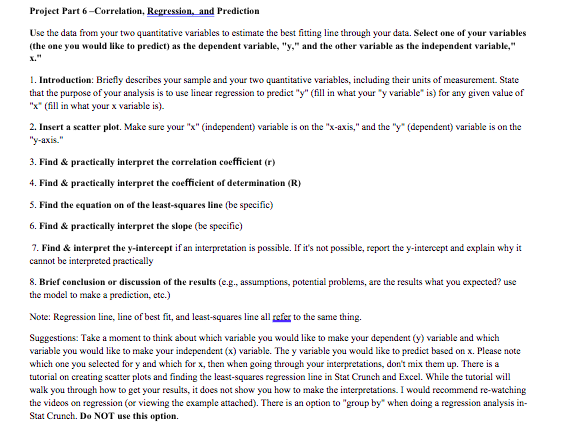
Project Part 6-Correlation, Regression. and Prediction Use the data from your two quantitative variables to estimate the best fitting line through your data. Select one of your variables (the one you would like to predict) as the dependent variable, "y," and the other variable as the independent variable," 1. Introduction: Briefly describes your sample and your two quantitative variables, including their units of measurement. State that the purpose of your analysis is to use linear regression to predict "y" (fill in what your "y variable" is) for any given value of "x" ( fill in what your x variable is). 2. Insert a scatter plot. Make sure your "x" (independent) variable is on the "x-axis," and the "y" (dependent) variable is on the "y-axis." 3. Find & practically interpret the correlation coefficient (r) 4. Find & practically interpret the coefficient of determination (R) 5. Find the equation on of the least-squares line (be specific) 6. Find & practically interpret the slope (be specific) 7. Find & interpret the y-intercept if an interpretation is possible. If it's not possible, report the y-intercept and explain why it cannot be interpreted practically 8. Brief conclusion or discussion of the results (e.g., assumptions, potential problems, are the results what you expected? use the model to make a prediction, etc.) Note: Regression line, line of best fit, and least-squares line all refer to the same thing. Suggestions: Take a moment to think about which variable you would like to make your dependent (y) variable and which variable you would like to make your independent (x) variable. The y variable you would like to predict based on x. Please note which one you selected for y and which for x, then when going through your interpretations, don't mix them up. There is a tutorial on creating scatter plots and finding the least-squares regression line in Stat Crunch and Excel. While the tutorial will walk you through how to get your results, it does not show you how to make the interpretations. I would recommend re-watching the videos on regression (or viewing the example attached). There is an option to "group by" when doing a regression analysis in- Stat Crunch. Do NOT use this option
Step by Step Solution
There are 3 Steps involved in it

Get step-by-step solutions from verified subject matter experts
 Study Help