



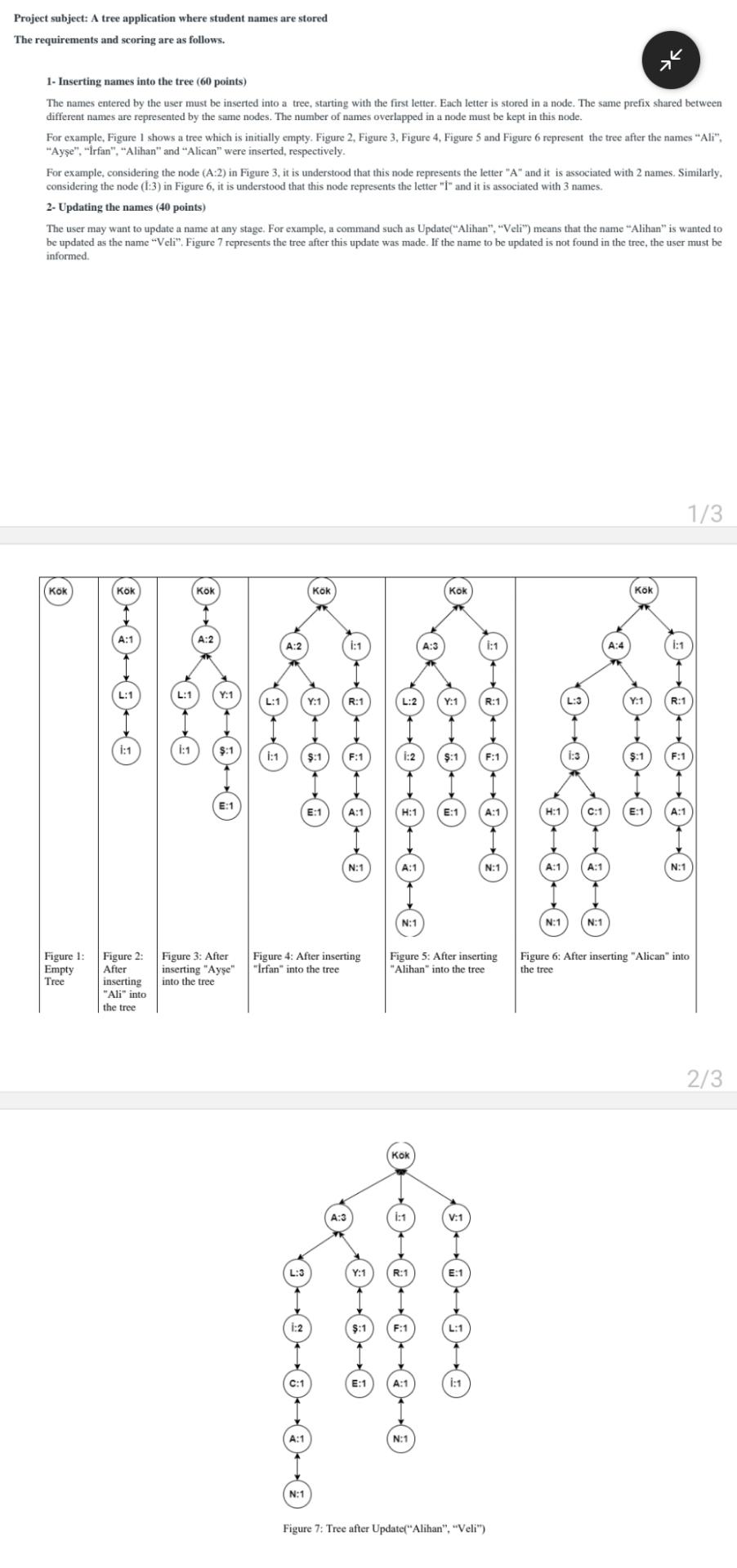
Question: Project subject: A tree application where student names are storedThe requirements and scoring are as follows . 1 - Inserting names into the tree (
Project subject: A tree application where student names are storedThe requirements and scoring are as follows Inserting names into the tree pointsThe names entered by the user must be inserted into a tree, starting with the first letter. Each letter is stored in a node. The same prefix shared betweendifferent names are represented by the same nodes. The number of names overlapped in a node must be kept in this node.For example, Figure I shows a tree which is initially empty. Figure Figure Figure Figure and Figure represent the tree after the names "Ali"."Aye "irfan","Alihan" and "Alican" were inserted, respectively.For example, considering the node A: in Figure it is understood that this node represents the letter A and it is associated with names. Similarly.considering the node : in Figure it is understood that this node represents the letter and it is associated with names Updating the names pointsThe user may want to update a name at any stage. For example, a command such as UpdateAlihan Veli" means that the name "Alihan" is wanted tobe updated as the name "Veli". Figure represents the tree after this update was made. If the name to be updated is not found in the tree, the user must beinformed.KOKFigure l:EmptyTreeKOHi:Figure :Afterinserting"Ali" intothe treei:E:Figure : Afterinserting Ayeinto the treeA:KokN:E:N:Figure : After inserting"Irfan" into the treeY:S:H:A:N:KokKokY:N:Figure : After inserting"Alihan" into the treeFigure :Tree after UpdateAlihan "Veli"A:N:N:KokR:N:Figure : After inserting "Alican" intothe tree
Step by Step Solution
There are 3 Steps involved in it
1 Expert Approved Answer
Step: 1 Unlock

Question Has Been Solved by an Expert!
Get step-by-step solutions from verified subject matter experts
Step: 2 Unlock
Step: 3 Unlock