







Question: Project: Train Booking System This project will implement a simple passenger/ticket lookup system using Hash Tables in Java. You should create the Hash Table
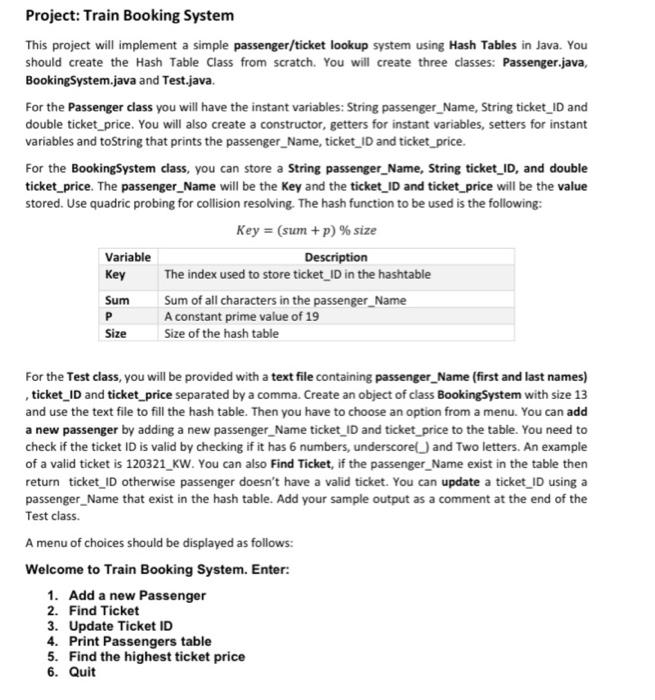
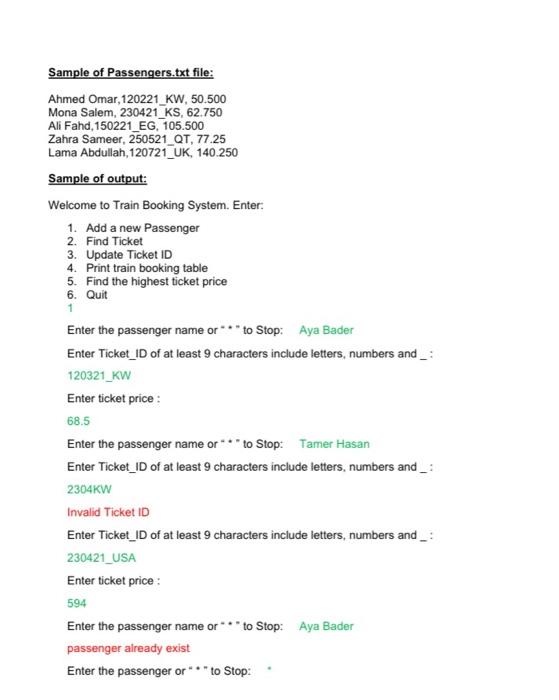
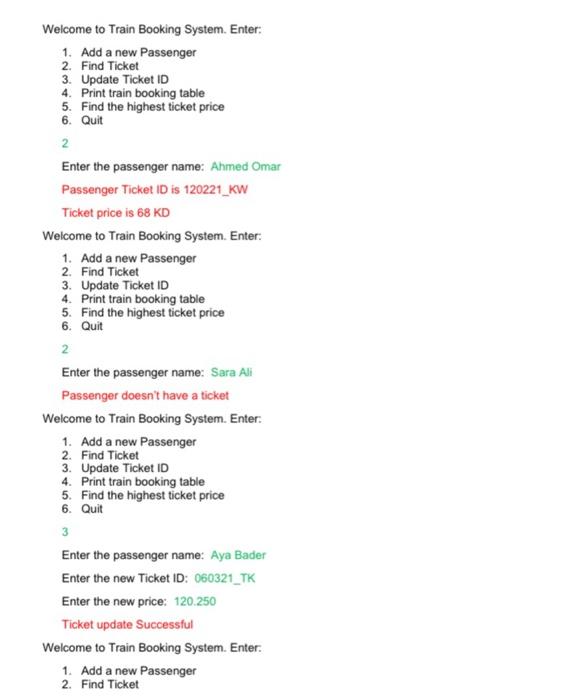
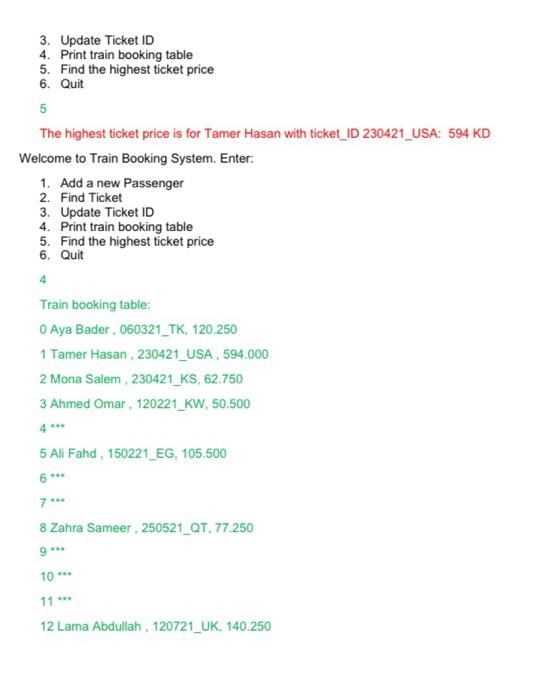
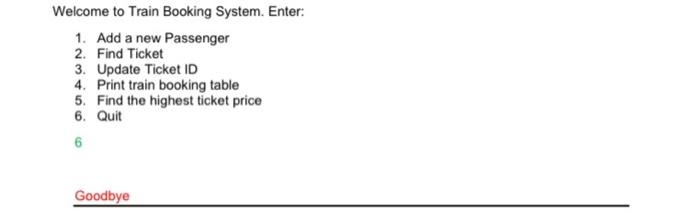
Project: Train Booking System This project will implement a simple passenger/ticket lookup system using Hash Tables in Java. You should create the Hash Table Class from scratch. You will create three classes: Passenger.java, BookingSystem.java and Test.java. For the Passenger class you will have the instant variables: String passenger_Name, String ticket_ID and double ticket price. You will also create a constructor, getters for instant variables, setters for instant variables and toString that prints the passenger_Name, ticket_ID and ticket_price. For the BookingSystem class, you can store a String passenger_Name, String ticket_ID, and double ticket price. The passenger_Name will be the Key and the ticket_ID and ticket price will be the value stored. Use quadric probing for collision resolving. The hash function to be used is the following: Variable Key Sum P Size Key=(sum +p) % size Description The index used to store ticket_ID in the hashtable Sum of all characters in the passenger_Name A constant prime value of 19 Size of the hash table For the Test class, you will be provided with a text file containing passenger_Name (first and last names) , ticket_ID and ticket price separated by a comma. Create an object of class BookingSystem with size 13 and use the text file to fill the hash table. Then you have to choose an option from a menu. You can add a new passenger by adding a new passenger_Name ticket_ID and ticket price to the table. You need to check if the ticket ID is valid by checking if it has 6 numbers, underscore) and Two letters. An example of a valid ticket is 120321_KW. You can also Find Ticket, if the passenger_Name exist in the table then return ticket_ID otherwise passenger doesn't have a valid ticket. You can update a ticket_ID using a passenger_Name that exist in the hash table. Add your sample output as a comment at the end of the Test class. A menu of choices should be displayed as follows: Welcome to Train Booking System. Enter: 1. Add a new Passenger 2. Find Ticket 3. Update Ticket ID 4. Print Passengers table 5. Find the highest ticket price 6. Quit Sample of Passengers.txt file: Ahmed Omar, 120221_KW, 50.500 Mona Salem, 230421 KS, 62.750 Ali Fahd, 150221_EG, 105.500 Zahra Sameer, 250521 QT, 77.25 Lama Abdullah, 120721_UK, 140.250 Sample of output: Welcome to Train Booking System. Enter: 1. Add a new Passenger 2. Find Ticket 3. Update Ticket ID 4. Print train booking table 5. Find the highest ticket price 6. Quit 1 Enter the passenger name or to Stop: Aya Bader Enter Ticket ID of at least 9 characters include letters, numbers and _: 120321_KW Enter ticket price: 68.5 Enter the passenger name or to Stop: Tamer Hasan Enter Ticket_ID of at least 9 characters include letters, numbers and _: 2304KW Invalid Ticket ID Enter Ticket_ID of at least 9 characters include letters, numbers and _: 230421_USA Enter ticket price: 594 Enter the passenger name or passenger already exist to Stop: Aya Bader Enter the passenger or***to Stop: Welcome to Train Booking System. Enter: 1. Add a new Passenger 2. Find Ticket 3. Update Ticket ID 4. Print train booking table 5. Find the highest ticket price 6. Quit 2 Enter the passenger name: Ahmed Omar Passenger Ticket ID is 120221_KW Ticket price is 68 KD Welcome to Train Booking System. Enter: 1. Add a new Passenger 2. Find Ticket 3. Update Ticket ID 4. Print train booking table 5. Find the highest ticket price 6. Quit 2 Enter the passenger name: Sara Ali Passenger doesn't have a ticket Welcome to Train Booking System. Enter: 1. Add a new Passenger 2. Find Ticket 3. Update Ticket ID 4. Print train booking table 5. Find the highest ticket price 6. Quit 3 Enter the passenger name: Aya Bader Enter the new Ticket ID: 060321_TK Enter the new price: 120.250 Ticket update Successful Welcome to Train Booking System. Enter. 1. Add a new Passenger 2. Find Ticket 3. Update Ticket ID 4. Print train booking table 5. Find the highest ticket price 6. Quit 5 The highest ticket price is for Tamer Hasan with ticket_ID 230421 USA: 594 KD Welcome to Train Booking System. Enter: 1. Add a new Passenger 2. Find Ticket 3. Update Ticket ID 4. Print train booking table 5. Find the highest ticket price 6. Quit Train booking table: 0 Aya Bader, 060321_TK, 120.250 1 Tamer Hasan, 230421_USA, 594.000 2 Mona Salem, 230421_KS, 62.750 3 Ahmed Omar, 120221_KW, 50.500 4 5 Ali Fahd, 150221_EG, 105.500 7** 8 Zahra Sameer, 250521 QT, 77.250 9--- 10--- 11*** 12 Lama Abdullah, 120721_UK, 140.250 Welcome to Train Booking System. Enter: 1. Add a new Passenger 2. Find Ticket 3. Update Ticket ID 4. Print train booking table 5. Find the highest ticket price 6. Quit 6 Goodbye
Step by Step Solution
There are 3 Steps involved in it
The main issue with the initial answer is that the ticket ID validation does not conform to the provided requirements and the handling of user inputoutput isnt aligned with the project specifications ... View full answer

Get step-by-step solutions from verified subject matter experts
 Study Help