







Question: /* Project2.java InsertInOrder with bSearch optimization to compute insertion index STUDENT NAME/ID: compile: javac Project2.java execute: java Project2 P2Input.txt */ import java.util.*; import java.io.*; public
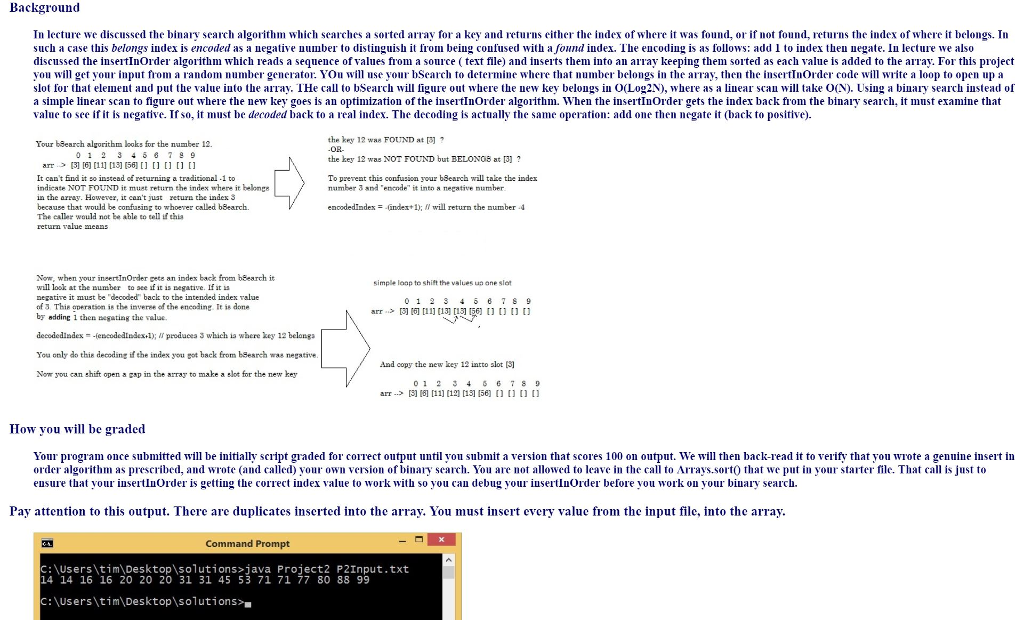
/* Project2.java InsertInOrder with bSearch optimization to compute insertion index STUDENT NAME/ID: compile: javac Project2.java execute: java Project2 P2Input.txt */ import java.util.*; import java.io.*; public class Project2 { static final int INITIAL_CAPACITY = 5; public static void main( String args[] ) throws Exception { if (args.length Background In lecture we discussed the binary search algorithm which searches a sorted array for a key and returns either the index of where it was found, or if not found, returns the index of where it belongs. In such case this belongs index 1s encoded as?negative number to distinguish it rom being con used with a ound index he encoding is as ollows: add 1 to Index then llegate. In lecture we also discussed the insertInOrder algorithm which reads a sequence of values from a source ( text file) and inserts them into an array keeping them sorted as each value is added to the array. For this project you will get your input from a random number generator. YOu wll use your bSearch to determine where that number belongs in the array, then the insertInOrder code will write a loop to open up a slot for that element and put the value into the aray. THe call to bSearch will figure out where the uew key belongs i O(Log2N), where as a linear scan will take O(N). Using a binary search instead of a simple linear scan to figure out where the new key goes is an optimization of the insertInOrder algorithm. When the insertInOrder gets the inder back from the binary search, it must examine that value to see if it is negative. If so, t must be decoded back to a real index. The decoding is actually the same operation: add one then negate t (back to positive the key 12 was FOUUND at []7 OR Your bBearch algorithm looks for the number 12. the key 12 was NOT FOUND but BELONO8 at [3] arr [3 [6] [11 [13] 56 [ [ [ It cant Gnd it soinstead of returning a traditional -1 to indicate NOT FOUND it must return the index where it belonge in the arnay. However, it can't just return the index 3 because that would be confasing to whoever called bSearch. The ealler would not be able to tell ifthi return value means To prerent this confusion your bSearch will take the index number 3 and encode" it intn a negative number encodedIndex-ndes+ 1); l will return the number -4 Now, when your ineertnOrder gete an index back from bBearch it will look at the umber to ee if it is negative. If it is negatire it must be "decoded" back to the intended index ralue of 3 This peration is the inveree of the encoding It is done by addinc 1 then aegating the value simple loap to shift the values ua ane slo arr .> [?[6] [11] [13][13] p6] [] [] [] [] decodediadex-feneodedindex l); produees 3 which ia where key 12 belonga You only do this decoding if the index you pot back from bSesrch was negative Now you can shift open a gap in the array to make a slot for the new key And copy the new key 12 intto slot [3 0123 67 8 arr 1811] 121 [15 15) How you will be graded Your program once submitted w be initially script graded for cormect output until you submit a version that scores 100 on output. We will then back-read it to verify that you wrote a genuine insert in order algorithm as prescribed, and wrote (and called) your own version of binary search. You are not allowed to leave in the call to Arrays.sortO that we put in your starter file. That call is just to ensure that your insertInOrder is getting the corect index value to work with so you can debug your iusertinOrder before you work on your binary search. Pay attention to this output. There are duplicates inserted into the array. You must insert every valuc from the input file, into the array 31 Command Prompt :Users\tim\Desktop\solutions>java Project2 P2Input.txt 14 14 16 16 20 20 20 31 31 45 53 71 71 77 80 88 99 C: \Users\tim Desktop\solutions> Step by Step Solution
There are 3 Steps involved in it
1 Expert Approved Answer
Step: 1 Unlock

Question Has Been Solved by an Expert!
Get step-by-step solutions from verified subject matter experts
Step: 2 Unlock
Step: 3 Unlock
 Study Help