







Question: Project#3 Using Loops and Reading in File 1. Create pseudocode or flowchart for the following problem a. Pseudocode must be on a separate Word .doc
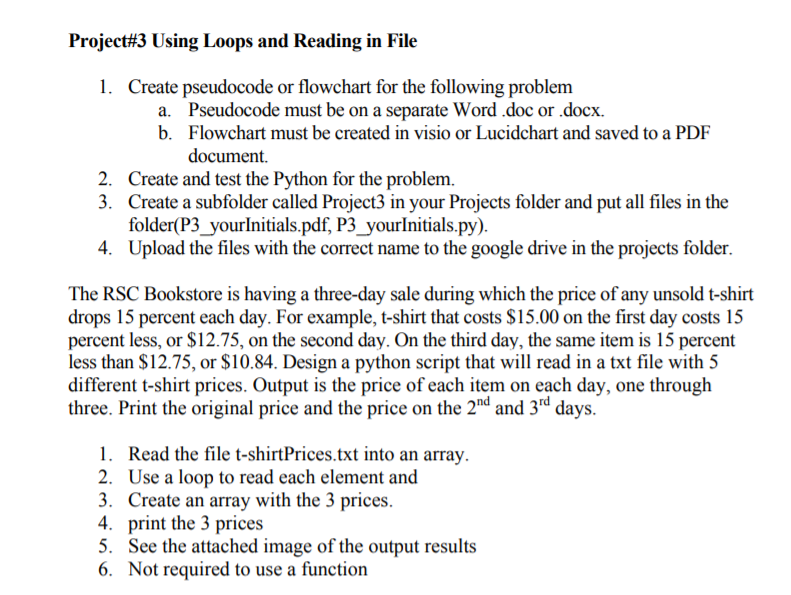
Project#3 Using Loops and Reading in File 1. Create pseudocode or flowchart for the following problem a. Pseudocode must be on a separate Word .doc or .docx. b. Flowchart must be created in visio or Lucidchart and saved to a PDF document. 2. Create and test the Python for the problem. Create a subfolder called Project3 in your Projects folder and put all files in the folder(P3_yourlnitials.pdf, P3_yourlnitials.py) Upload the files with the correct name to the google drive in the projects folder. 3. 4. The RSC Bookstore is having a three-day sale during which the price of any unsold t-shirt drops 15 percent each day. For example, t-shirt that costs $15.00 on the first day costs 15 percent less, or $12.75, on the second day. On the third day, the same item is 15 percent less than $12.75, or S10.84. Design a python script that will read in a txt file with 5 different t-shirt prices. Output is the price of each item on each day, one through three. Print the original price and the price on the 2nd and 3rd days 1. Read the file t-shirtPrices.txt into an array 2. Use a loop to read each element and 3. Create an array with the 3 prices 4. print the 3 prices 5. See the attached image of the output results 6. Not required to use a function
Step by Step Solution
There are 3 Steps involved in it

Get step-by-step solutions from verified subject matter experts
 Study Help