



Question: Projecting NOPAT and NOA Using Parsimonious Forecasting Method Following are Logitecis sales, nes operating profit ahter tax (NOPA), and net opeeating assets (NqOy for its
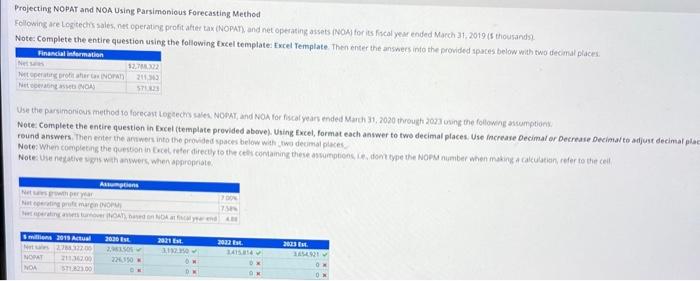
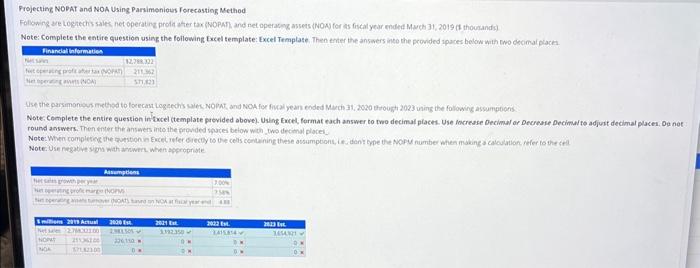
Projecting NOPAT and NOA Using Parsimonious Forecasting Method Following are Logitecis sales, nes operating profit ahter tax (NOPA), and net opeeating assets (NqOy for its fincal year ended March 31,2019 (5 thousandy. Note: Complete the entire question using the following fxcel template fxcel Template. Then enter the answecs into the provided apares below whth two decimal places: Note: Complete the entire question in Excel (template provided above). Uting Excel, format each anvwer to two decimal places. Use increase Oecimal or Oecreaie oecimiaito adjust decimar . round answers. Then eoter the ariwers into the provided spaces below wath jtwo dechal piaces. Note: Use nezatise s.gls weth antwers, when apgropiote. Frojecting NODAt and NOA Using Parsimenious forecastiog Method Note: Compiete the entire question using the following Excel template: Excel Template. Then enter the answers inco the provided apaces below wath owo cecimal plack. Note: Complete the entire question inficel (template previded above). Using Eucel, fermat each answer to two decimal piaces. Use Mocresse Decimal or Decrease Decimal te adjuit decimal paces. Og nof round answers. Then enter the answes into the provded spucei below with two decinal placel Note:Use negate sign wath anowrt. when appooprime Projecting NOPAT and NOA Using Parsimonious Forecasting Method Following are Logitecis sales, nes operating profit ahter tax (NOPA), and net opeeating assets (NqOy for its fincal year ended March 31,2019 (5 thousandy. Note: Complete the entire question using the following fxcel template fxcel Template. Then enter the answecs into the provided apares below whth two decimal places: Note: Complete the entire question in Excel (template provided above). Uting Excel, format each anvwer to two decimal places. Use increase Oecimal or Oecreaie oecimiaito adjust decimar . round answers. Then eoter the ariwers into the provided spaces below wath jtwo dechal piaces. Note: Use nezatise s.gls weth antwers, when apgropiote. Frojecting NODAt and NOA Using Parsimenious forecastiog Method Note: Compiete the entire question using the following Excel template: Excel Template. Then enter the answers inco the provided apaces below wath owo cecimal plack. Note: Complete the entire question inficel (template previded above). Using Eucel, fermat each answer to two decimal piaces. Use Mocresse Decimal or Decrease Decimal te adjuit decimal paces. Og nof round answers. Then enter the answes into the provded spucei below with two decinal placel Note:Use negate sign wath anowrt. when appooprime
Step by Step Solution
There are 3 Steps involved in it

Get step-by-step solutions from verified subject matter experts