







Question: Provided code: ARRAYSTRINGLIST CLASS: import java.util.List; import java.util.ArrayList; public class ArrayStringList { /* This field is really important! * This is the internal array of
Provided code:
ARRAYSTRINGLIST CLASS:
import java.util.List; import java.util.ArrayList;
public class ArrayStringList {
/* This field is really important! * This is the internal array of data you're going to use to implement the * ArrayStringList. This is what actually STORES the Strings in your list. * More information about how this should be used is in the lab writeup. * Read it first! */ private String[] data;
private int size;
/* YOUR CODE HERE
/* This method is mostly here for your own benefit. You may be resizing the * array in several places (in both of the add methods, for instance), and * whenever we are doing the same thing in multiple places, it's usually a * good idea to put it into a function, so it can be easily reused. * * This method should change the size of that data array to whatever the * newSize is. It should keep the original data intact as well. I recommend * you start by creating a totally new String[] array of the desired size, * then copying over the elements from the data array to this new array, * then when that is done, replacing the data array with the new one. */ private void resizeData(int newSize) { } /* Remember: An uninitialized field is a bad one. In this constructor, you * should initialize data and size, using the initialCapacity as the, * well, initial capacity of the data array */ public ArrayStringList(int initialCapacity) { }
/* This method should add a string to the END of your ArrayList. * For instance, if there are 5 elements, this should go into index 5 (the * sixth spot). */ public void add(String str) {
}
/* This method should add a string to a specific index in your ArrayList. * The index may not be valid. For instance, calling this with an index of * 10 on an ArrayList that only has 7 elements is not allowed. * If the index is out of bounds, stop the method without doing anything. */ public void add(int index, String str) {
}
/* This method should return the string stored at a certain index. * Like the method above, the index may not be valid. Return null if the * index given is out of bounds. */ public String get(int index) { return null; }
/* This method should take the string at a given index out of your * ArrayList. * If the index isn't valid, then stop the method without doing anything. */ public void remove(int index) {
}
/* This method should return how many elements are in your ArrayList. * Hint: You should already be storing this in a variable called size. */ public int size() { return -1; }
/* This method should return true if the given string is in your ArrayList, * and false otherwise. * Remember to use .equals() instead of == when comparing one String * with another. */ public boolean contains(String str) { return false; }
MAIN CLASS:
import java.util.List; import java.util.ArrayList;
public class Main {
public static void main(String[] args) { ArrayStringList list = new ArrayStringList(2); ArrayList
list.add("alpha"); referenceList.add("alpha"); list.add("beta"); referenceList.add("beta"); list.add("gamma"); referenceList.add("gamma");
if (list.size() != referenceList.size()) { throw new AssertionError(String.format("Your size method produced " + "the wrong results. It should be been %d, but it was %d.", referenceList.size(), list.size())); }
for (int i = 0; i
list.remove(1); referenceList.remove(1);
if (list.size() != referenceList.size()) { throw new AssertionError(String.format("After removing an item, " + "the size of your list should be %d, but it was %d. Your " + "remove method may not properly be updating the list's size.", referenceList.size(), list.size())); }
for (int i = 0; i
if (!list.contains("alpha")) { throw new AssertionError(String.format("Your contains method " + "reported a string doesn't exist in the List, even though " + "it should.")); }
if (list.contains("beta")) { throw new AssertionError(String.format("Your contains method " + "reported a string DID exist in the List, even though it " + "should have been removed.")); }
// Fun fact: Java strings (and chars, for that matter) are // Unicode-compatible!
list.add("delta"); referenceList.add("delta"); list.add("epsilon"); referenceList.add("epsilon"); list.add("zeta"); referenceList.add("zeta"); list.add("eta"); referenceList.add("eta"); list.add("theta"); referenceList.add("theta"); list.add("iota"); referenceList.add("iota"); list.add("kappa"); referenceList.add("kappa"); list.add("lambda"); referenceList.add("lambda"); list.add("mu"); referenceList.add("mu");
if (list.size() != referenceList.size()) { throw new AssertionError(String.format("After adding a bunch of " + "new elements, the size of your list should have been %d " + "but it was %d", referenceList.size(), list.size())); }
for (int i = 0; i
System.out.println("If you're reading this, everything worked!"); } }
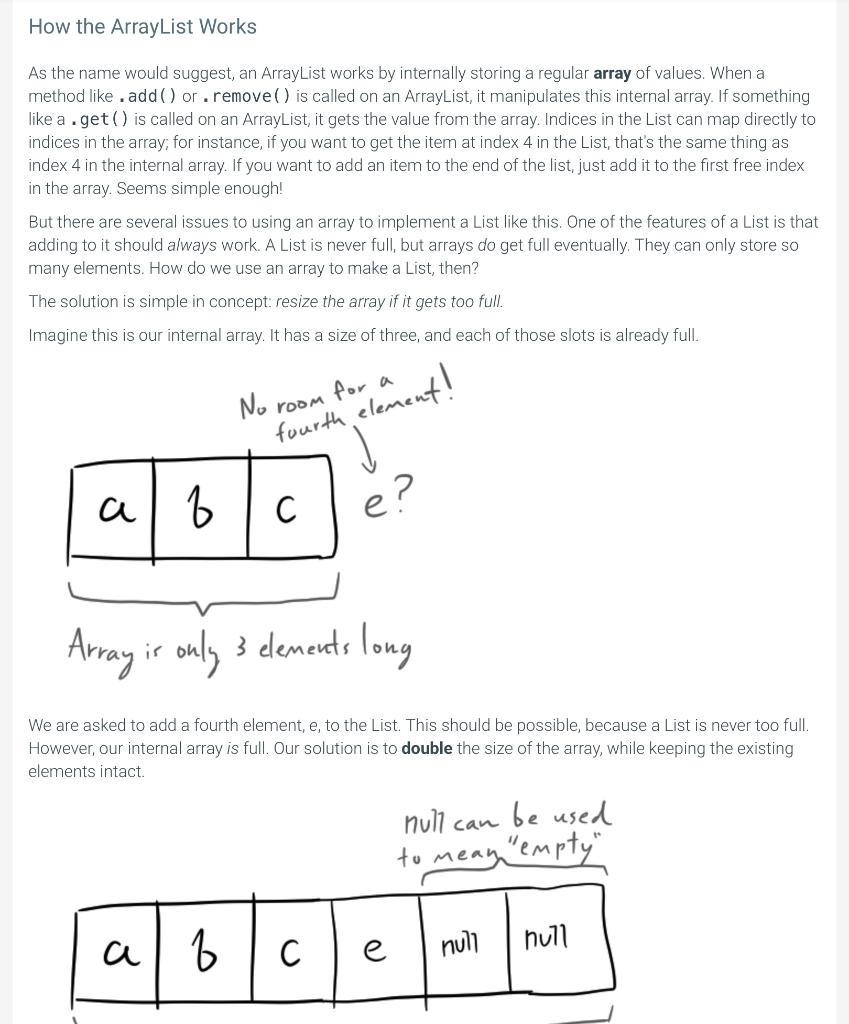
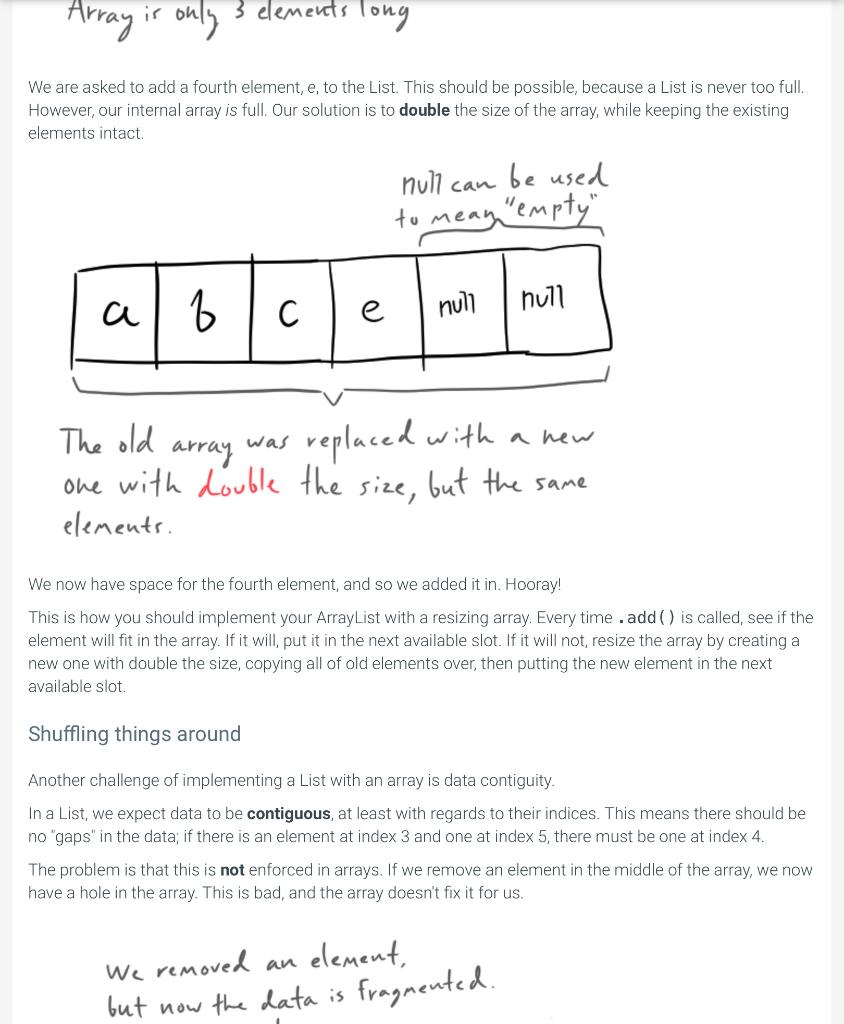
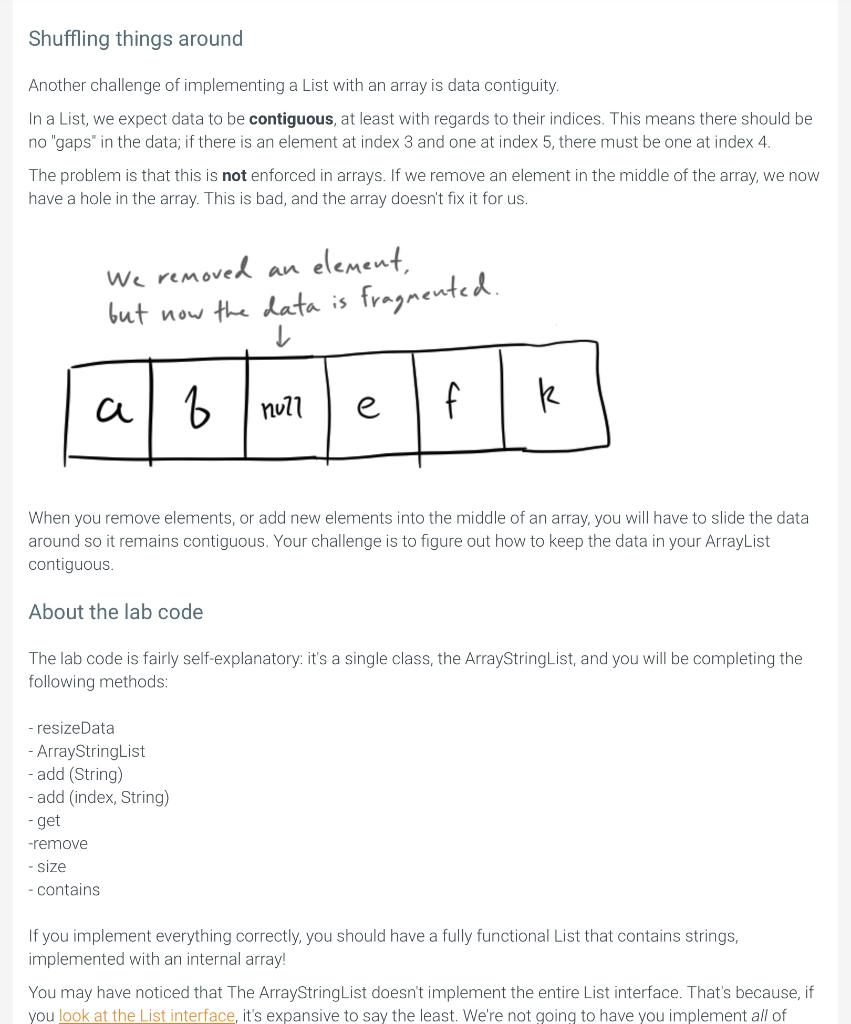
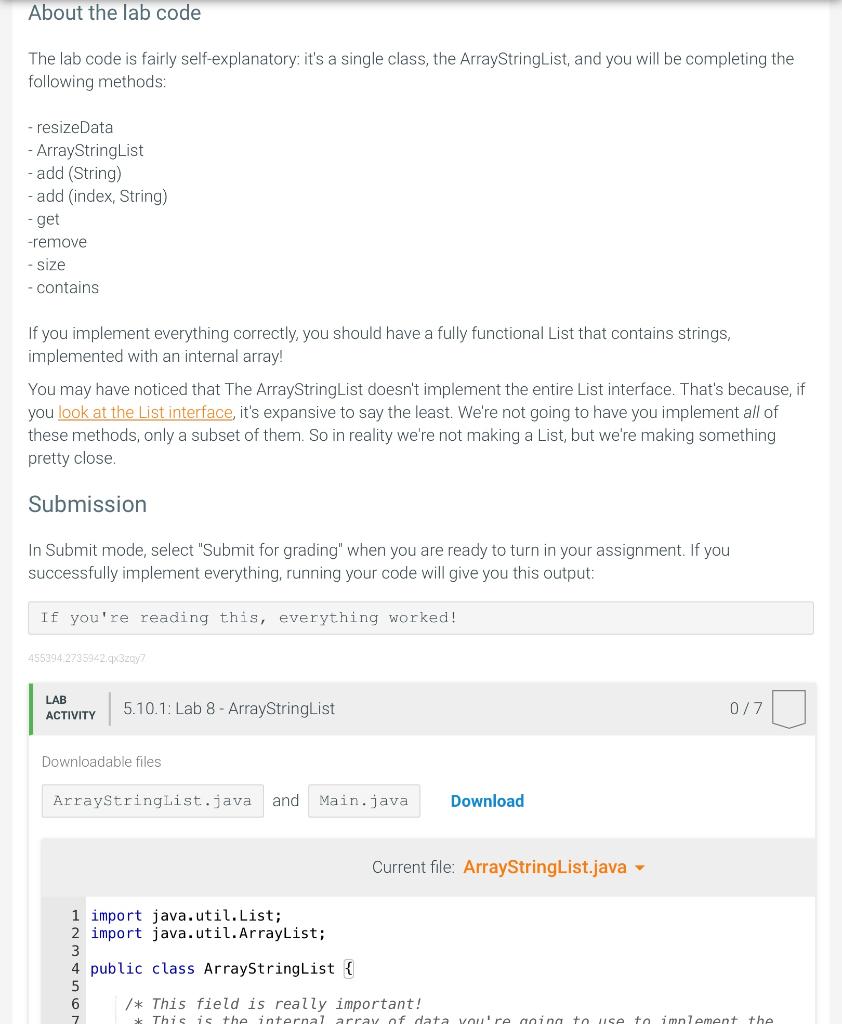
5.10 Lab 8 - ArrayStringList Module 4: Lab 8 - ArrayStringList Making Your Very Own ArrayList This lab includes the following java files: L7/ ArrayStringList.java Main.java* * Main.java is used for testing and cannot be modified. Here is the starter jar with ArrayStringList.java if you would like to code in a different environment: L7.jar. Fair warning: you may find this lab slightly more difficult than most. Read this writeup in its entirety, and please do not be afraid to ask your TAs for help if you get stuck! We all know and love the standard Java ArrayList. It is a wonderful alternative to regular Java arrays, the ones that look like this: String [] myStrings ={ "hello", "world" }; This is great and all, but it's very static. Sure, we can change the existing elements, but what if we want to add a third one? Or take one out? There's no easy way to do either of these things, and so working with regular arrays is a bit of a chore. The ArrayList is an implementation of a List. A List is more powerful than an array. You can add elements to the List with . add ( ), you can take them out with. remove ( ), you can even see if a certain element is in the list with a single call to . contains ( ). In fact, the list of everything a List can do is quite extensive, ranging from iteration to replacement to filtering. An ArrayList is a class that supports all of these awesome List features. But how does it do it? In this lab, you'll learn more about how the ArrayList works internally by creating a simpler one of your own! How the ArrayList Works As the name would suggest, an ArrayList works by internally storing a regular array of values. When a method like. add() or . remove ( ) is called on an ArrayList, it manipulates this internal array. If something like a . get ( ) is called on an ArrayList, it gets the value from the array. Indices in the List can map directly to indices in the array; for instance, if you want to get the item at index 4 in the List, that's the same thing as index 4 in the internal array. If you want to add an item to the end of the list, just add it to the first free index in the array. Seems simple enough! How the ArrayList Works As the name would suggest, an ArrayList works by internally storing a regular array of values. When a method like add() or . remove ( ) is called on an ArrayList, it manipulates this internal array. If something like a. get() is called on an ArrayList, it gets the value from the array. Indices in the List can map directly to indices in the array; for instance, if you want to get the item at index 4 in the List, that's the same thing as index 4 in the internal array. If you want to add an item to the end of the list, just add it to the first free index in the array. Seems simple enough! But there are several issues to using an array to implement a List like this. One of the features of a List is that adding to it should always work. A List is never full, but arrays do get full eventually. They can only store so many elements. How do we use an array to make a List, then? The solution is simple in concept: resize the array if it gets too full. Imagine this is our internal array. It has a size of three, and each of those slots is already full. We are asked to add a fourth element, e, to the List. This should be possible, because a List is never too full. However, our internal array is full. Our solution is to double the size of the array, while keeping the existing elements intact. We are asked to add a fourth element, e, to the List. This should be possible, because a List is never too full. However, our internal array is full. Our solution is to double the size of the array, while keeping the existing elements intact. The old array was replaced with a new one with double the size, but the same elements. We now have space for the fourth element, and so we added it in. Hooray! This is how you should implement your ArrayList with a resizing array. Every time. add () is called, see if the element will fit in the array. If it will, put it in the next available slot. If it will not, resize the array by creating a new one with double the size, copying all of old elements over, then putting the new element in the next available slot. Shuffling things around Another challenge of implementing a List with an array is data contiguity. In a List, we expect data to be contiguous, at least with regards to their indices. This means there should be no "gaps" in the data; if there is an element at index 3 and one at index 5, there must be one at index 4. The problem is that this is not enforced in arrays. If we remove an element in the middle of the array, we now have a hole in the array. This is bad, and the array doesn't fix it for us. We removed an element, We removed now the data is fragmented. Shuffling things around Another challenge of implementing a List with an array is data contiguity. In a List, we expect data to be contiguous, at least with regards to their indices. This means there should be no "gaps" in the data; if there is an element at index 3 and one at index 5 , there must be one at index 4. The problem is that this is not enforced in arrays. If we remove an element in the middle of the array, we now have a hole in the array. This is bad, and the array doesn't fix it for us. We removed an element, but now the data is fragmented. When you remove elements, or add new elements into the middle of an array, you will have to slide the data around so it remains contiguous. Your challenge is to figure out how to keep the data in your ArrayList contiguous. About the lab code The lab code is fairly self-explanatory: it's a single class, the ArrayStringList, and you will be completing the following methods: - resizeData - ArrayStringList - add (String) - add (index, String) - get -remove - size - contains If you implement everything correctly, you should have a fully functional List that contains strings, implemented with an internal array! You may have noticed that The ArrayStringList doesn't implement the entire List interface. That's because, if you look at the List interface, it's expansive to say the least. We're not going to have you implement all of The lab code is fairly self-explanatory: it's a single class, the ArrayStringList, and you will be completing the following methods: - resizedata - ArrayStringList - add (String) - add (index, String) - get -remove - size - contains If you implement everything correctly, you should have a fully functional List that contains strings, implemented with an internal array! You may have noticed that The ArrayStringList doesn't implement the entire List interface. That's because, if you look at the List interface, it's expansive to say the least. Were not going to have you implement all of these methods, only a subset of them. So in reality we're not making a List, but we're making something pretty close. Submission In Submit mode, select "Submit for grading" when you are ready to turn in your assignment. If you successfully implement everything, running your code will give you this output: If you're reading this, everything worked! LAB ACTIVITY 0/7 Downloadable files and Current file: ArrayStringList.java - \begin{tabular}{l|l} 1 & import java. util. List; \\ 2 & import java. util. Arraylist; \\ 3 & \\ 4 & public class ArrayStringList \{ \\ 5 & \\ 6 & / This field is really important! \\ 7 & This is the internal arrav of dat \end{tabular}
Step by Step Solution
There are 3 Steps involved in it

Get step-by-step solutions from verified subject matter experts
 Study Help