



Question: PT Activity: 01:23:45 Skills Test Instructions Part 1: VLSM Using the given network, subnet accordingly to address all Networks, Devices, Ports, and Connections. A
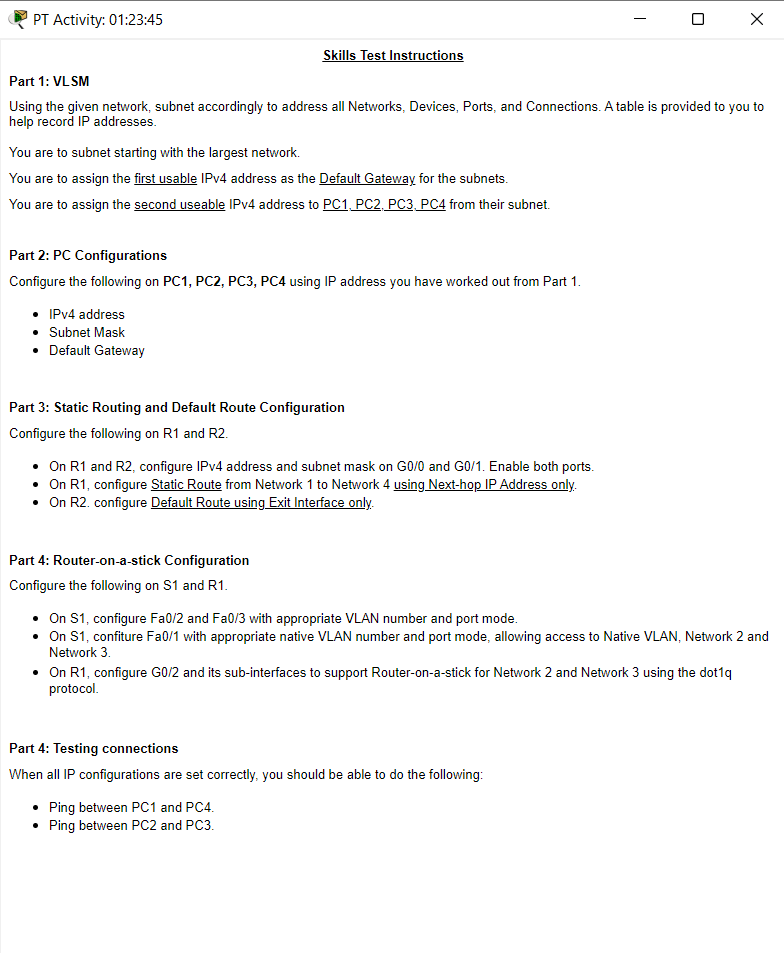
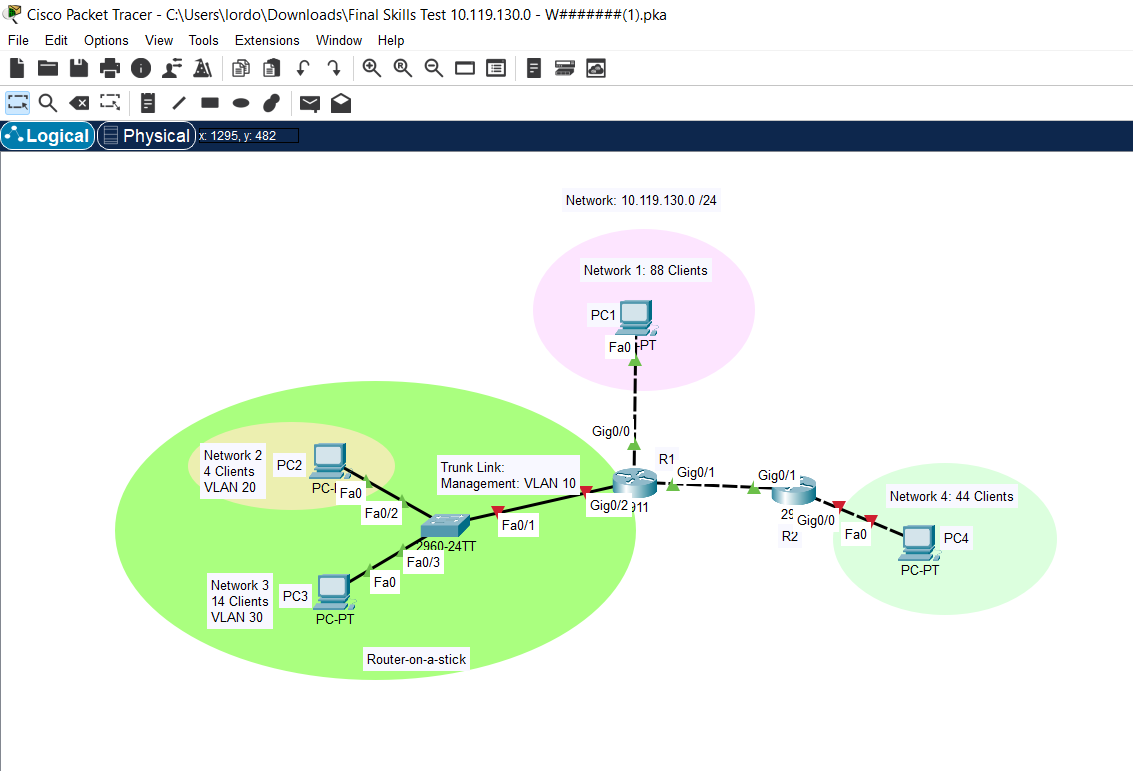
PT Activity: 01:23:45 Skills Test Instructions Part 1: VLSM Using the given network, subnet accordingly to address all Networks, Devices, Ports, and Connections. A table is provided to you to help record IP addresses. You are to subnet starting with the largest network. You are to assign the first usable IPv4 address as the Default Gateway for the subnets. You are to assign the second useable IPv4 address to PC1, PC2, PC3, PC4 from their subnet. Part 2: PC Configurations Configure the following on PC1, PC2, PC3, PC4 using IP address you have worked out from Part 1. IPv4 address Subnet Mask Default Gateway Part 3: Static Routing and Default Route Configuration Configure the following on R1 and R2. On R1 and R2, configure IPv4 address and subnet mask on G0/0 and G0/1. Enable both ports. On R1, configure Static Route from Network 1 to Network 4 using Next-hop IP Address only. On R2. configure Default Route using Exit Interface only. Part 4: Router-on-a-stick Configuration Configure the following on S1 and R1. On S1, configure Fa0/2 and Fa0/3 with appropriate VLAN number and port mode. On S1, confiture Fa0/1 with appropriate native VLAN number and port mode, allowing access to Native VLAN, Network 2 and Network 3. On R1, configure G0/2 and its sub-interfaces to support Router-on-a-stick for Network 2 and Network 3 using the dot1q protocol. Part 4: Testing connections When all IP configurations are set correctly, you should be able to do the following: Ping between PC1 and PC4. Ping between PC2 and PC3. Cisco Packet Tracer - C:\Users\lordo\Downloads\Final Skills Test 10.119.130.0 - W#######(1).pka File Edit Options View Tools Extensions Window Help , Q Q Q x: y: Logical Physical) x 1295,482 Network 2 PC2 4 Clients VLAN 20 PC-I Fa0 Fa0/2 Network 3 14 Clients PC3 VLAN 30 Trunk Link: Network: 10.119.130.0/24 Management: VLAN 10 Fa0/1 2960-24TT Fa0/3 Fa0 PC-PT Router-on-a-stick Network 1: 88 Clients PC1 Fa0 PT Gig0/0 T R1 Gig0/1 Gig0/1 Gig0/2011 2 Gig0/0 R2 Fa0 Network 4: 44 Clients PC-PT PC4
Step by Step Solution
There are 3 Steps involved in it

Get step-by-step solutions from verified subject matter experts