







Question: public class Age implements Process { protected final String PROMPT = In the Input line, please enter + an age (the sentinel is ;
public class Age implements Process {
protected final String PROMPT = "In the Input line, please enter " + "an age (the sentinel is "; protected final int SENTINEL = -1; protected int highestAge; protected GUI gui;
// Postcondition: This Age has been initialized. public Age() { // default constructor gui = new GUI (this); gui.print(PROMPT + SENTINEL + "): "); }
// Postcondition: The input string s has been processed. public void processInput(String s) { final String HIGHEST_MESSAGE = " The highest age is "; final String CLOSE_WINDOW_PROMPT = " The execution of this project has " + "been completed. Please close this window when you are ready.";
gui.println(s); int age = Integer.parseInt(s); if (age != SENTINEL) { // not the sentinel if (age > highestAge) highestAge = age; gui.print(PROMPT + SENTINEL + "): ");
} else { // sentinel reached gui.println(HIGHEST_MESSAGE + highestAge + CLOSE_WINDOW_PROMPT); gui.freeze( ); } }
public static void main(String argv[]) { Age age = new Age(); }
}
import javax.swing.*;
public class GUI extends JFrame { protected JTextArea outputArea; protected JTextField inputField;
// constructor public GUI(Process process) {
setSize(600, 400); JPanel panel = new JPanel(); getContentPane().add(panel);
JLabel inputLabel = new JLabel("Input: "); panel.add(inputLabel);
inputField = new JTextField(47); panel.add(inputField); inputField.setEditable(true);
JLabel outputLabel = new JLabel("Output: "); panel.add(outputLabel);
outputArea = new JTextArea("", 18, 47); outputArea.setEditable(false); JScrollPane scrollPane = new JScrollPane(outputArea); panel.add(scrollPane);
setVisible(true);
addWindowListener(new GUIListener()); inputField.addActionListener(new GUIListener (inputField, process)); }
// Postcondition: the output area is now blank. public void clear() { outputArea.setText(""); }
// Postcondition: s has been converted to a string and output. public void print(Object s) { outputArea.append(s.toString()); inputField.requestFocus(); }
// Postcondition: s has been converted to a string and output, and // the next line has been advanced to. public void println(Object s) { print(s + " "); }
public void print(long i) { print(new Long (i)); }
public void println(long i) { print(i + " "); }
public void print(double x) { print(new Double (x)); }
public void println(double x) { print(x + " "); }
public void print(char c) { print(new Character (c)); }
public void println(char c) { print(c + " "); }
public void print(boolean b) { print(new Boolean(b)); }
public void println(boolean b) { print(b + " "); }
// Postcondition: the Input Line in this GUI window can no // longer be written to. public void freeze() { inputField.setEditable(false); } }
import java.awt.event.*; import javax.swing.*;
public class GUIListener extends WindowAdapter implements ActionListener { protected JTextField inputField; protected Process process;
// Postcondition: This GUI listener has been initialized. public GUIListener(){}
// Postcondition: This GUI listener has been initialized according to // the values of tf and p. public GUIListener(JTextField tf, Process p) { // constructor inputField = tf; process = p; }
// Postcondition: The window has closed. public void windowClosing(WindowEvent e) { System.exit(0); }
// Postcondition: The input has been processed. public void actionPerformed(ActionEvent e) { inputField.setText(""); inputField.setEnabled(false); process.processInput(e.getActionCommand()); inputField.setEnabled(true); } }
public interface Process {
void processInput (String s); }
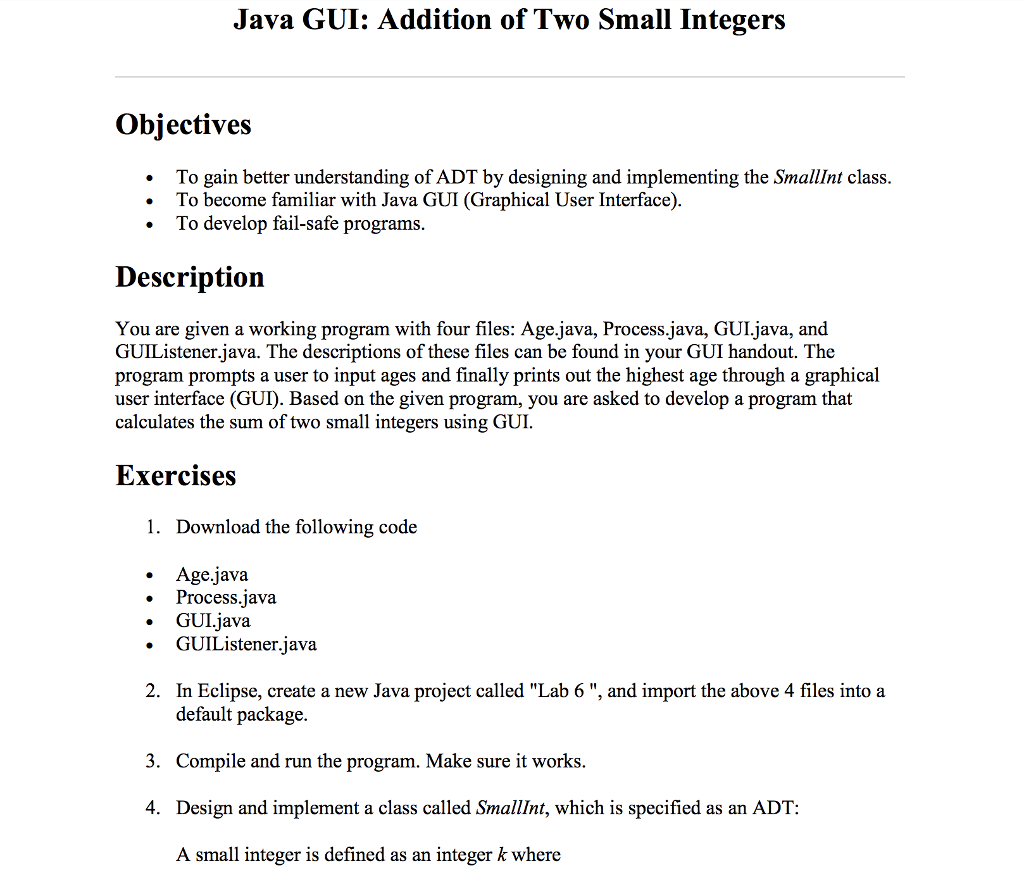
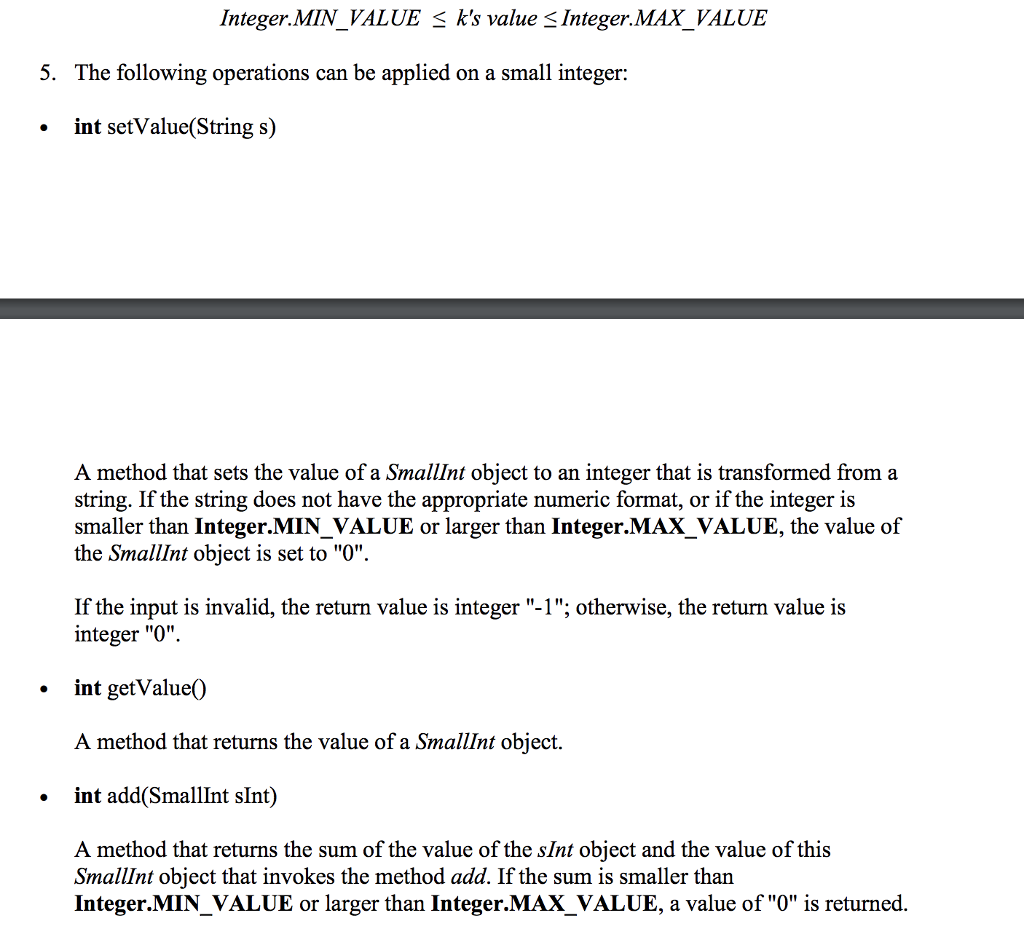
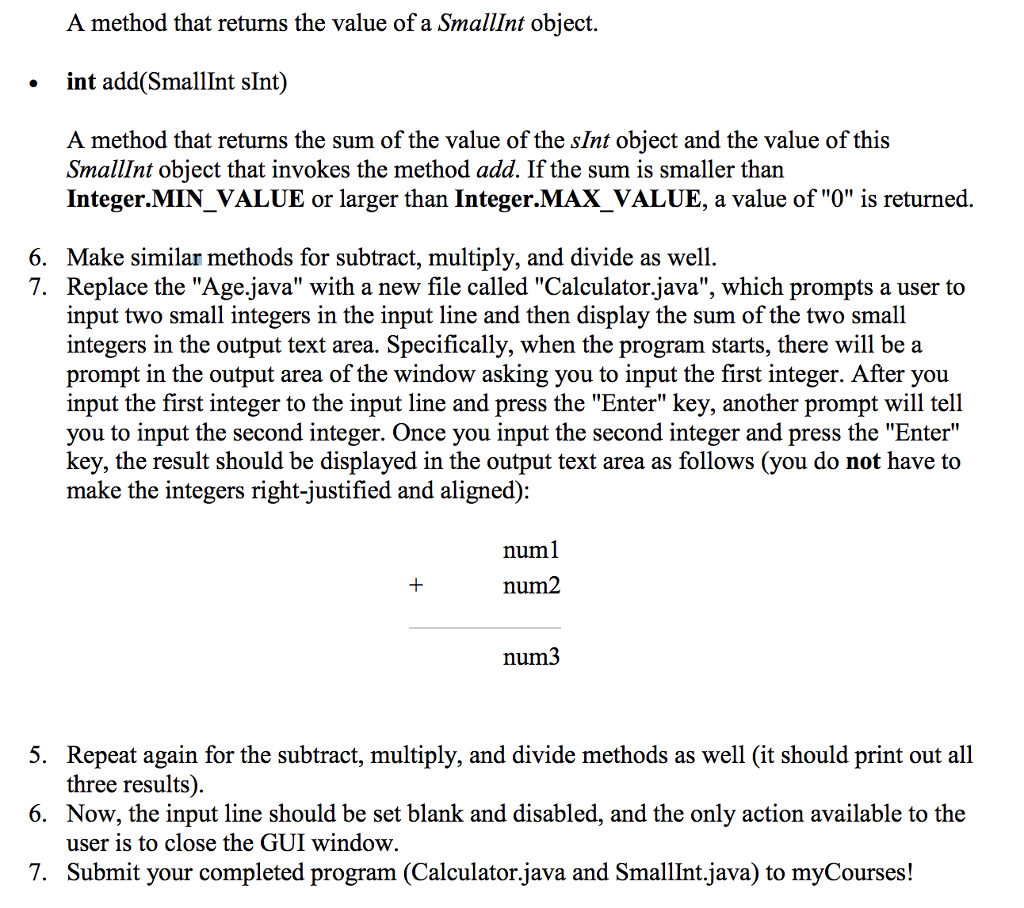
Java GUI: Addition of Two Small Integers Objectives . To gain better understanding of ADT by designing and implementing the SmallInt class . To become familiar with Java GUI (Graphical User Interface) To develop fail-safe programs Description You are given a working program with four files: Age.java, Process.java, GUI.java, and GUIListener.java. The descriptions of these files can be found in your GUI handout. The program prompts a user to input ages and finally prints out the highest age through a graphical user interface (GUI). Based on the given program, you are asked to develop a program that calculates the sum of two small integers using GUI Exercises 1. Download the following code .Age.java . Process.java GUIjava GUIListener.java 2. In Eclipse, create a new Java project called "Lab 6 ", and import the above 4 files into a default package. Compile and run the program Design and implement a class called SmallInt, which is specified as an ADT: A small integer is defined as an integer k where 3. . Make sure it works 4. Java GUI: Addition of Two Small Integers Objectives . To gain better understanding of ADT by designing and implementing the SmallInt class . To become familiar with Java GUI (Graphical User Interface) To develop fail-safe programs Description You are given a working program with four files: Age.java, Process.java, GUI.java, and GUIListener.java. The descriptions of these files can be found in your GUI handout. The program prompts a user to input ages and finally prints out the highest age through a graphical user interface (GUI). Based on the given program, you are asked to develop a program that calculates the sum of two small integers using GUI Exercises 1. Download the following code .Age.java . Process.java GUIjava GUIListener.java 2. In Eclipse, create a new Java project called "Lab 6 ", and import the above 4 files into a default package. Compile and run the program Design and implement a class called SmallInt, which is specified as an ADT: A small integer is defined as an integer k where 3. . Make sure it works 4
Step by Step Solution
There are 3 Steps involved in it

Get step-by-step solutions from verified subject matter experts
 Study Help