







Question: public class DebugBox { private int width; private int length; private int height; public DebugBox() { length = 1; width = 1; height = 1;
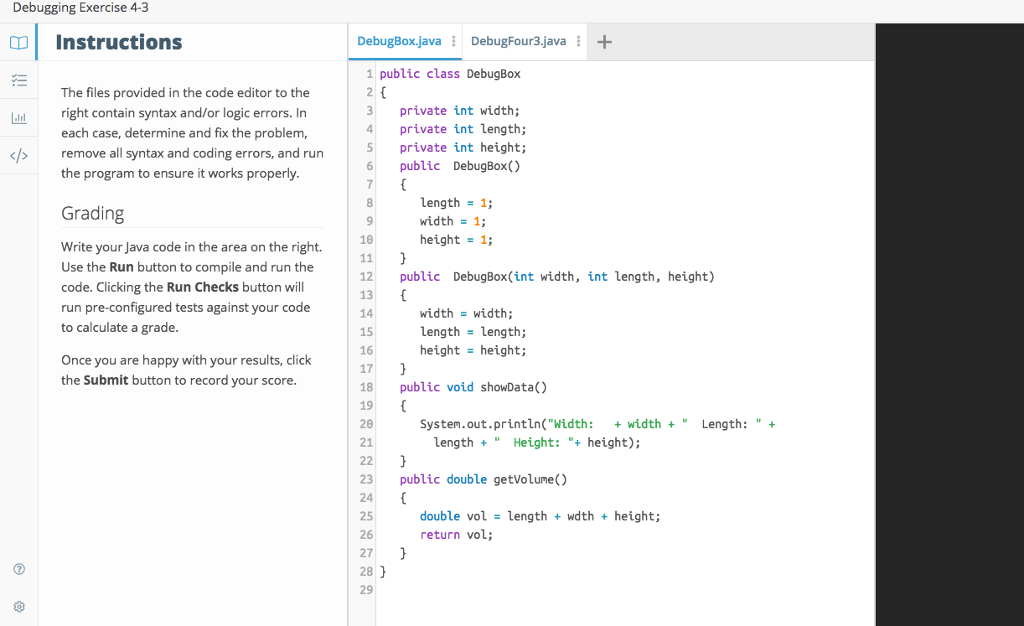
public class DebugBox { private int width; private int length; private int height; public DebugBox() { length = 1; width = 1; height = 1; } public DebugBox(int width, int length, height) { width = width; length = length; height = height; } public void showData() { System.out.println("Width: + width + " Length: " + length + " Height: "+ height); } public double getVolume() { double vol = length + wdth + height; return vol; } }
// This class uses a DebugBox class to instantiate two Box objects public class DebugFour3 { public static void main(String args[]) { int width = 12, length = 10, height = 8; DebugBox box1 = new DebugBox(); debugBox box2 = new DebugBox(width, length, height); System.out.println("The dimensions of the first box are"); box1.showData; System.out.print(" The volume of the first box is "); showVolume(box1); System.out.println(The dimensions of the second box are"); box2.showData(); System.out.print(" The volume of the second box is "); showVolume(box2); } public static void showVolume(DebugBox aBox) { double vol = aBox.getVolume(); System.out.println(volume); } }
Debugging Exercise 4-3 col Instructions DebugBox.javaDebugFour3.java 1 public class DebugBox The files provided in the code editor to the 3 private int width; 4 private int length; private int height; 6 public DebugBox() l right contain syntax and/or logic errors. In each case, determine and fix the problem, remove all syntax and coding errors, and run the program to ensure it works properly KT> length 1; width 1; height 1; Grading 10 Write your Java code in the area on the right. Use the Run button to compile and run the code. Clicking the Run Checks button will run pre-configured tests against your code to calculate a grade 12 13 14 15 16 17 18 19 20 21 public DebugBox(int width, int length, height) width width; length length; height - height; Once you are happy with your results, click the Submit button to record your score public void showData() System.out.println("Width: + widthLength: "+ Length "Height: "+height); 23 public double getVolune() 24 25 26 27 28 29 double vol ength wdth + height; return vol
Step by Step Solution
There are 3 Steps involved in it

Get step-by-step solutions from verified subject matter experts
 Study Help