







Question: public class Question01 { // part (a) public static void showMenu() { // FINISH THIS METHOD for part (a) } // CREATE A SECOND showMenu
public class Question01 {
// part (a)
public static void showMenu() {
// FINISH THIS METHOD for part (a)
}
// CREATE A SECOND showMenu method for part (b)
// this method has an input remember! (see lab definition for info)
public static void main(String[] args) {
// test your methods here, by making calls to them (invoking)
// e.g. call to first showMenu method is given : part (a)
showMenu();
// include a call to part b (create a string first, and pass to your
// second showMenu method
}
}
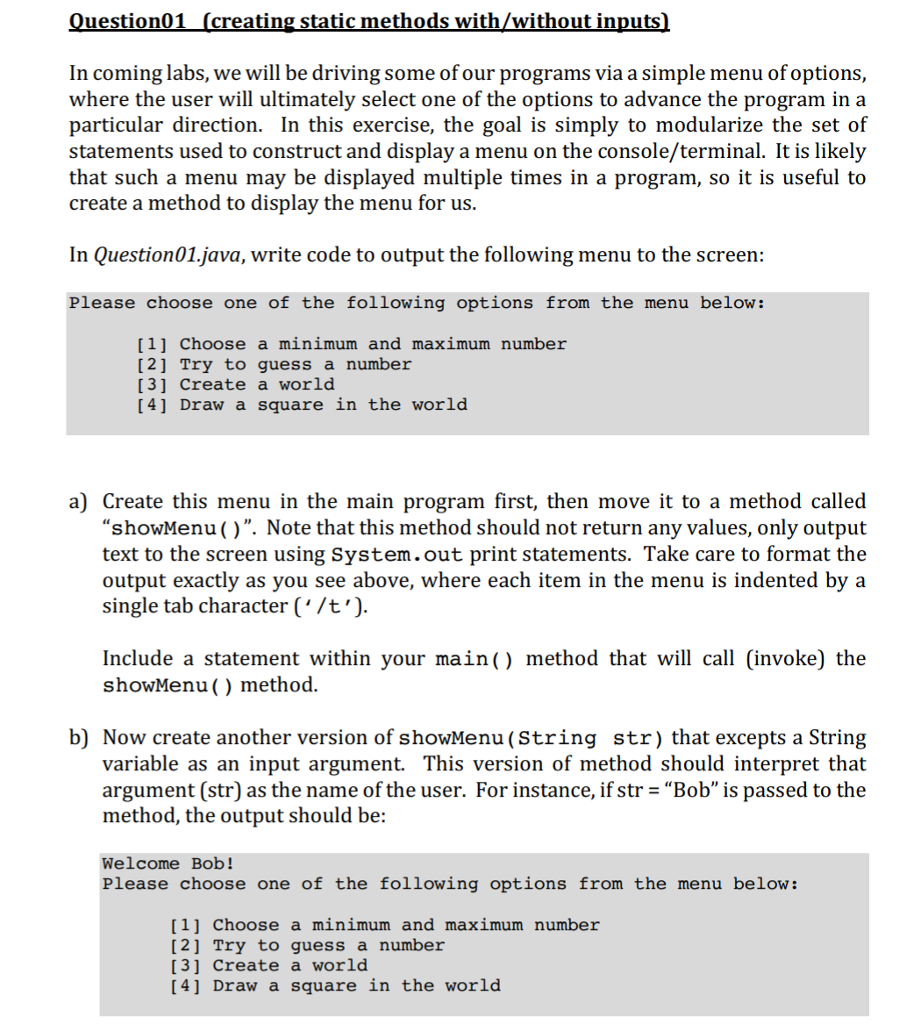

uestion01 (creating static methods with/without inputs In coming labs, we will be driving some of our programs via a simple menu of options, where the user will ultimately select one of the options to advance the program in a particular direction. In this exercise, the goal is simply to modularize the set of statements used to construct and display a menu on the console/terminal. It is likely that such a menu may be displayed multiple times in a program, so it is useful to create a method to displav the menu for us In Question01.java, write code to output the following menu to the screen: Please choose one of the following options from the menu below: [ 1] Choose a minimum and maximum number [2] Try to guess a number [3] Create a world [4] Draw a square in the world a) Create this menu in the main program first, then move it to a method called "showMenu ()". Note that this method should not return any values, only output text to the screen using System.out print statements. Take care to format the output exactly as you see above, where each item in the menu is indented by a single tab character ('/t') Include a statement within your main() method that will call (invoke) the showMenu () method. b) Now create another version of showMenu(String str) that excepts a String variable as an input argument. This version of method should interpret that argument (str) as the name of the user. For instance, if str-"Bob" is passed to the method, the output should be: Welcome Bob! Please choose one of the following options from the menu below: [11 Choose a minimum and maximum number [2] Try to guess a number [3] Create a world [4] Draw a square in the world
Step by Step Solution
There are 3 Steps involved in it

Get step-by-step solutions from verified subject matter experts
 Study Help