







Question: Purpose: Use 2 dimensional array Use functions in the implementation Use randO and srand) functions from the library Generate random numbers using the above functions.
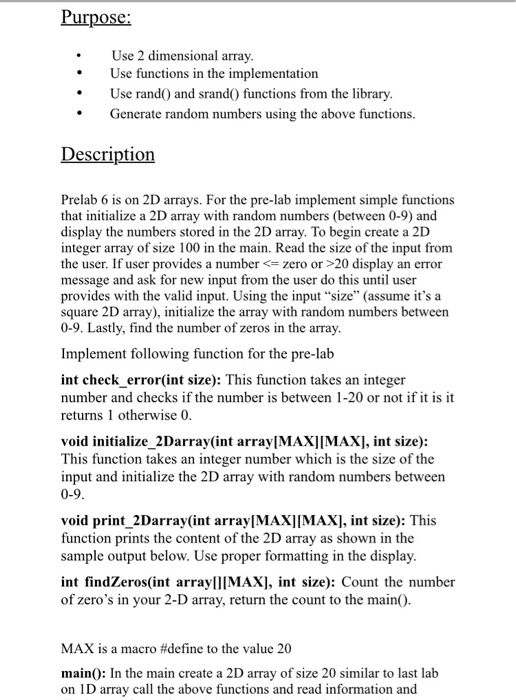
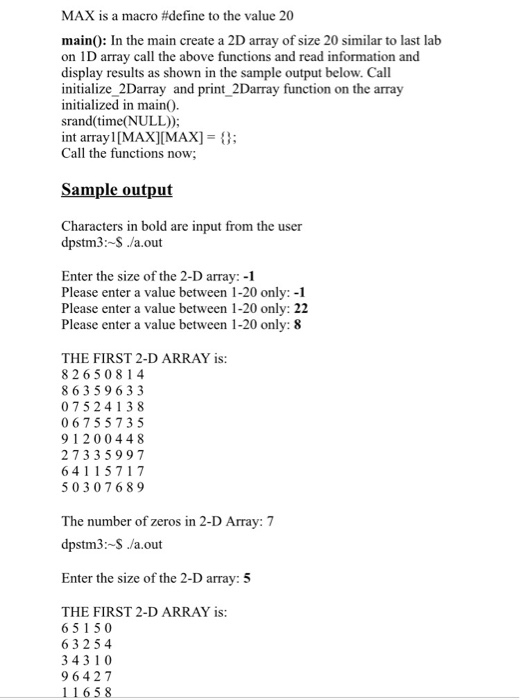
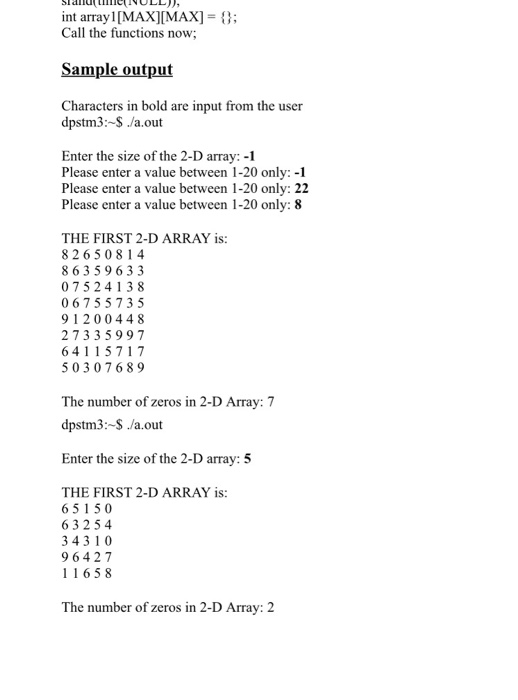
Purpose: Use 2 dimensional array Use functions in the implementation Use randO and srand) functions from the library Generate random numbers using the above functions. Description Prelab 6 is on 2D arrays. For the pre-lab implement simple functions that initialize a 2D array with random numbers (between 0-9) and display the numbers stored in the 2D array. To begin create a 2D integer array of size 100 in the main. Read the size of the input from the user. If user provides a num message and ask for new input from the user do this until user provides with the valid input. Using the input "size" (assume it's a square 2D array), initialize the array with random numbers between 0-9. Lastly, find the number of zeros in the array berzero or >20 display an error Implement following function for the pre-lab int check error(int size): This function takes an integer number and checks if the number is between 1-20 or not if it is it returns 1 otherwise 0 void initialize_2Darray(int array MAXI[MAX], int size): This function takes an integer number which is the size of the input and initialize the 2D array with random numbers between 0-9 void print 2Darray(int arraylMAXI[MAX], int size): This function prints the content of the 2D array as shown in the sample output below. Use proper formatting in the display int findZeros(int arraylIIMAX], int size): Count the number of zero's in your 2-D array, return the count to the mainO. MAX is a macro #define to the value 20 main0: In the main create a 2D array of size 20 similar to last lab on 1D array call the above functions and read information and
Step by Step Solution
There are 3 Steps involved in it

Get step-by-step solutions from verified subject matter experts
 Study Help