







Question: Put all SQL statements in a Word document and turn-in to the Assignments 1. To conduct some reconnaissance on the database, run the SQL statement
Put all SQL statements in a Word document and turn-in to the Assignments
1. To conduct some reconnaissance on the database, run the SQL statement to view the entire EMPLOYEES table.
2. Run the SQL statement to display the datatypes of the employees table.
3. Create an SQL statement that will display the average salary, the maximum salary, and the minimum salary for all the sales representatives (use the string LIKE %REP% to do this) from the EMPLOYEES table.
4. Now adjust your SQL statement from Question number 3 so that you round the average salary output to 2 decimal places (e.g. xxxxx.xx) (see slides).
5. Now, take your SQL statement from #3 above (the one that is not rounded) and instead of using the string LIKE %REP% use the string LIKE '%SA_REP%' in order to attempt to limit the output to all sales representatives.
Is the output different from #2?
If it is different, why do you think it is?
6. Create an SQL statement that displays a report containing departments, the job ids, and sums of the salaries from the EMPLOYEES table. We only want to see those departments with a department id greater than 40. The output should be grouped by the department id and then the job id and the output order should be by department id.
See output below:
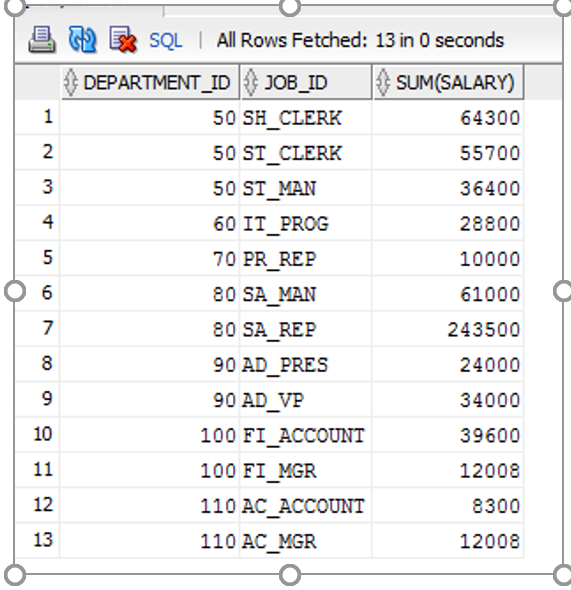
st)SQL | All DEPARTMENT-ID Rows Fetched: 13 in 0 seconds JOB-ID SUM SALARY) 50 SH CLERK 50 ST CLERK 50 ST MAN 60 IT PROG 70 PR REP 80 SA MAN 80 SA REP 90 AD PRES 90 AD VP 64300 55700 36400 28800 10000 61000 243500 24000 34000 39600 12008 8300 12008 3 4 7 8 10 100 FI ACCOUNT 100 FI MGR 110 AC ACCOUNT 110 AC MGR 12 13
Step by Step Solution
There are 3 Steps involved in it

Get step-by-step solutions from verified subject matter experts
 Study Help