







Question: Pyhton (JSON to List (Retrieving Values) (Setting Values) JSON and Dictionaries Before you built a JSON parsing module using lists. Now that we have discussed
Pyhton
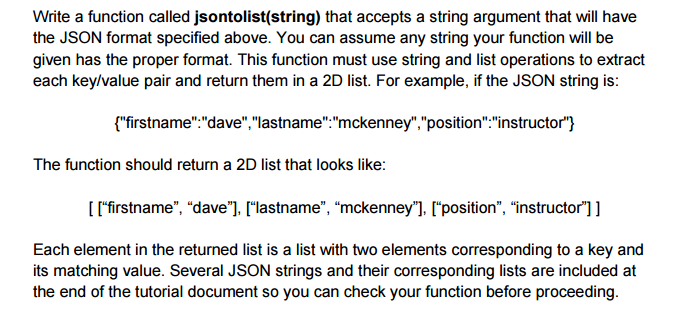
(JSON to List
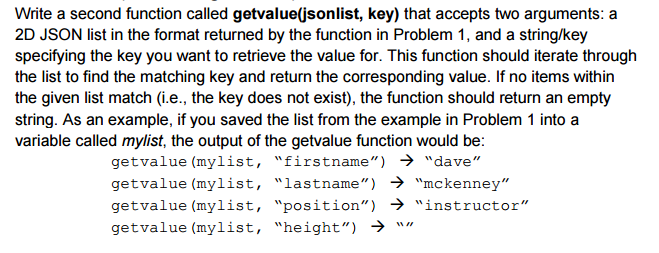
(Retrieving Values)
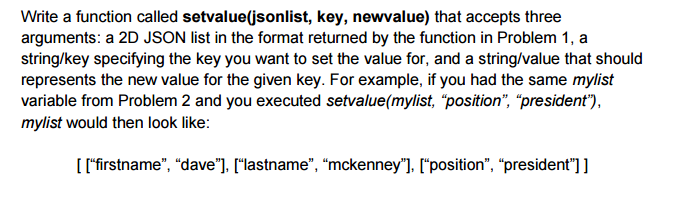
(Setting Values)
JSON and Dictionaries
Before you built a JSON parsing module using lists. Now that we have discussed dictionaries, you should realize that, since the keys in JSON are strings, dictionaries are a more logical choice for storing JSON information. Recreate your JSON parsing module from the previous tutorial using dictionaries instead of lists. You should find the implementation is much easier.
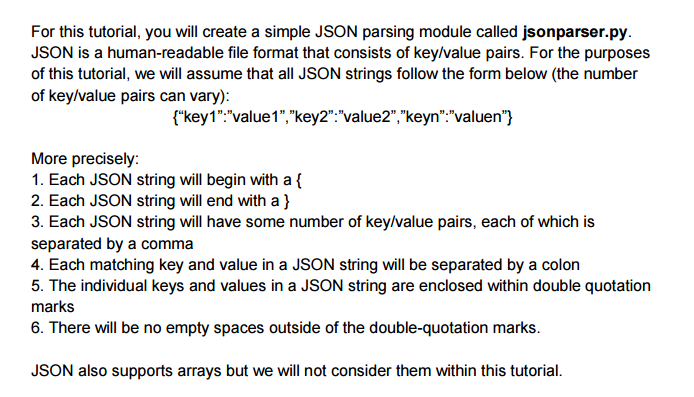
For this tutorial, you will create a simple JSON parsing module called jsonparser.py. JSON is a human-readable file format that consists of key/value pairs. For the purposes of this tutorial, we will assume that all JSON strings follow the form below (the number of key/value pairs can vary): fkey1": value1","key2" value2", keyn". valuen" More precisely: 1. Each JSON string will begin with a f 2. Each JSON string will end with a ) 3. Each JSON string will have some number of key/value pairs, each of which is separated by a comma 4. Each matching key and value in a JSON string will be separated by a colon 5. The individual keys and values in a JSON string are enclosed within double quotation marks 6. There will be no empty spaces outside of the double-quotation marks. JSON also supports arrays but we will not consider them within this tutorial
Step by Step Solution
There are 3 Steps involved in it

Get step-by-step solutions from verified subject matter experts
 Study Help