







Question: pytest: '''changes depending on alphabet used''' def test_getCharacterBackward_1 (): # Note: This is using the alphabet used in createAlphabet() assert getCharacterBackward('f', 5) == 'a' def
pytest:
'''changes depending on alphabet used''' def test_getCharacterBackward_1(): # Note: This is using the alphabet used in createAlphabet() assert getCharacterBackward('f', 5) == 'a' def test_getCharacterBackward_2(): # Note: This is using the alphabet used in createAlphabet() assert getCharacterBackward('e', 5) == '#' def test_getCharacterBackward_3(): # Note: This is using the alphabet used in createAlphabet() assert getCharacterBackward('N', 967) == 'a'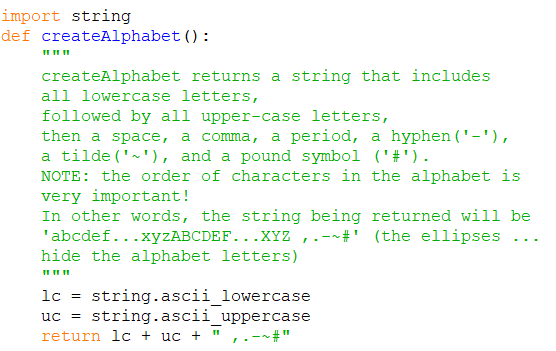
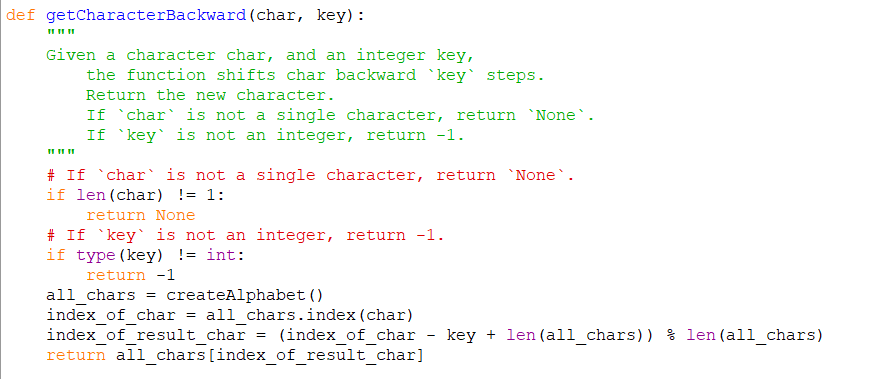
# is there any way to rewrite all_char.index? We have never learn all_chars.index() function, It is fine to be more complicated
we only learned variable[i]
import string def createAlphabet(): createAlphabet returns a string that includes all lowercase letters, followed by all upper-case letters, then a space, a comma, a period, a hyphen('-'), a tilde (''), and a pound symbol ('#'). NOTE: the order of characters in the alphabet is very important! In other words, the string being returned will be 'abcdef...XYZABCDEF...XYZ ,.-~' (the ellipses ... hide the alphabet letters) lc = string.ascii lowercase uc = string.ascii uppercase return lc + uc + " ,.-~" def getCharacterBackward (char, key): Given a character char, and an integer key, the function shifts char backward key steps. Return the new character If 'char' is not a single character, return 'None'. If 'key' is not an integer, return -1. # If 'char is not a single character, return 'None'. if len(char) != 1: return None # If 'key' is not an integer, return -1. if type (key) != int: return -1 all_chars = createAlphabet () index_of_char = all chars.index (char) index_of_result_char = (index_of_char - key + len(all_chars)) % len (all_chars) return all_chars[index_of_result_char]
Step by Step Solution
There are 3 Steps involved in it

Get step-by-step solutions from verified subject matter experts
 Study Help