







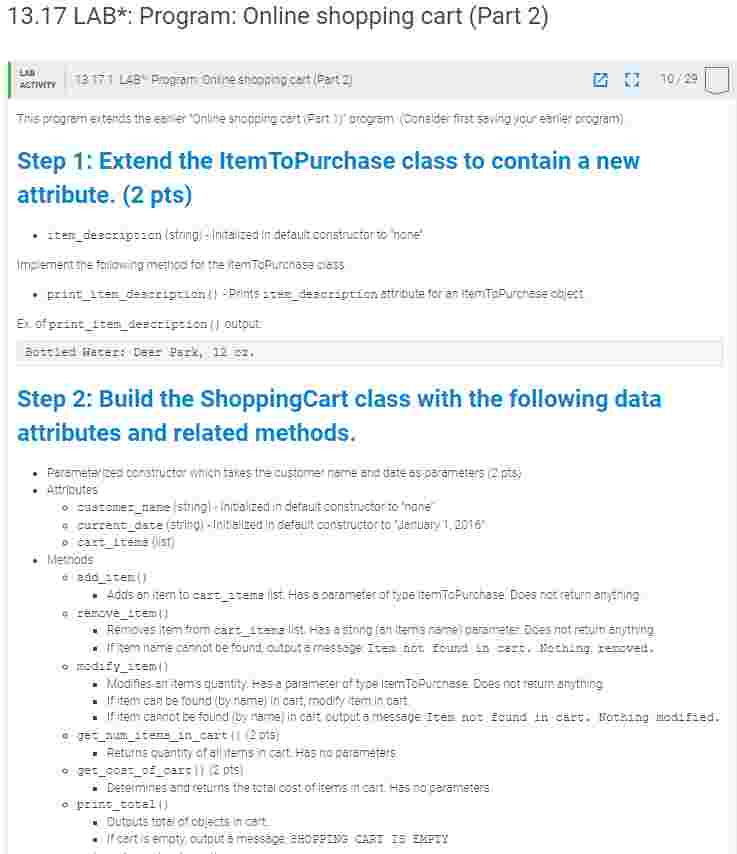
Question: PYTHON: 1 3 . 1 7 LAB * : Program: Online shopping cart ( Part 2 ) Step 1 : Extend the ItemToPurchase class to
PYTHON:
LAB: Program: Online shopping cart Part
Step : Extend the ItemToPurchase class to contain a new
attribute. pts
Ex of print Itenlcigheson outout
Bots:
Step : Build the ShoppingCart class with the following data
attributes and related methods.
Aftrinutes
heriods
d asinzes
Rmo
resdufyzemil
printtotal
Outputs total of objects in cart.
If cart is empty, output a message: SHOPPING CART IS EMPTY
printdescriptions
Outputs each item's description.
If cart is empty, output a message: SHOPPING CART IS EMPTY
Ex of printtotal output:
John Doe's Shopping Cart February
Number of Items:
Nike Romaleos @ $ $
Chocolate Chips @ $ $ $
Powerbeats Headphones $ $
Total: $
Ex of printdescriptions output:
John Doe's Shopping Cart February
Item Descriptions
Nike Romaleos: Volt color, Weightlifting shoes
Chocolate Chips: Semisweet
Powerbeats Headphones: Bluetooth headphones
Step : In the main section of the code, prompt the user for a
customer's name and today's date. Output the name and date.
Create an object of type ShoppingCart. pt
Ex:
Enter customer's name:
John Doe
Enter today's date:
February
Customer name: John Doe
Today's date: February
Step : Implement the following menu functions
printmenu
Prints the following menu of options to manipulate the shopping cart. pt
MENU
a Add item to cart
r Remove item from cart
c Change item quantity
i Output items' descriptions
Output shopping cart
q Quit
executemenu
Takes parameters: a character representing the user's choice and a shopping cart. Performs the menu options described
below in step according to the user's choice. pt
Step : Implement the menu options
Step a: In the main section of the code, call printmenu and prompt for the user's choice of menu options. Each option is
represented by a single character.
If an invalid character is entered, continue to prompt for a valid choice. When a valid option is entered, execute the option by calling
executemenu Then, print the menu and prompt for a new option. Continue until the user enters q pt
Hint: Implement Quit before implementing other options.
Ex:
a Add item to cart
r Remove item from cart
c Change item quantity
i Output items' descriptions
Output shopping cart
q Quit
Choose an option:
Step b: Implement 'Output shopping cart' menu option in executemenu pts
Ex:
OUTPUT SHOPPING CART
John Doe's Shopping Cart February
Number of Items:
Nike Romaleos @ $ $
Chocolate Chips @ $ $
Powerbeats Headphones @ $ $
Total: $
Step c: Implement "Output items' descriptions" menu option in executemenu pts
Step c: Implement "Output items' descriptions" menu option in execute menu pts
Ex:
OUTPUT ITEMS' DESCRIPTIONS
John Doe's Shopping Cart February
Item Descriptions
Nike Romaleos: Volt color, Weightlifting shoes
Chocolate Chips: Semisweet
Powerbeats Headphones: Bluetooth headphones
Step d: Implement 'Add item to cart' menu option in executemenu pts
Ex:
ADD ITEM TO CART
Enter the item name:
Nike Romaleos
Enter the item description:
Volt color, Weightlifting shoes
Enter the item price:
Enter the item quantity:
Step e: Implement 'Remove item from cart' menu option in execute menu pts
Ex:
REMOVE ITEM FROM CART
Enter name of item to remove:
Chocolate Chips
Step f: Implement "Change item quantity" menu option in executemenu pts
Hint: Make a new ItemToPurchase object before using Modifyltem method.
Ex:
CHANGE ITEM QUANTITY
Enter the item name:
Nike Romaleos
Enter the new quantity:
Step by Step Solution
There are 3 Steps involved in it
1 Expert Approved Answer
Step: 1 Unlock

Question Has Been Solved by an Expert!
Get step-by-step solutions from verified subject matter experts
Step: 2 Unlock
Step: 3 Unlock
 Study Help