







Question: Python 2. Click on Start Game to start the game (5 points) 3. Click on Quit to quit the game (5 points) 4. Prompt user
Python
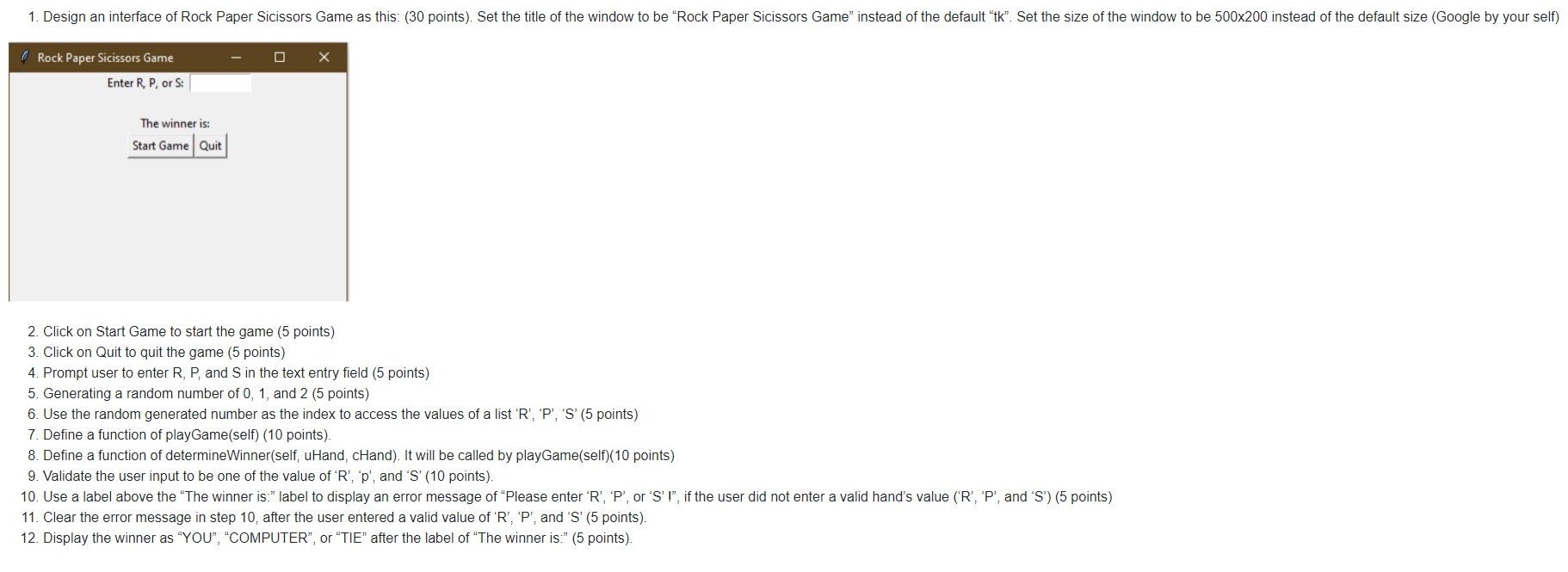
2. Click on Start Game to start the game (5 points) 3. Click on Quit to quit the game (5 points) 4. Prompt user to enter R, P, and S in the text entry field (5 points) 5. Generating a random number of 0,1 , and 2 (5 points) 6. Use the random generated number as the index to access the values of a list ' R ', ' P ', ' S ' (5 points) 7. Define a function of playGame(self) (10 points). 8. Define a function of determineWinner(self, uHand, cHand). It will be called by playGame(self)(10 points) 9. Validate the user input to be one of the value of ' R ', ' p ', and ' S ' (10 points). 10. Use a label above the "The winner is:" label to display an error message of "Please enter ' R ', ' P ', or ' S ' !", if the user did not enter a valid hand's value (' R ', ' P ', and ' S ') (5 points) 11. Clear the error message in step 10, after the user entered a valid value of ' R ', ' P ', and ' S ' (5 points). 12. Display the winner as "YOU", "COMPUTER", or "TIE" after the label of "The winner is:" (5 points)
Step by Step Solution
There are 3 Steps involved in it

Get step-by-step solutions from verified subject matter experts
 Study Help