







Question: Python 3 In the minesweeper folder, write a GUI program. In its main function 1. Get user input for the desired board size. Instantiate a
Python 3
In the minesweeper folder, write a GUI program. In its main function
1. Get user input for the desired board size. Instantiate a corresponding Game object.
2. Get user input for the number of mines. Send a message to the Game object to hide that number of mines. Repeat this entire step until the operation is successful.
3. Associate the closure function (that you will write) with a screen click event.
4. Write a closure function
5. Send a message to the Game object to check the Cell that is nearest to the screen click location.
6. If the previous operation results in finding the last mine (or only cells with mines remain hidden,) display how many turns were taken and ask if the user would like to play again. If the user wants to play again, call the main function. Otherwise, shut down the turtle window.
### CODES Goes here ###
### --- ###
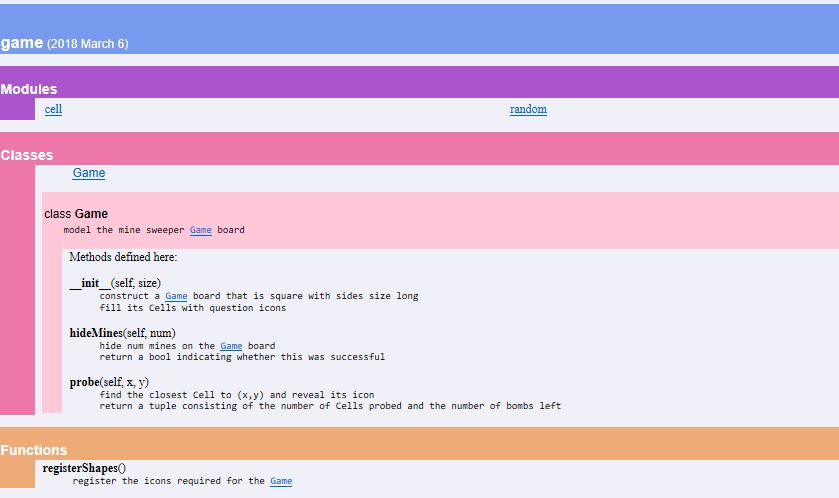
game (2018 March 6) Modules andot Classes Game class Game model the mine sweeper Game board Methods defined here: _init (self, size) construct a Game board that is square with sides size long fill its Cells with question icons hide\Mines(self, num) the Game board hide num mines on return a bool indicating whether this was successful probe(self, x, y) return a tuple consisting of the number of Cells probed and the number of bombs left Functions registerShapes0 register the icons required for the Game game (2018 March 6) Modules andot Classes Game class Game model the mine sweeper Game board Methods defined here: _init (self, size) construct a Game board that is square with sides size long fill its Cells with question icons hide\Mines(self, num) the Game board hide num mines on return a bool indicating whether this was successful probe(self, x, y) return a tuple consisting of the number of Cells probed and the number of bombs left Functions registerShapes0 register the icons required for the Game
Step by Step Solution
There are 3 Steps involved in it

Get step-by-step solutions from verified subject matter experts
 Study Help