







Question: Python 3: Make sure to RETURN. Make sure everything looks like the examples! 3. At the end of textbooks there is usually an index that
Python 3:
Make sure to RETURN.
Make sure everything looks like the examples!
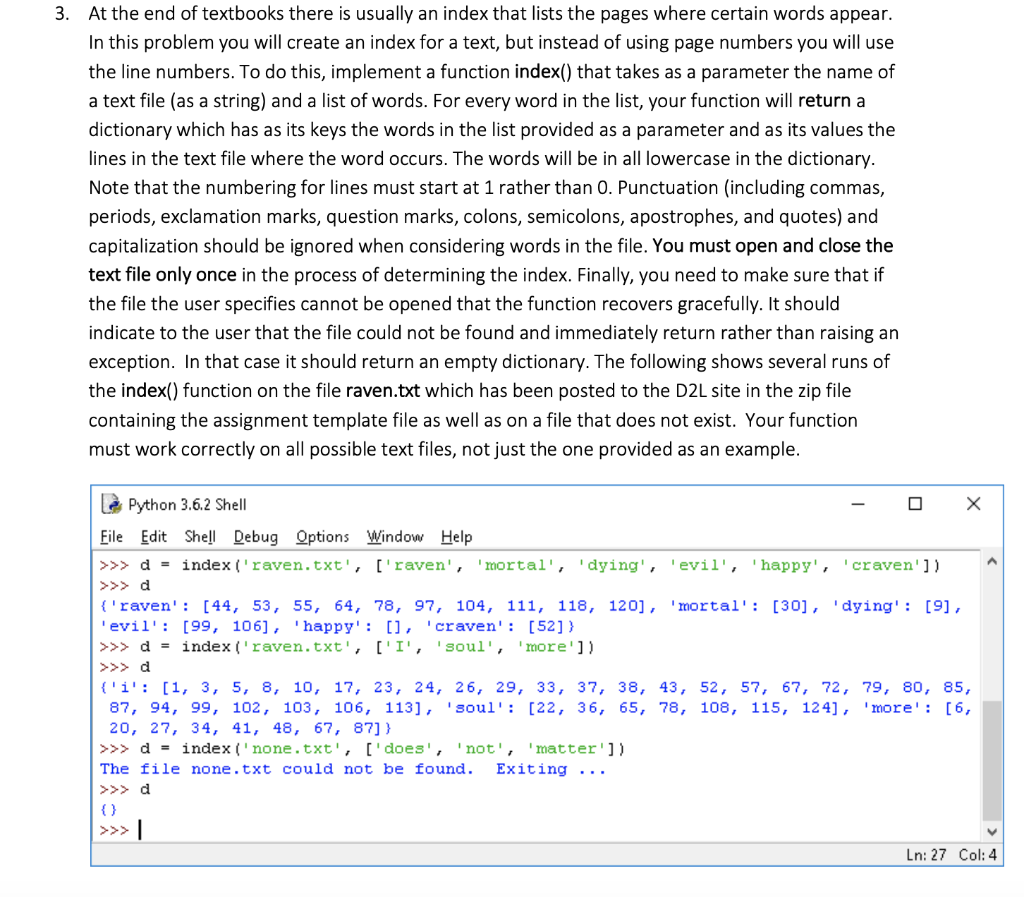
3. At the end of textbooks there is usually an index that lists the pages where certain words appear. In this problem you will create an index for a text, but instead of using page numbers you will use the line numbers. To do this, implement a function index() that takes as a parameter the name of a text file (as a string) and a list of words. For every word in the list, your function will return a dictionary which has as its keys the words in the list provided as a parameter and as its values the lines in the text file where the word occurs. The words will be in all lowercase in the dictionary Note that the numbering for lines must start at 1 rather than 0. Punctuation (including commas, periods, exclamation marks, question marks, colons, semicolons, apostrophes, and quotes) and capitalization should be ignored when considering words in the file. You must open and close the text file only once in the process of determining the index. Finally, you need to make sure that if the file the user specifies cannot be opened that the function recovers gracefully. It should indicate to the user that the file could not be found and immediately return rather than raising an exception. In that case it should return an empty dictionary. The following shows several runs of the index() function on the file raven.txt which has been posted to the D2L site in the zip file containing the assignment template file as well as on a file that does not exist. Your function must work correctly on all possible text files, not just the one provided as an example Python 3.6.2 Shell File Edit Sh Debug Options Window Help >>> d- index ( raven. txt. [ rave n' , mortal. dying. ' evil", 'happy' , craven' ] ) raven[44, 53, 55, 64, 78, 97, 104, 111, 118, 120],'mortal'[30 'evil': [99, 106], happy: [, 'craven [52]) >>> d index (' raven. txt' , I' , ' soul' , 'more' ] ) dying' [91, 'i: 1, 3, 5, 8, 10, 17, 23, 24, 26, 29, 33, 37, 38, 43, 52, 57, 67, 72, 79, 80, 85, 87, 94, 99, 102, 103, 106, 113], 'soul': [22, 36, 65, 78, 108, 115, 124] 'more': [6, 20, 27, 34, 41, 48, 67, 87]) >>> d index ( none . txt' , does. not' , matter' ] ) The file none.txt could not be found. Exiting . .. Ln: 27 Col: 4
Step by Step Solution
There are 3 Steps involved in it

Get step-by-step solutions from verified subject matter experts
 Study Help