







Question: Python 3 You will be working with the following classes that represent a playing card and a player: class Card: suit_sym = {0: u2663, 1:
Python 3
You will be working with the following classes that represent a playing card and a player:
class Card:
suit_sym = {0: \u2663, 1: \u2666, 2: \u2665, 3: \u2660}
rank_sym = {0: 2, 1: 3, 2: 4, 3: 5, 4: 6, 5: 7, 6: 8, 7: 9, 8: 10, 9: J, 10: Q, 11: K, 12: A}
def __init__(self, rank, suit):
self.rank = rank
self.suit = suit
def __repr__(self):
return self.rank_sym[self.rank] + self.suit_sym[self.suit]
def __eq__(self, other):
return self.suit == other.suit and self.rank == other.rank
class Player:
def __init__(self, card_list):
self.card_list = card_list
self.score = 0
def __repr__(self):
return cards: + str(self.card_list) + , score: + str(self.score)
Data Encoding for the suit Field in the Card Class
0 represents Clubs
1 represents Diamonds
2 represents Hearts
3 represents Spades
Data Encoding for the rank Field in the Card Class
0 represents 2
1 represents 3
.
.
.
11 represents K
12 represents A
Additional Functionality
In the homework5.py file you will find the typical main if-statement, but also two functions: run tests()
and simulate game(). Inside the main section (at the very end of the file) you will see that the run tests()
function is called, but simulate game() is commented out. The run tests() will execute the same test
cases given in the PDF. The simulate game() function will call the functions you must write to simulate
a full 13-round game of Bridge. Although you dont have to use the simulate game() to test your work,
you may find it useful/interesting to watch a game played out from start to finish. Realistically, however, the
simulate game() will crash the program until you have implemented most of the required functions.
You will be required to write the following five functions (not methods) to support playing of the game.
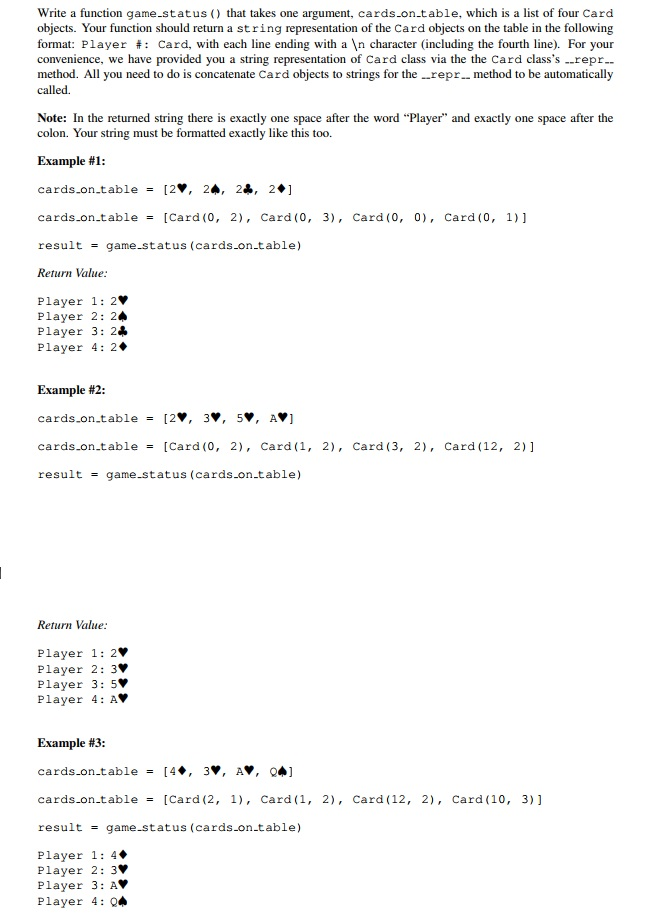
Write a function game.status that takes one argument, cards.on.table, which is a list of four Card objects. Your function should return a string representation of the Card objects on the table in the following format: Player # : Card, with each line ending with a character (including the fourth line). For your convenience, we have provided you a string representation of Card class via the the Card class's ..repr method. All you need to do is concatenate Card objects to strings for the .repr.. method to be automatically called. Note: In the returned string there is exactly one space after the word "Player" and exactly one space after the colon. Your string must be formatted exactly like this too. Example #1 cards-on-table= [2v, 2+. 24, 29] cards-on-table= [Card (0, 2), Card (0, result game-status (cards-on-table) Return Value 3), Card (0, 0), Card (0, 1)] Player 1: 2 Player 2: 2 Player 3: Player 4: 2 Example #2 cards-on-table= [2v, 3,, 5., A, ] cards-on-table= [Card (0, 2), Card ( 1, result game-status (cards-on-table) 2), Card (3, 2), Card (12, 2)] Return Value Player 1: 2 Player 2: 3 Player 3: 5 Player 4: AV Example #3 cards on.table[4, 3, AV, cards-on-table= [Card (2, 1), Card (1, result game-status (cards.on.table) 2), Card (12, 2), Card (10, 31] Player 1: 4 Player 2: 3 Player 3: Player 4: Q4
Step by Step Solution
There are 3 Steps involved in it

Get step-by-step solutions from verified subject matter experts
 Study Help