







Question: Python 3.4import osdef scan(path, text): 'scan folders below path for filename containing text' if os.path.isfile(path): #base case if text in path: print(path) return if not
Python 3.4import osdef scan(path, text): 'scan folders below path for filename containing text' if os.path.isfile(path): #base case if text in path: print(path) return if not os.path.exists(path): return for item in os.listdir(path): itempath = os.path.join(path, item) if os.path.isfile(itempath): if text in item: print(itempath) elif os.path.isdir(itempath): scan(itempath, text) else: #unknown object type pass
Start by reviewing the program scan we saw in class (above)which scans a folder structure for file names containing some text;we want to modify it so that a) it scans for a list of words,instead of a single word, and b) it looks inside the file, not atthe filename, c) it doesn't create an error message when it can'topen a file, but simply continues. As it scans, it should print thename of the current directory it is scanning, and whenever it findsone, or multiple words, in a file it is scanning, it should printthe full list of words it found in the file. Below is a sample runof this program scan(path, words):
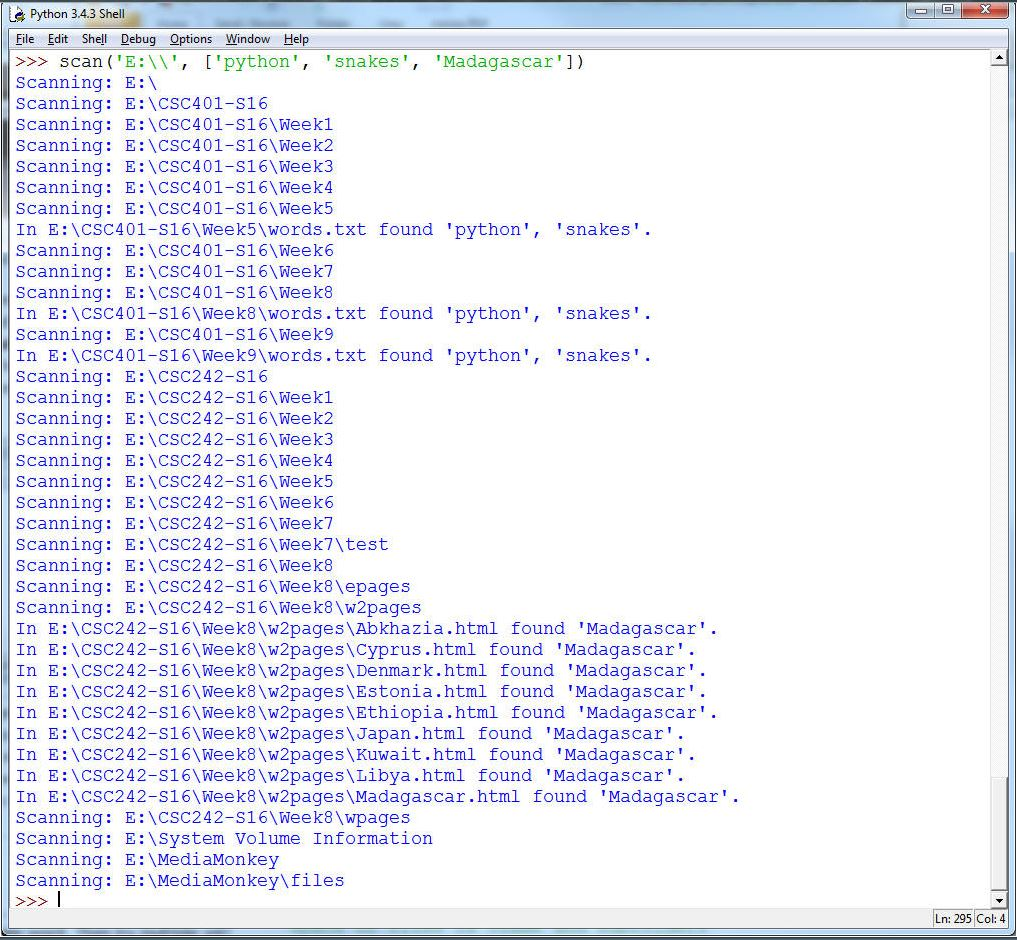
Directories will obviously vary.
Hint: Start with the scan function we wrote; modify itso it prints the 'Scanning ...' part, that'll be useful fordebugging. Then, in a first step, program scan(path,word)that looks for a single word in each file. Add anexception to ignore files you cannot open (so they don't stopexecution of the program). Finally, extend this so it works a listcontaining a single word. Then try multiple words. You only want toscan once, so you need to check the content of each file for eachword in the list. Hint 2: for each file you open,accumulate results in a list, remember the easy way we saw how toprint a list without its brackets using str() and slicing.
Python 3.4.3 Shell File Edit Shell Debug Options Window Help >>> scan ('E:\\', ['python', 'snakes', 'Madagascar']) Scanning: E:\ Scanning: E:\CSC401-S16 Scanning: E:\CSC401-S16\Week1 Scanning: E:\CSC401-S16\Week2 Scanning: E:\CSC401-S16\Week3 Scanning: E:\CSC401-S16\Week4 Scanning: E:\CSC401-S16\ Week5 In E:\CSC401-S16\ Week5\words.txt found 'python', 'snakes'. Scanning: E:\CSC401-S16 Week6 Scanning: E:\CSC401-S16\ Week7 Scanning: E:\CSC401-S16\Week8 In E:\CSC401-S16\ Week8\words.txt found 'python', 'snakes'. Scanning: E:\CSC401-S16\Week9 In E:\CSC401-S16 Week 9\words.txt found 'python', 'snakes'. Scanning: E:\CSC242-S16 Scanning: E:\CSC242-S16\Week1 Scanning: E:\CSC242-S16\Week2 Scanning: E:\CSC242-S16\ Week3 Scanning: E:\CSC242-S16\ Week4 Scanning: E:\CSC242-S16\Week5 Scanning: E:\CSC242-S16\Week6 Scanning: E:\CSC242-S16\Week7 Scanning: E:\CSC242-S16 Week7\test Scanning: E:\CSC242-S16\Week8 Scanning: E:\CSC242-S16\Week8\epages Scanning: E:\CSC242-S16\ Week8\w2pages In E:\CSC242-S16\Week8\w2pages\Abkhazia.html found 'Madagascar'. In E:\CSC242-S16\Week8\w2pages\Cyprus.html found 'Madagascar'. In E:\CSC242-S16\Week8\w2pages\Denmark.html found 'Madagascar' In E:\CSC242-S16 Week8\w2pages\Estonia.html found 'Madagascar'. In E:\CSC242-S16\Week8\w2pages\Ethiopia.html found 'Madagascar' In E:\CSC242-S16\ Week8\w2pages\Japan.html found 'Madagascar'. In E:\CSC242-S16\ Week8\w2pages \ Kuwait.html found 'Madagascar'. In E:\CSC242-S16\ Week8\w2pages \Libya.html found 'Madagascar'. In E:\CSC242-S16\Week8\w2pages\Madagascar.html found 'Madagascar'. Scanning: E:\CSC242-S16\Week8\wpages Scanning: E:\System Volume Information Scanning: E:\MediaMonkey Scanning: E:\MediaMonkey\files >>> I Ln: 295 Col: 4
Step by Step Solution
There are 3 Steps involved in it

Get step-by-step solutions from verified subject matter experts
 Study Help