







Question: Python 3.6 Create a program which accepts integer from keyboard, and output to the screen a Roman numeral as txt string. The output string must
Python 3.6
Create a program which accepts integer from keyboard, and output to the screen a Roman numeral as txt string. The output string must be in all uppercase letters and should be from high to low order.
The following features of the Roman numeral system are shown for review:
I 1 X 10 D 500 V 5 L 50 M 1000
C 100
The Middle-Ages extension of the Roman numeral system which intended to shorten notations (such as replacing VIIII by IX and XXXX by XL) does not have to be included. The program does not have to anticipate or handle subtractive prefixes.
All inputs will be in the range [1, ..., 500]. The program does not have to handle a zero, and it does not have to work with Roman numerals larger than 1,000.
If the input from the keyboard entered is not an integer value then the program should respond to cause the user to only enter valid data. You can use try, catch exception method to do this.
I have done part of this program already, but it needs adjustments (shown below). Please make the necessary adjustments. Provide indented source code and screenshot of output. Thanks
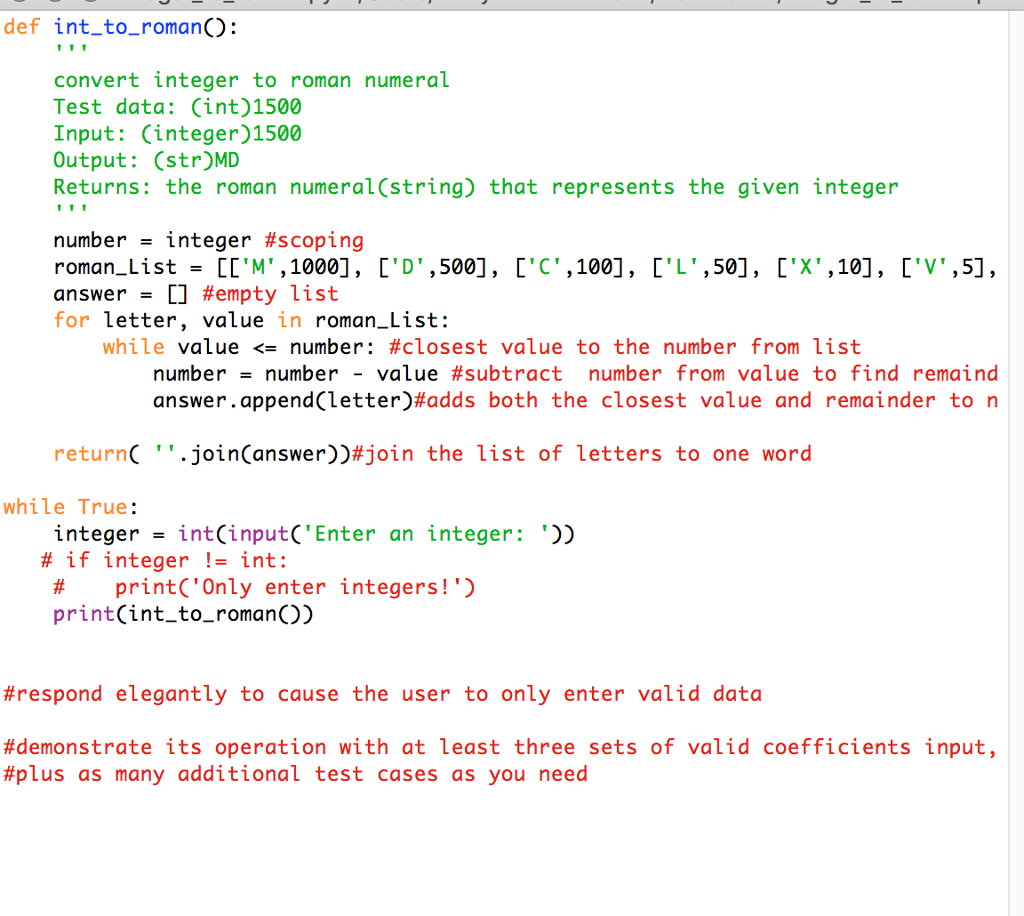
def int_to_romanO: convert integer to roman numeral Test data: (int)1500 Input: Cinteger)1500 Output: (str)MD Returns: the roman numeral(string) that represents the given integer number-integer #scoping roman-List= [['M',1000], ['D',500] , answer = [] #empty list for letter, value in roman_List: D',500], ["c',100], ['L',50], ["x',10], ['v',5] , while value
Step by Step Solution
There are 3 Steps involved in it

Get step-by-step solutions from verified subject matter experts
 Study Help