







Question: python 5.17 LAB: Stronger Passwords CSW8 Learning Goals In this lab, you will practice: - writing a function to match the specifications - using string
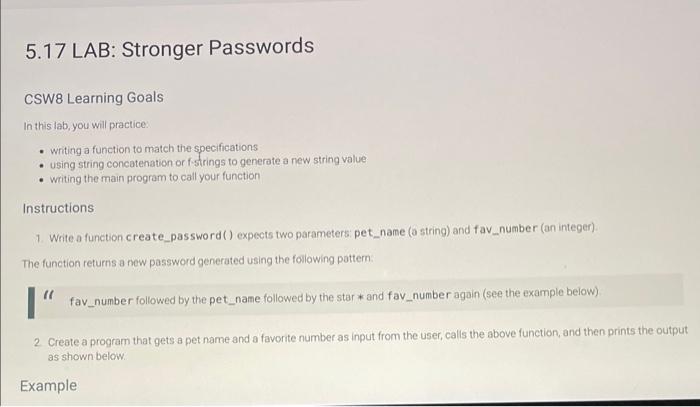
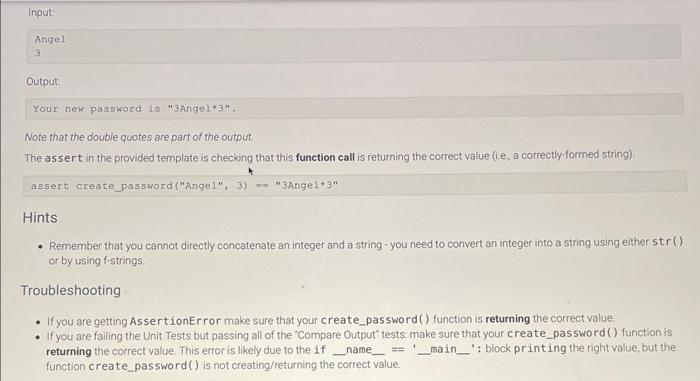
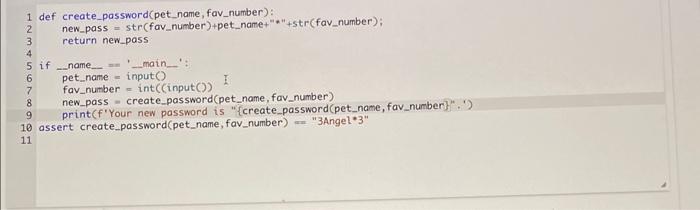
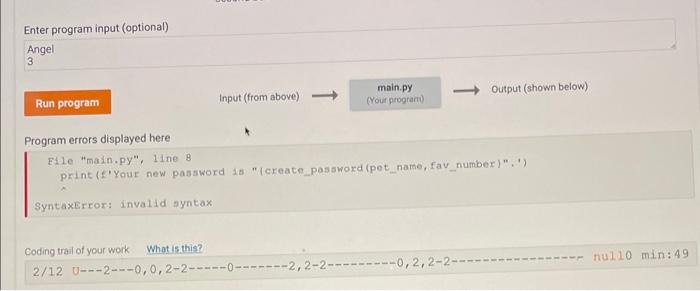
5.17 LAB: Stronger Passwords CSW8 Learning Goals In this lab, you will practice: - writing a function to match the specifications - using string concatenation or fstrings to generate a new string value - writing the main program to call your function Instructions 1. Write a function create_password () expects two parameters pet_name (a string) and fav number (an integer). The function returns a new password generated using the foilowing pattern. (f fav_number followed by the pet_name followed by the star * and fav_number again (see the example below) 2. Create a program that gets a pet name and a favorite number as input from the user, calis the above function, and then prints the out as shown below. Example - Remember that you cannot directly concatenate an integer and a string - you need to convert an integer into a string using either st r () or by using f-strings. Troubleshooting - If you are getting AssertionError make sure that your create_password () function is returning the correct value: - If you are failing the Unit Tests but passing all of the 'Compare Output' tests make sure that your create_password() function is returning the correct value. This error is likely due to the if __ name _ = _ main _ ': block print ing the right value, but the function create_password () is not creating/returning the correct value. Program errors displayed here Eile "main.py", line 8 print (f'your new password 18 " (creace_password (pot_name, fav_number)", ') SyntaxError: invalid ayntax Coding trai of your work
Step by Step Solution
There are 3 Steps involved in it

Get step-by-step solutions from verified subject matter experts
 Study Help