







Question: PYTHON ASSIGNMENT Details: 1) Implement a SocialNetworkUser class in the file socialnetworkuser.py according to this UML diagram 2) Write a traditional test file test1.py that
PYTHON ASSIGNMENT
Details:
1) Implement a SocialNetworkUser class in the file socialnetworkuser.py according to this UML diagram 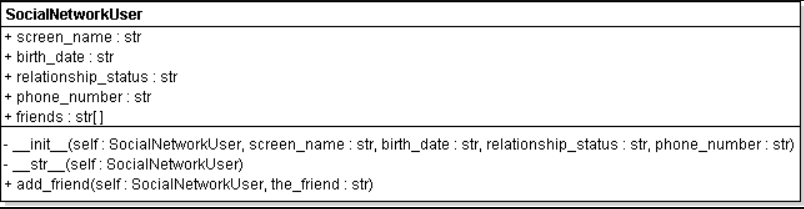
2) Write a traditional test file test1.py that
* creates a SocialNetworkUser object user,
* prints user and prints the value of each public instance variable of user,
* calls the add_friend method to add "PonyTail" as a friend,
* calls the add_friend method to add "Applejacks" as a friend,
prints the friends instance variable of user.
Hints:
To add a friend to a SocialNetworkUser object, use the list append method in add_friend, not in the test script:
def add_friend(self, the_friend): self.friends.append(the_friend)
Then you can add two friends like this in test1.py:
snu1.add_friend("PonyTail") snu1.add_friend("AppleJacks") If you check the UML diagram for SocialNetworkUser, you see that you are adding the screen names as friends, not actual SocialNetworkUser objects. You can print the friend screen names for a SocialNetworkUser object, say snu1, like this:
for friend in snu1.friends: print(friend)
The __str__ method for the SocialNetworkUser object should not display the friends of the object. It should just display the fields screen_name, birth_date,relationship_status, and phone_number. The friends are printed like this:
print(snu.friends)
or
for f in snu.friends: print(f, end=" ") print( )
SocialNetworkUser + screen name str birth_date: str + relationship_status str + phone_number str + friends :S tr init__(self: SocialNetworkUser, screen_name str, birth_date : str, relationship_status: str, phone_number: str) -str(self: SocialNetworkUser) + add friend(self: SocialNetworkUser, the friend: str)
Step by Step Solution
There are 3 Steps involved in it

Get step-by-step solutions from verified subject matter experts
 Study Help