







Question: PYTHON Assignment! Tic-tac-toe is a game for two players. The players take turns marking the spaces in a 33 grid. The player who succeeds in
PYTHON Assignment! Tic-tac-toe is a game for two players. The players take turns marking the spaces in a 33 grid. The player who succeeds in placing three marks in a horizontal, vertical, or diagonal row wins the game.
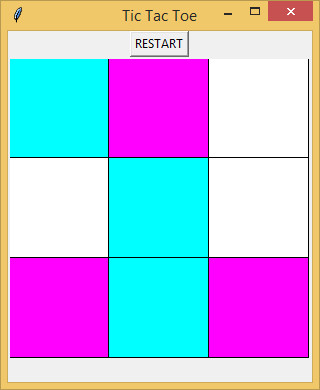
You will implement a Graphical User interface for a Tic Tac Toe game with the following specifications:
The user will play against the computer.
The user is assigned one color and the computer is assigned another color. These may be any 2 colors of your choice.
The user always starts playing first. The user marks a space on the grid by clicking on that space. That space is then colored with the users assigned color. The computer immediately plays its move by coloring an available space with the other color.
If the user attempts to mark a space that is already taken, either by the user or the computer, nothing happens.
The game goes on until one player (the user or the computer) has 3 colored spaces in a line. The line can be horizontal, vertical, or diagonal. The game can also end in a tie if the entire board fills with no player completing such a line.
The player is given the option to restart the game, at any point during a game or after a win, a loss or a tie.
To get a feel of the required appearance and behavior of the game, watch the screen cast below:
Getting Started:
Start with the module tictac.py. This is more than a template. It sketches an object oriented implementation that you must follow.
Brainstorming Data Structures:
Before you start coding, think about the following decisions youll have to make and their implications:
How will you represent the 3x3 grid?
How will you indicate that a space is empty, is marked by the player or is marked by the computer?
How will you check that one player has won?
How will you check for a tie?
How will you decide what space the computer will mark? Just a random empty space is OK for the purpose of this assignment but if you like a challenge, think of smarter moves. To generate a random integer between a and b (including a and b), you may use the randint function in the random module as follows:
import random
my_random_int = random.randint(a, b)
Optional Challenge:
Implement a smart strategy for the computer play. One such strategy is for the computer to try to win first. If that is not possible, the computer should try to block the player.
Testing:
Make sure you test your module before submitting it! You have to be able to win, lose and end the game in a tie. If you implement a 'smart' strategy and the computer always wins, it is fine too, but the code to check for a player's win should be included regardless.
Hints:
To be able to access the Canvas widget and the message Label widget from outside the __init__ method, you will need to save them as instance variables.
You can use either the grid or the pack geometry managers but you cannot mix the two.
Do not use button widgets to implement clickable squares. The buttons' background color option is not supported on Mac OS and your implementation must be platform independent. Please use the canvas widget as indicated in the template.
You can use the configure method on an existing Label widget to modify its text (section 21.11)
You will need to figure out which one of the 9 spaces the player has clicked so that space is colored with the player's color. The play method has access to the event coordinates, x and y just like the event handlers in our examples at the end of the module. Your task is to decide which space (square) the click corresponds to.
One way to do that is to use the find_closest canvas method as illustrated in the example in section 21.16. Note that the find_closest method does not work on transparent shapes. To use find_closest, we need to make sure that the shapes have a fill (it can be 'white').
#------------------------------------------------------------------------------------------------------------------
Model tictac.py file:
import tkinter
import random
class Game(object):
'''
Enter the class docstring here
'''
# Add your class variables if needed here - square size, etc...)
def __init__(self, parent):
parent.title('Tic Tac Toe')
# Create the restart button widget
# Create a canvas widget
# Create a label widget for the win/lose message
# Create any additional instance variable you need for the game
pass # take out the pass statement and enter your code
def restart(self):
# This method is invoked when the user clicks on the RESTART
button.
pass # take out the pass statement and enter your code
def play(self, event):
# This method is invoked when the user clicks on a square.
pass # take out the pass statement and enter your code
def main():
# Instantiate a root window
# Instantiate a Game object
# Enter the main event loop
pass # take out the pass statement and enter your code
if __name__ == '__main__':
main()
Step by Step Solution
There are 3 Steps involved in it

Get step-by-step solutions from verified subject matter experts
 Study Help