







Question: PYTHON Below is a Python script with an almost complete program written, but with one key piece missing. import math import pygame class Blip: def
PYTHON
Below is a Python script with an almost complete program written, but with one key piece missing.
import math import pygame class Blip: def __init__(self): self._radius = 0 self._angle = 0 def move(self) -> None: self._radius += 0.001 self._angle += 1 def radius(self) -> float: return self._radius def angle(self) -> float: return self._angle def _determine_blip_center(surface: pygame.Surface, blip: Blip) -> (float, float): return (0.0, 0.0) def run() -> None: pygame.init() try: surface = pygame.display.set_mode((700, 700), pygame.RESIZABLE) running = True clock = pygame.time.Clock() blips = [] next_blip = 30 while running: clock.tick(30) for event in pygame.event.get(): if event.type == pygame.QUIT: running = False break elif event.type == pygame.VIDEORESIZE: surface = pygame.display.set_mode(event.size, pygame.RESIZABLE) for blip in blips: blip.move() next_blip -= 1 if next_blip == 0: blips.append(Blip()) next_blip = 30 surface.fill(pygame.Color(64, 64, 64)) for blip in blips: pygame.draw.circle( surface, pygame.Color(255, 255, 0), _determine_blip_center(surface, blip), 10) pygame.display.flip() finally: pygame.quit() if __name__ == '__main__': run()
When complete, it draws a collection of blips, which are yellow circles that travel around the display in a spiral pattern, beginning from the center. A new blip appears once per second, but each blip moves a little bit every 1/30th of a second. After you've done your work and the program has been running for a while, this is what it would look like
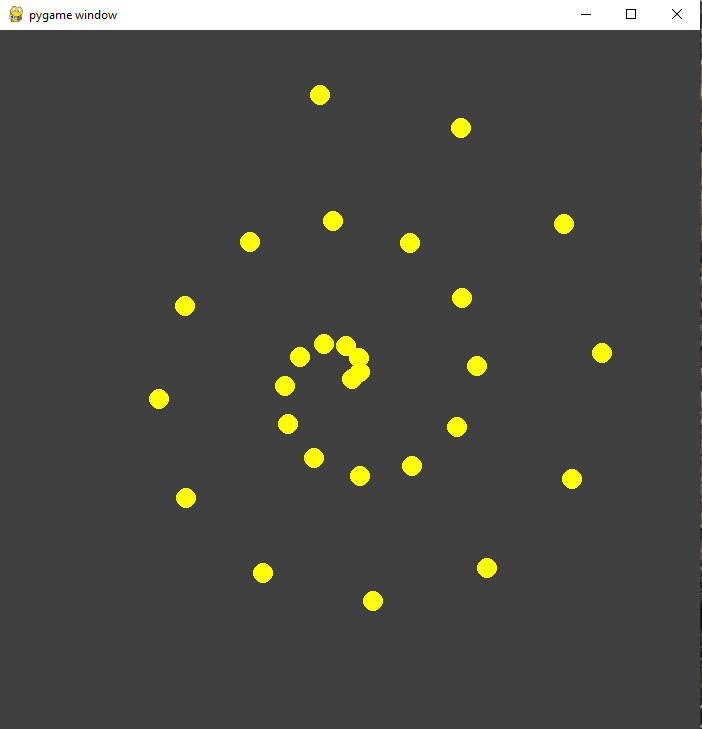
The problem is that, as provided, the program draws all of the blips in the same place in the top-left corner of the display no matter how much time has passed. How you'll solve this problem is to rewrite the function _determine_blip_center, which has been provided with an incorrect implementation. Replace its implementation with a correct one one that performs the appropriate coordination conversion to allow PyGame to know where to draw the blips.
We'll need to agree on one convention for what our polar coordinates mean. We'll say that a radius of 1 means the distance from the center of the display to the edge of the display, so that a point with a radius of 1 and an angle of 0 would be along the rightmost edge of the display (halfway up), a point with a radius of 1 and an angle of 90 would be along the topmost edge of the display (halfway across), and so on. The display is resizable, but this rule applies no matter what the size of the display is.
(Note, too, that this particular program doesn't separate model and view implementations into separate modules, and it has one monolithic run() function that does almost everything in one long loop, and that's fine; our goal here is to explore the one technique you're implementing, but this is hardly a paragon of software design otherwise.
If pygame.draw.circle can't handle float coordinates, then you have to turn them into integers somehow. That would mean either to round them up, round them down, or round them to the nearest integer (e.g., 2.3 rounds to 2, 2.7 rounds to 3). Which is what you did and it is okay.
Regarding changing 0.001 to 0.3, you should not change 0.001 to 0.3 because what's really happening is you're calculating the wrong position based on what the radius and angle are supposed to mean.
pygame window
Step by Step Solution
There are 3 Steps involved in it

Get step-by-step solutions from verified subject matter experts
 Study Help