







Question: Python: class MagicSquare: def __init__(self, n): ''' Initializes an empty square with n*n cells. Inputs: n (int) - number of rows in square, or equivalently,
Python:
class MagicSquare: def __init__(self, n): ''' Initializes an empty square with n*n cells. Inputs: n (int) - number of rows in square, or equivalently, the number of columns Returns: None ''' self.square = [] # list of lists, where each internal list represents a row self.size = n # number of columns and rows of square for i in range(self.size): row = [] for j in range(self.size): row.append(0) self.square.append(row) def cellIsEmpty(self, row, col): ''' Checks if a given cell is empty, or if it already contains a number greater than 0. Inputs: row (int) - row index of cell to check col (int) - column index of cell to check Returns: True if cell is empty; False otherwise ''' return self.square[row][col] == 0
def drawSquare(self): ''' Displays the current state of the square, formatted with column and row indices shown along the top and left side, respectively. Inputs: N/A Returns: None ''' pass # DELETE pass and replace with your code
def update(self, row, col, num): ''' Assigns the integer, num, to the cell at the provided row and column, but only if that cell is empty and only if the number isn't already in another cell in the square (i.e. it is unique) Inputs: row (int) - row index of cell to update col (int) - column index of cell to update num (int) - entry to place in cell Returns: True if attempted update was successful; False otherwise ''' # check uniqueness unique = True for valuesInRow in self.square: if num in valuesInRow: unique = False # try to update cell if unique: if row = 0: if col = 0: if self.cellIsEmpty(row, col): self.square[row][col] = num return True return False def isFull(self): ''' Checks if the square has any remaining empty cells. Inputs: N/A Returns: True if the square has no empty cells (full); False otherwise ''' for row in self.square: if 0 in row: return False return True def isMagic(self): ''' Checks whether the square is a complete, magic square: 1. All cells contain a unique, positive number (i.e. greater than 0) 2. All lines sum up to the same value (horizontals, verticals, diagonals) Inputs: N/A Returns: True if square is magic; False otherwise ''' pass # DELETE pass and replace with your code
if __name__ == "__main__": # TEST EACH METHOD THOROUGHLY HERE # complete the suggested tests; more tests may be required # start by creating an empty 3x3 square and checking the contents of the square attribute mySquare = MagicSquare(3) print(mySquare.square)
# check if a specific cell (any cell) is empty, as expected.
# does the entire square display properly when you draw it?
# assign a number to an empty cell and display the entire square # try to assign a number to a non-empty cell. What happens?
# check if the square is full. Should it be full after only 1 entry?
# check if the square is a magic square. Should it be after only 1 entry? # add values to the square so that every line adds up to 21. Display the square. #(Check out the example at the beginning of the lab description for values to put into each cell.) # check if the square is full # check if the square is magic # write additional tests, as needed
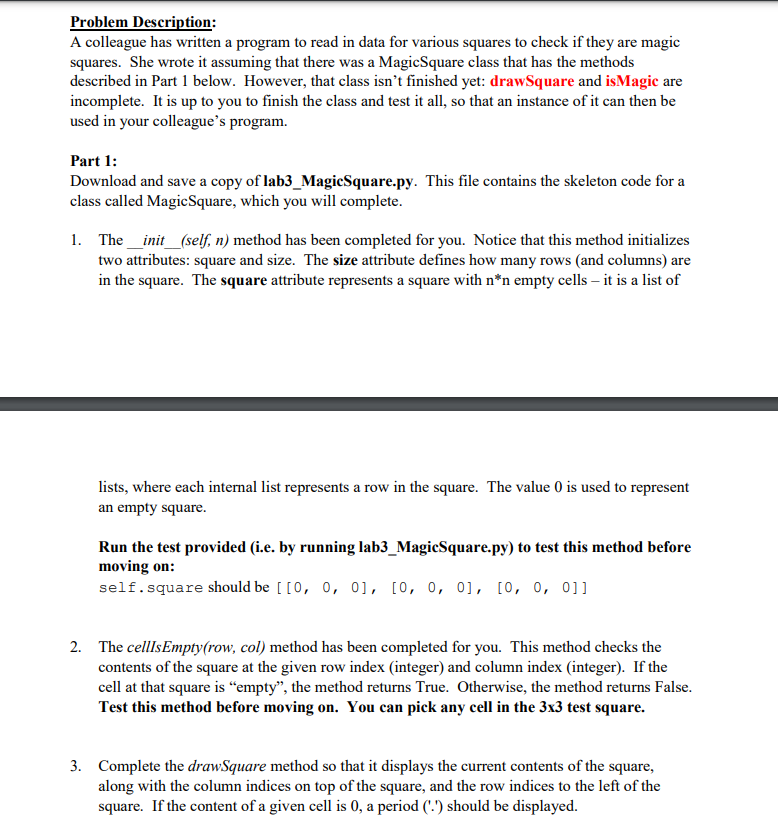
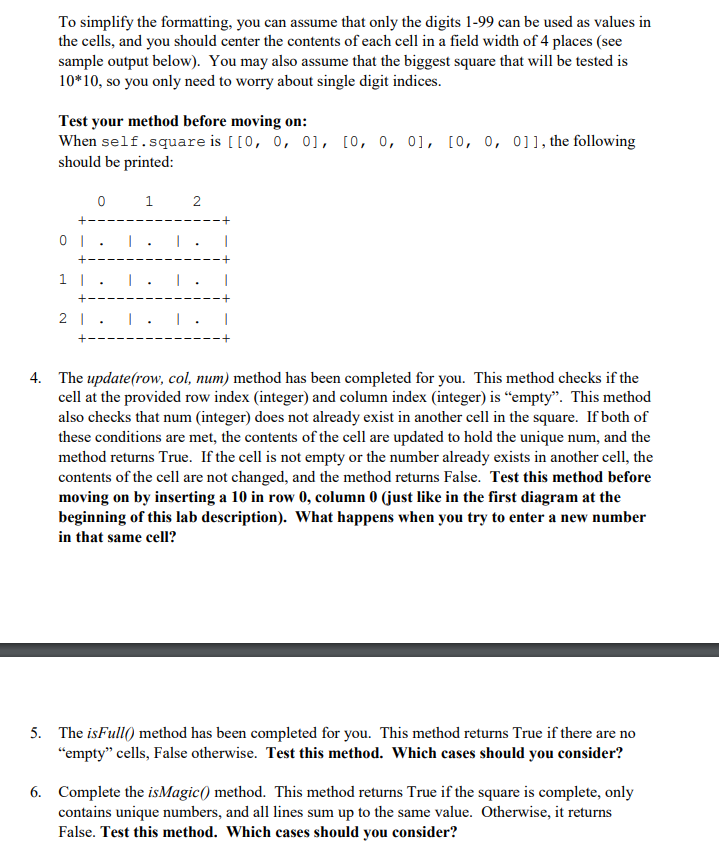
Problem Description: A colleague has written a program to read in data for various squares to check if they are magic squares. She wrote it assuming that there was a MagicSquare class that has the methods described in Part 1 below. However, that class isn't finished yet: drawSquare and isMagic are incomplete. It is up to you to finish the class and test it all, so that an instance of it can then be used in your colleague's program. Part 1: Download and save a copy of lab3_MagicSquare.py. This file contains the skeleton code for a class called MagicSquare, which you will complete. 1. The_init__(self, n) method has been completed for you. Notice that this method initializes two attributes: square and size. The size attribute defines how many rows (and columns) are in the square. The square attribute represents a square with n*n empty cells it is a list of lists, where each internal list represents a row in the square. The value 0 is used to represent an empty square. Run the test provided (i.e. by running lab3_MagicSquare.py) to test this method before moving on: self.square should be [[0, 0, 0], [0, 0, 0], [0, 0, 0]] 2. The cellIsEmpty(row, col) method has been completed for you. This method checks the contents of the square at the given row index (integer) and column index (integer). If the cell at that square is "empty", the method returns True. Otherwise, the method returns False. Test this method before moving on. You can pick any cell in the 3x3 test square. 3. Complete the drawSquare method so that it displays the current contents of the square, along with the column indices on top of the square, and the row indices to the left of the square. If the content of a given cell is 0, a period (.') should be displayed. To simplify the formatting, you can assume that only the digits 1-99 can be used as values in the cells, and you should center the contents of each cell in a field width of 4 places (see sample output below). You may also assume that the biggest square that will be tested is 10*10, so you only need to worry about single digit indices. Test your method before moving on: When self.square is [[0, 0, 0], [0, 0, 0], [0, 0, 0]], the following should be printed: 0 1 2 --+ | 01. +- 1 I. +-- 21. + I. 1 | 4. The update(row, col, num) method has been completed for you. This method checks if the cell at the provided row index (integer) and column index (integer) is empty. This method also checks that num (integer) does not already exist in another cell in the square. If both of these conditions are met, the contents of the cell are updated to hold the unique num, and the method returns True. If the cell is not empty or the number already exists in another cell, the contents of the cell are not changed, and the method returns False. Test this method before moving on by inserting a 10 in row 0, column 0 (just like in the first diagram at the beginning of this lab description). What happens when you try to enter a new number in that same cell? 5. The isFull() method has been completed for you. This method returns True if there are no "empty" cells, False otherwise. Test this method. Which cases should you consider? 6. Complete the isMagic() method. This method returns True if the square is complete, only contains unique numbers, and all lines sum up to the same value. Otherwise, it returns False. Test this method. Which cases should you consider? Problem Description: A colleague has written a program to read in data for various squares to check if they are magic squares. She wrote it assuming that there was a MagicSquare class that has the methods described in Part 1 below. However, that class isn't finished yet: drawSquare and isMagic are incomplete. It is up to you to finish the class and test it all, so that an instance of it can then be used in your colleague's program. Part 1: Download and save a copy of lab3_MagicSquare.py. This file contains the skeleton code for a class called MagicSquare, which you will complete. 1. The_init__(self, n) method has been completed for you. Notice that this method initializes two attributes: square and size. The size attribute defines how many rows (and columns) are in the square. The square attribute represents a square with n*n empty cells it is a list of lists, where each internal list represents a row in the square. The value 0 is used to represent an empty square. Run the test provided (i.e. by running lab3_MagicSquare.py) to test this method before moving on: self.square should be [[0, 0, 0], [0, 0, 0], [0, 0, 0]] 2. The cellIsEmpty(row, col) method has been completed for you. This method checks the contents of the square at the given row index (integer) and column index (integer). If the cell at that square is "empty", the method returns True. Otherwise, the method returns False. Test this method before moving on. You can pick any cell in the 3x3 test square. 3. Complete the drawSquare method so that it displays the current contents of the square, along with the column indices on top of the square, and the row indices to the left of the square. If the content of a given cell is 0, a period (.') should be displayed. To simplify the formatting, you can assume that only the digits 1-99 can be used as values in the cells, and you should center the contents of each cell in a field width of 4 places (see sample output below). You may also assume that the biggest square that will be tested is 10*10, so you only need to worry about single digit indices. Test your method before moving on: When self.square is [[0, 0, 0], [0, 0, 0], [0, 0, 0]], the following should be printed: 0 1 2 --+ | 01. +- 1 I. +-- 21. + I. 1 | 4. The update(row, col, num) method has been completed for you. This method checks if the cell at the provided row index (integer) and column index (integer) is empty. This method also checks that num (integer) does not already exist in another cell in the square. If both of these conditions are met, the contents of the cell are updated to hold the unique num, and the method returns True. If the cell is not empty or the number already exists in another cell, the contents of the cell are not changed, and the method returns False. Test this method before moving on by inserting a 10 in row 0, column 0 (just like in the first diagram at the beginning of this lab description). What happens when you try to enter a new number in that same cell? 5. The isFull() method has been completed for you. This method returns True if there are no "empty" cells, False otherwise. Test this method. Which cases should you consider? 6. Complete the isMagic() method. This method returns True if the square is complete, only contains unique numbers, and all lines sum up to the same value. Otherwise, it returns False. Test this method. Which cases should you consider
Step by Step Solution
There are 3 Steps involved in it

Get step-by-step solutions from verified subject matter experts
 Study Help