







Question: PYTHON CODE: Fractal Design using Turtle Graphics: A four-step algorithm creates this fractal: Specify an intricacy level, a positive integer for the fractal. Start with
PYTHON CODE:
Fractal Design using Turtle Graphics:
A four-step algorithm creates this fractal:
Specify an intricacy level, a positive integer for the fractal.
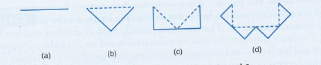
Start with a straight line. This line is called level 0 fractal (Fig. (a))
To obtain a fractal for the next level, replace each line in the drawing with sides of an isosceles right triangle having the line as hypotenuse. Fig. (b), (c), and (d) show the level I, 2, and 3 fractals.
Repeat last step until the desired level of recursion is reached.
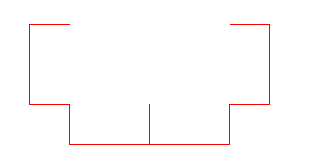
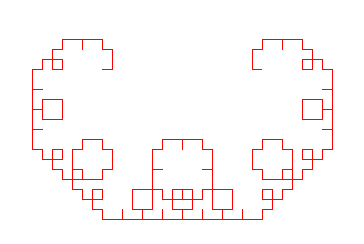
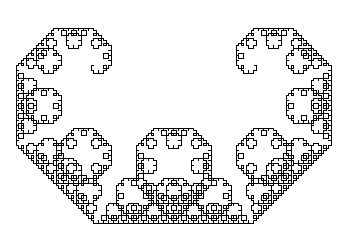
The fractal designs below have intricacy level 4, 8, and 12.
|
|
|
|
Hints:
Write a function drawline () draw line from (x1, y1) to (x2, y2)
Write a recursive function fractal (t, x1, y1, x2, y2, level) which starts drawing at (x1, y1) and ends at (x2, y2) for given level. To call the function recursively, use the following steps:
If level =0 call drawline()
Else
Find newX as (x1 +x2)/2 + (y2 y1)/2
Find newY as (y1 = y2)/2 (x2-x1)/2
Call fractal with x1,y1, newX, newY, and level-1
Call fractal with newX, newY, x2, y2, and level-1
Step by Step Solution
There are 3 Steps involved in it

Get step-by-step solutions from verified subject matter experts
 Study Help