







Question: Python Code Help. I'm writing this gui program with tkinter that converts celsius to fahrenheit. However when i write in a value in the entry
Python Code Help. I'm writing this gui program with tkinter that converts celsius to fahrenheit. However when i write in a value in the entry box, my convert function doesn't seem to pick up y self.temp which it's supposed to use in the function to calculate fahrenheit. Instead for any number it just displays 32 degrees.
Also how can i do it so the label in the bottom right where 32.0 is currently displayed changes everytime the entry is changed and the button is clicked
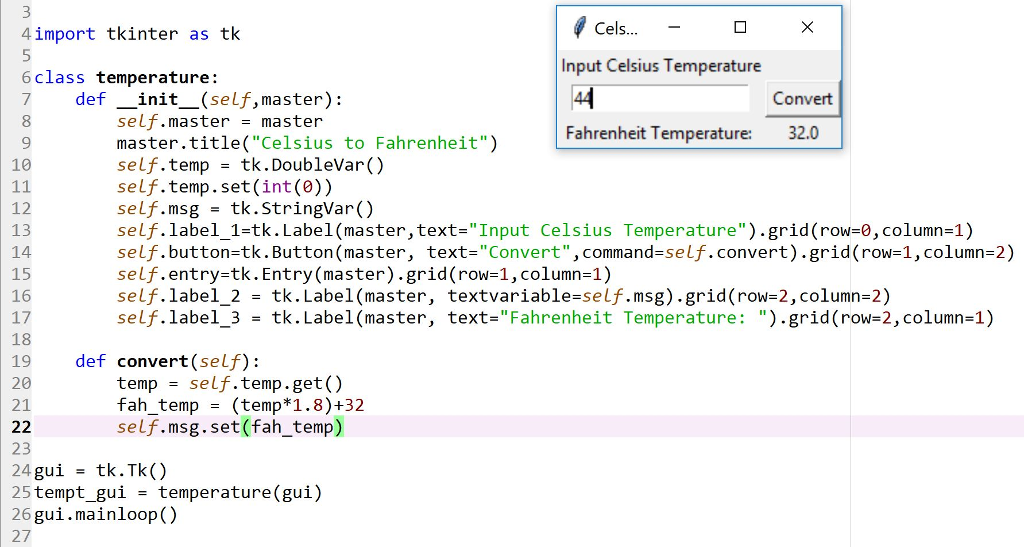
4import tkinter as tk Cels Input Celsius Temperature 6 class temperature: Fahrenheit Temperature def _init_(self,master): Convert self.master master master.title( "Celsius to Fahrenheit") self.temp = tk.DoubleVar() self.temp.set(int(e)) self.msg = tk.Stringvar() self. label-1-tk. Label(master,text-"Input Celsius Temperature") . grid(row=0 , column=1) self.button=t k . Button (master, text-"convert " , command-self.convert).grid(row=1,column-2) self.entry-tk. Entry(master).grid (row-1,column-1) self. label. 2 = tk. Label (master, textvariable-self.msg).grid(row-2, column-2) self. label. 3 tk. Label(master, text-"Fahrenheit Temperature: ").grid(row=2, column=1) 8 9 10 32.0 12 13 14 15 16 17 18 19 20 21 def convert (self): temp self.temp.get() fah-temp (temp*1.8)+32 self.msg.set(fah_temp) 23 25tempt gui = temperature(gui) 26gui.mainloop() 27
Step by Step Solution
There are 3 Steps involved in it

Get step-by-step solutions from verified subject matter experts
 Study Help