







Question: python code, I appreciate your help on this assignment. Thanks Programming Assignment: Rectangle and Point classes Problem Statement: In this assignment you will write two
python code, I appreciate your help on this assignment. Thanks
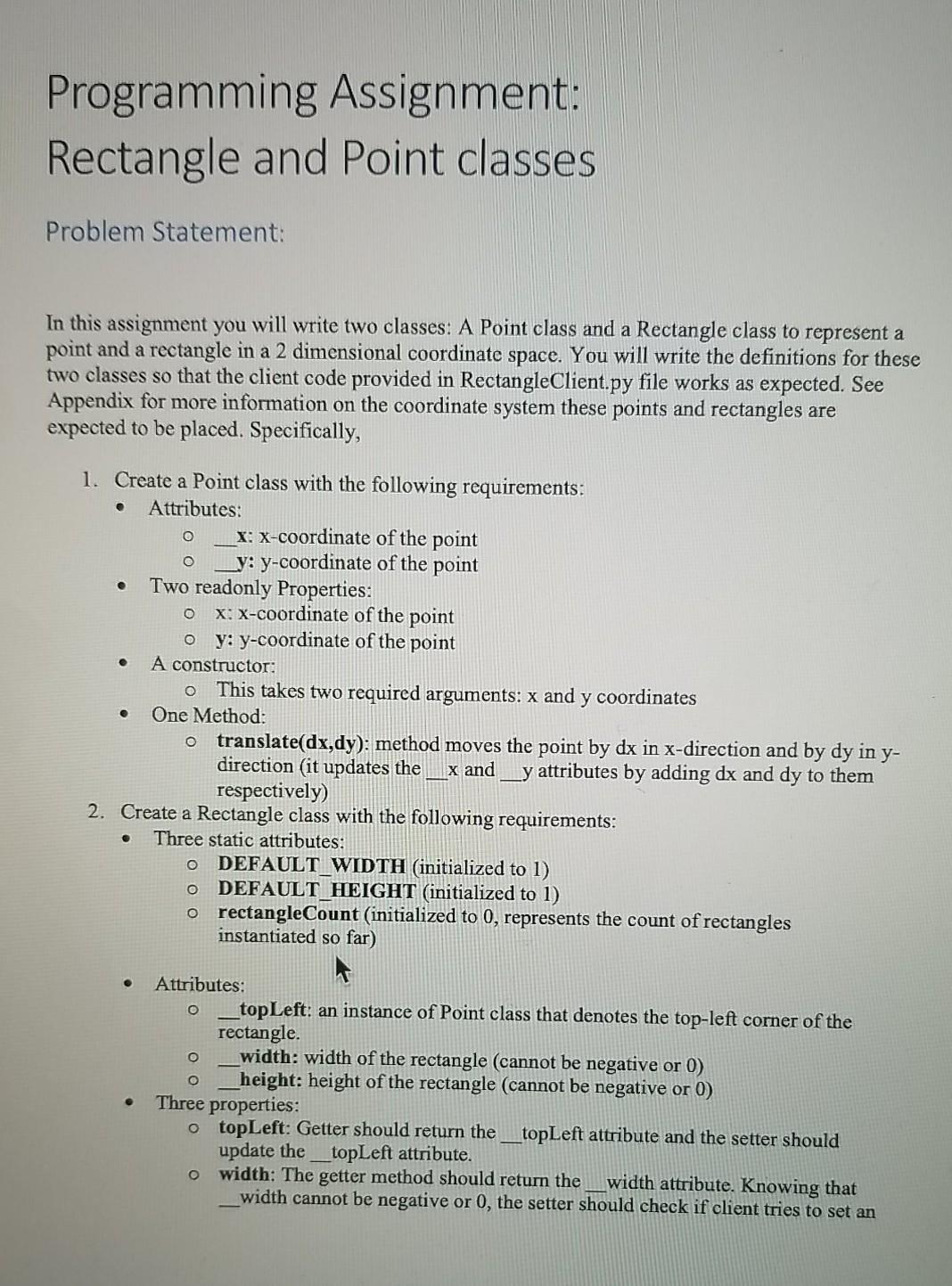
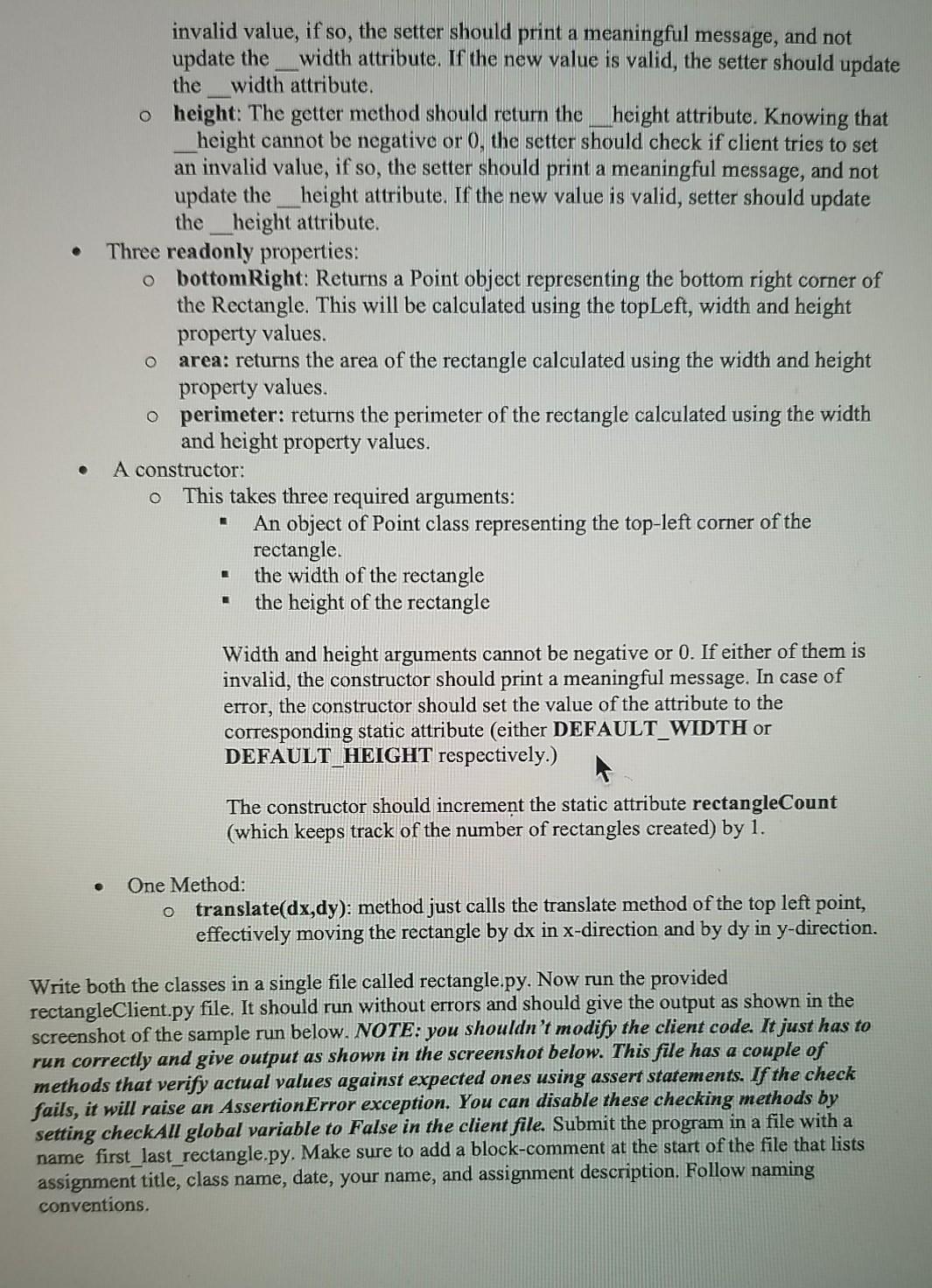
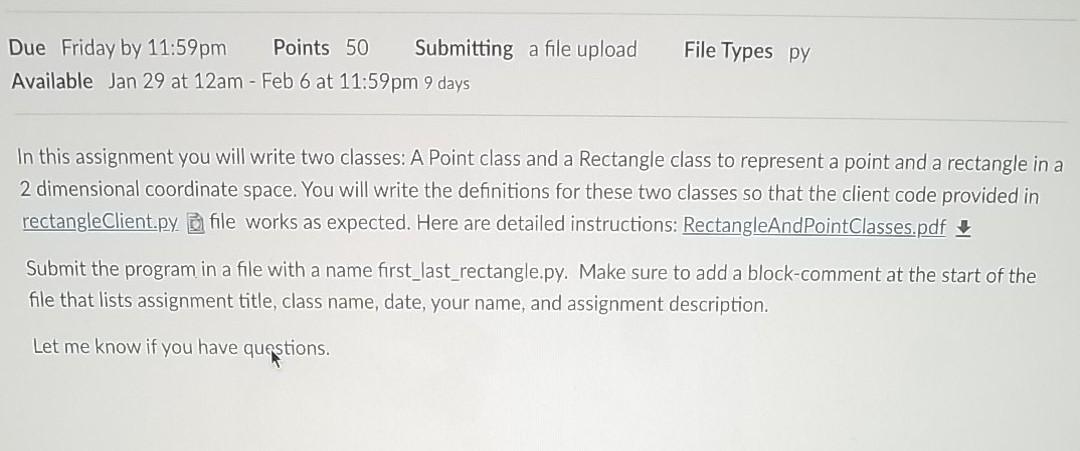
Programming Assignment: Rectangle and Point classes Problem Statement: In this assignment you will write two classes: A Point class and a Rectangle class to represent a point and a rectangle in a 2 dimensional coordinate space. You will write the definitions for these two classes so that the client code provided in RectangleClient.py file works as expected. See Appendix for more information on the coordinate system these points and rectangles are expected to be placed. Specifically, O O O 1. Create a Point class with the following requirements: Attributes: X: X-coordinate of the point _y: y-coordinate of the point Two readonly Properties: x:x-coordinate of the point oy: y-coordinate of the point A constructor: o This takes two required arguments: x and y coordinates One Method: o translate(dx,dy): method moves the point by dx in x-direction and by dy in y- direction (it updates the x and __y attributes by adding dx and dy to them respectively) 2. Create a Rectangle class with the following requirements: Three static attributes: o DEFAULT_WIDTH (initialized to 1) O DEFAULT_HEIGHT (initialized to 1) o rectangleCount (initialized to 0, represents the count of rectangles instantiated so far) o Attributes: top Left: an instance of Point class that denotes the top-left corner of the rectangle. width: width of the rectangle (cannot be negative or 0) height: height of the rectangle (cannot be negative or 0) Three properties: topLeft: Getter should return the topLeft attribute and the setter should update the topLeft attribute. o width: The getter method should return the width attribute. Knowing that width cannot be negative or 0, the setter should check if client tries to set an invalid value, if so, the setter should print a meaningful message, and not update the width attribute. If the new value is valid, the setter should update the width attribute. o height: The getter method should return the height attribute. Knowing that height cannot be negative or 0, the setter should check if client tries to set an invalid value, if so, the setter should print a meaningful message, and not update the __height attribute. If the new value is valid, setter should update the_height attribute. Three readonly properties: o bottomRight: Returns a Point object representing the bottom right corner of the Rectangle. This will be calculated using the topLeft, width and height property values. area: returns the area of the rectangle calculated using the width and height property values. o perimeter: returns the perimeter of the rectangle calculated using the width and height property values. A constructor: This takes three required arguments: An object of Point class representing the top-left corner of the rectangle the width of the rectangle the height of the rectangle O O Width and height arguments cannot be negative or 0. If either of them is invalid, the constructor should print a meaningful message. In case of error, the constructor should set the value of the attribute to the corresponding static attribute (either DEFAULT_WIDTH or DEFAULT_HEIGHT respectively.) The constructor should increment the static attribute rectangleCount (which keeps track of the number of rectangles created) by 1. One Method: o translate(dx,dy): method just calls the translate method of the top left point, effectively moving the rectangle by dx in x-direction and by dy in y-direction. Write both the classes in a single file called rectangle.py. Now run the provided rectangleClient.py file. It should run without errors and should give the output as shown in the screenshot of the sample run below. NOTE: you shouldn't modify the client code. It just has to run correctly and give output as shown in the screenshot below. This file has a couple of methods that verify actual values against expected ones using assert statements. If the check fails, it will raise an AssertionError exception. You can disable these checking methods by setting checkAll global variable to False in the client file. Submit the program in a file with a name first_last_rectangle.py. Make sure add a block-comment at the start of the file that lists assignment title, class name, date, your name, and assignment description. Follow naming conventions. File Types py Due Friday by 11:59pm Points 50 Submitting a file upload Available Jan 29 at 12am - Feb 6 at 11:59pm 9 days In this assignment you will write two classes: A Point class and a Rectangle class to represent a point and a rectangle in a 2 dimensional coordinate space. You will write the definitions for these two classes so that the client code provided in rectangleClient.py file works as expected. Here are detailed instructions: RectangleAndPointClasses.pdf Submit the program in a file with a name first_last_rectangle.py. Make sure to add a block-comment at the start of the file that lists assignment title, class name, date, your name, and assignment description. Let me know if you have questions
Step by Step Solution
There are 3 Steps involved in it

Get step-by-step solutions from verified subject matter experts
 Study Help