







Question: PYTHON CODE: I'm trying to input images and have the program print out a video/gif/ combination of the images. My starting code is below, but
PYTHON CODE: I'm trying to input images and have the program print out a video/gif/ combination of the images. My starting code is below, but there are various mistakes that I don't understand how to fix.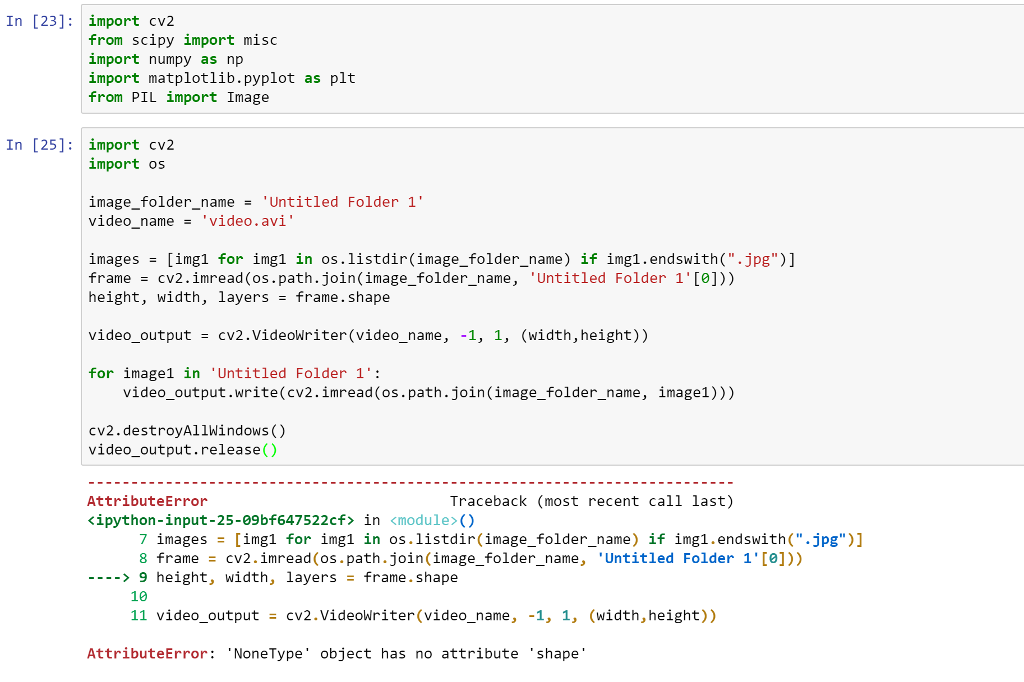
In [23] import cv2 from scipy import misc import numpy as np import matplotlib.pyplot as plt from PIL import Image In [25] import cv2 import os image_folder_nameUntitled Folder 1" video name -'video.avi' images = [ingi for img1 in os.listdir(image folder_name) if 1mg1.endswith(".jpg")] frame cv2.inread (os.path.join(image_folder_name, 'Untitled Folder 1'[0])) height, width, layers frame. Shape video-output cv2.VideoWriter(video-name , -1, 1, (width,height)) = for image1 in 'Untitled Folder 1': video_output.write(cv2.imread (os.path.join(image_folder_name, image1))) cv2.destroyAllWindows() video_output.release( Traceback (most recent call last) AttributeError ipython-input-25-09bf647522cE> in () img1.endswith(".jpg")] 1. [e])) if 7 images 8 frame = img1 [img1 for cv2.inread (os.path.join(image_folder_name, in os.listdir(image_folder_name) = 'Untitled Folder > 9 height, width, layers frame. Shape 10 11 video-output cv2.VideoWriter(video-name, -1, 1, (width,height)) = AttributeError: NoneType' object has no attribute 'shape
Step by Step Solution
There are 3 Steps involved in it

Get step-by-step solutions from verified subject matter experts
 Study Help