







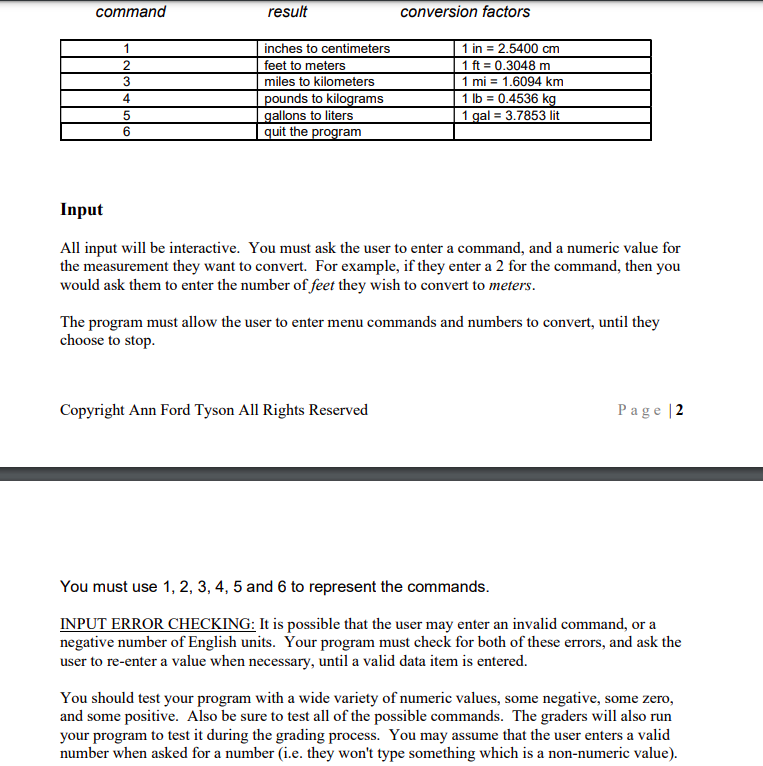
Question: Python command result conversion factors 1 2 3 4 5 6 inches to centimeters feet to meters miles to kilometers pounds to kilograms gallons to
Python
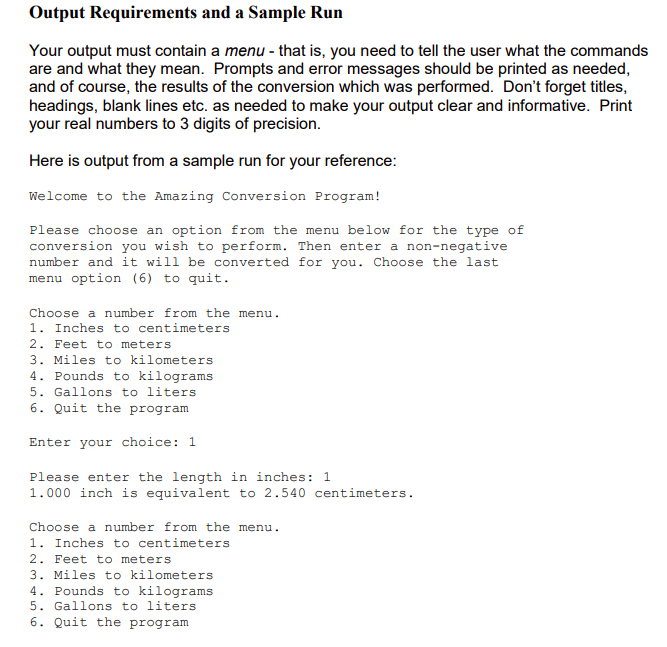
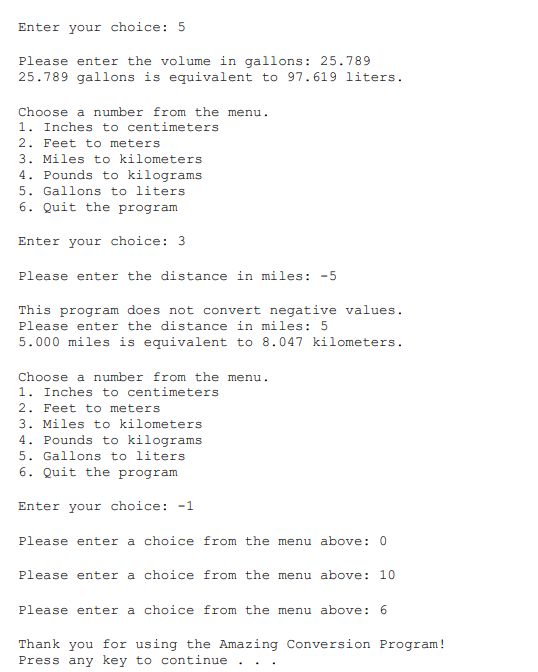
command result conversion factors 1 2 3 4 5 6 inches to centimeters feet to meters miles to kilometers pounds to kilograms gallons to liters quit the program 1 in = 2.5400 cm 1 ft = 0.3048 m 1 mi = 1.6094 km 1 lb = 0.4536 kg 1 gal = 3.7853 lit Input All input will be interactive. You must ask the user to enter a command, and a numeric value for the measurement they want to convert. For example, if they enter a 2 for the command, then you would ask them to enter the number of feet they wish to convert to meters. The program must allow the user to enter menu commands and numbers to convert, until they choose to stop. Copyright Ann Ford Tyson All Rights Reserved Page 2 You must use 1, 2, 3, 4, 5 and 6 to represent the commands. INPUT ERROR CHECKING: It is possible that the user may enter an invalid command, or a negative number of English units. Your program must check for both of these errors, and ask the user to re-enter a value when necessary, until a valid data item is entered. You should test your program with a wide variety of numeric values, some negative, some zero, and some positive. Also be sure to test all of the possible commands. The graders will also run your program to test it during the grading process. You may assume that the user enters a valid number when asked for a number (i.e. they won't type something which is a non-numeric value). Output Requirements and a Sample Run Your output must contain a menu - that is, you need to tell the user what the commands are and what they mean. Prompts and error messages should be printed as needed, and of course, the results of the conversion which was performed. Don't forget titles, headings, blank lines etc. as needed to make your output clear and informative. Print your real numbers to 3 digits of precision. Here is output from a sample run for your reference: Welcome to the Amazing Conversion Program! Please choose an option from the menu below for the type of conversion you wish to perform. Then enter a non-negative number and it will be converted for you. Choose the last menu option (6) to quit. Choose a number from the menu. 1. Inches to centimeters 2. Feet to meters 3. Miles to kilometers 4. Pounds to kilograms 5. Gallons to liters 6. Quit the program Enter your choice: 1 Please enter the length in inches: 1 1.000 inch is equivalent to 2.540 centimeters. Choose a number from the menu. 1. Inches to centimeters 2. Feet to meters 3. Miles to kilometers 4. Pounds to kilograms 5. Gallons to liters 6. Quit the program Enter your choice: 5 Please enter the volume in gallons: 25.789 25.789 gallons is equivalent to 97.619 liters. Choose a number from the menu. 1. Inches to centimeters 2. Feet to meters 3. Miles to kilometers 4. Pounds to kilograms 5. Gallons to liters 6. Quit the program Enter your choice: 3 Please enter the distance in miles: -5 This program does not convert negative values. Please enter the distance in miles: 5 5.000 miles is equivalent to 8.047 kilometers. Choose a number from the menu. 1. Inches to centimeters 2. Feet to meters 3. Miles to kilometers 4. Pounds to kilograms 5. Gallons to liters 6. Quit the program Enter your choice: -1 Please enter a choice from the menu above: 0 Please enter a choice from the menu above: 10 Please enter a choice from the menu above: 6 Thank you for using the Amazing Conversion Program! Press any key to continue
Step by Step Solution
There are 3 Steps involved in it

Get step-by-step solutions from verified subject matter experts
 Study Help