







Question: Python Complete the Python program (decision_tree.py) that will read the files contact_lens_training_1.csv, contact_lens_training_2.csv, and contact_lens_training_3.csv. Each of those training sets has a different number of
Python
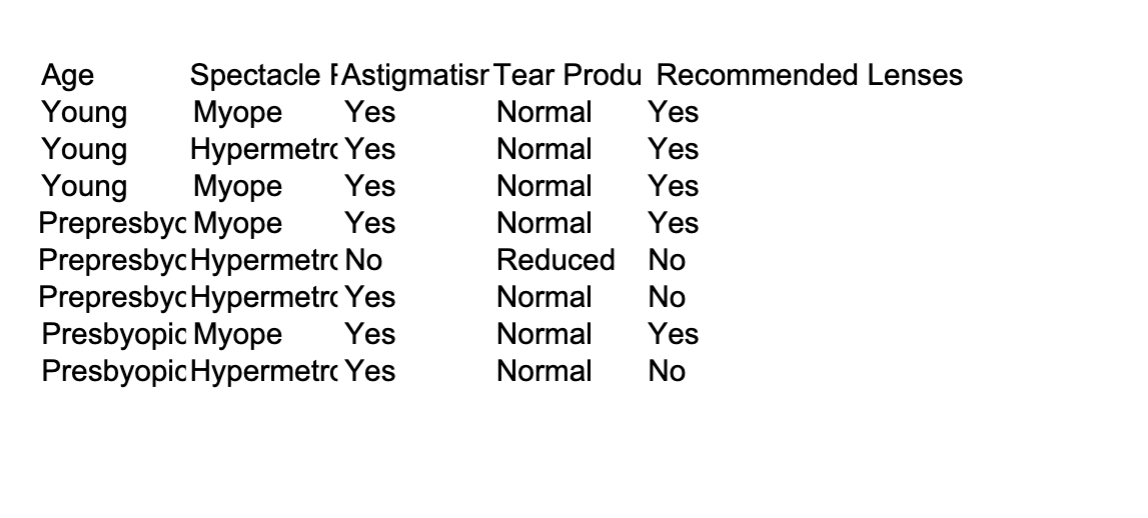
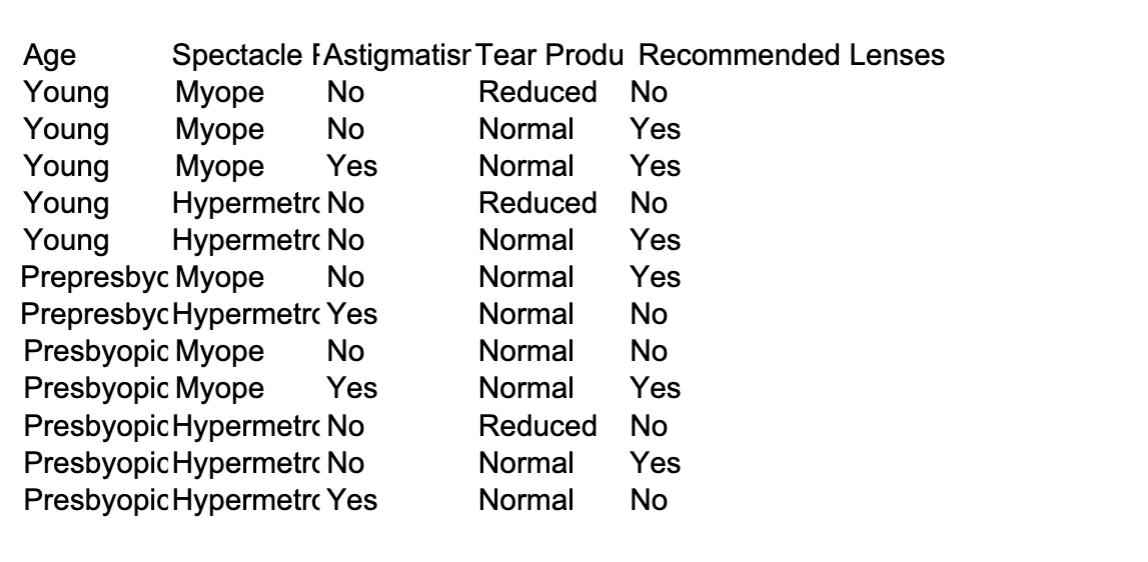
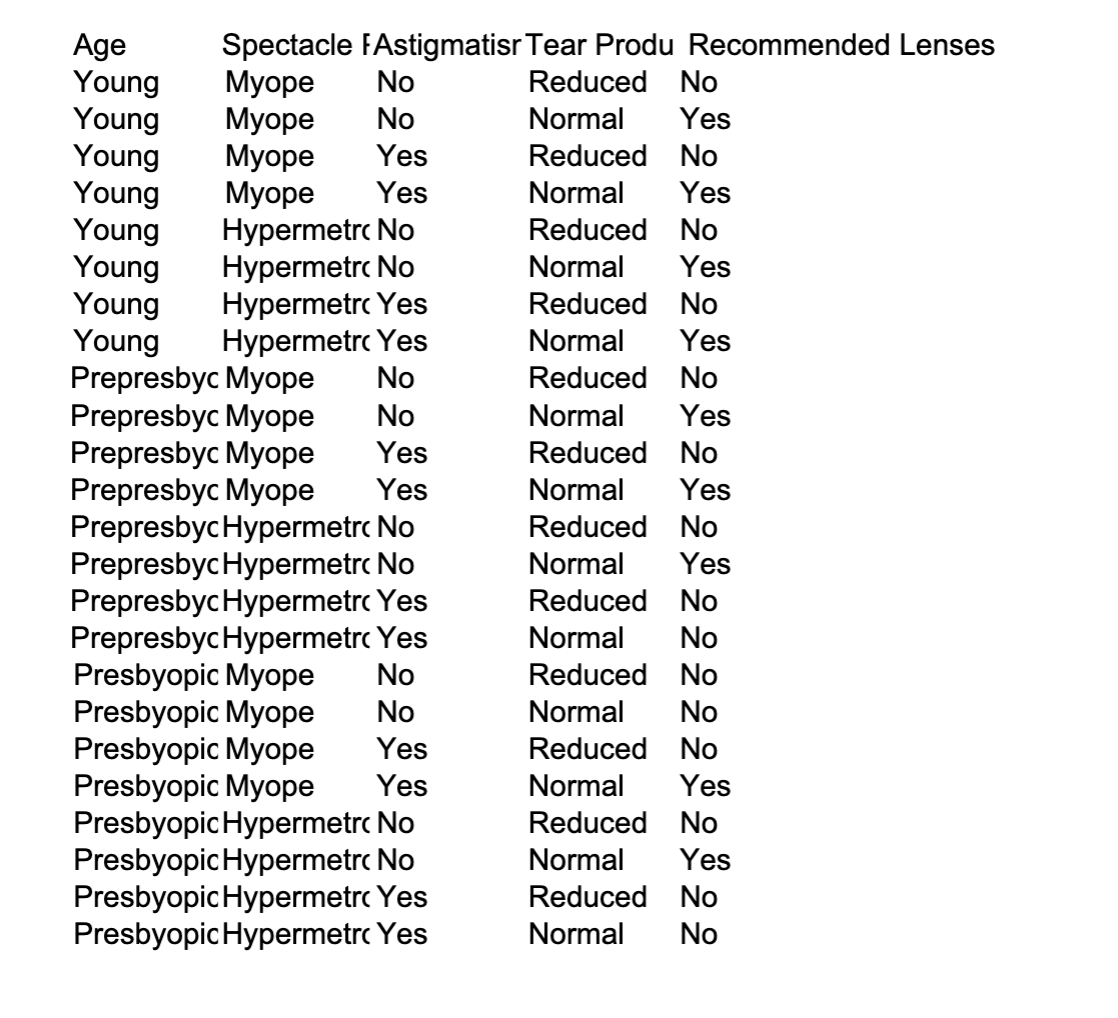
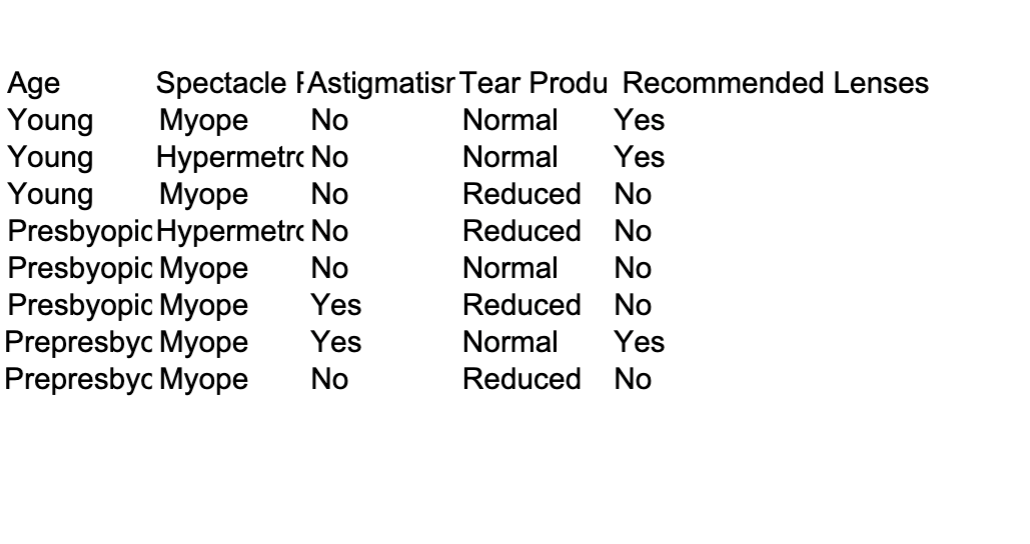
Complete the Python program (decision_tree.py) that will read the files contact_lens_training_1.csv, contact_lens_training_2.csv, and contact_lens_training_3.csv. Each of those training sets has a different number of instances. You will observe that now the trees are being created setting the parameter max_depth =3, which it is used to define the maximum depth of the tree(pre-pruning strategy)in sklearn. Your goal is to train, test,and output the performance of the models created by using each training set on the test set provided (contact_lens_test.csv). You must repeat this process 10 times (train and test by using a different training set), choosing the lowest accuracy as the final classification performance of each model.
decision_tree.py
#importing some Python libraries
from sklearn import tree
import csv
dataSets = ['contact_lens_training_1.csv', 'contact_lens_training_2.csv', 'contact_lens_training_3.csv']
for ds in dataSets:
dbTraining = []
X = []
Y = []
#reading the training data in a csv file
with open(ds, 'r') as csvfile:
reader = csv.reader(csvfile)
for i, row in enumerate(reader):
if i > 0: #skipping the header
dbTraining.append (row)
#transform the original training features to numbers and add to the 4D array X.
For instance Young = 1, Prepresbyopic = 2, Presbyopic = 3, so X = [[1, 1, 1, 1], [2, 2, 2, 2], ...]]
#--> add your Python code here
# X =
#transform the original training classes to numbers and add to the vector Y. For instance Yes = 1, No = 2, so Y = [1, 1, 2, 2, ...]
#--> add your Python code here
# Y =
#loop your training and test tasks 10 times here
for i in range (10):
#fitting the decision tree to the data setting max_depth=3
clf = tree.DecisionTreeClassifier(criterion = 'entropy', max_depth=3)
clf = clf.fit(X, Y)
#read the test data and add this data to dbTest
#--> add your Python code here
# dbTest =
for data in dbTest:
#transform the features of the test instances to numbers following the same strategy done during training, and then use the decision tree to make the class prediction. For instance:
#class_predicted = clf.predict([[3, 1, 2, 1]])[0]-> [0] is used to get an integer as the predicted class label so that you can compare it with
the true label
#--> add your Python code here
#compare the prediction with the true label (located at data[4]) of the test instance to start calculating the accuracy.
#--> add your Python code here
#find the lowest accuracy of this model during the 10 runs (training and test set)
#--> add your Python code here
#print the lowest accuracy of this model during the 10 runs (training and test set) and save it.
#your output should be something like that: final accuracy when training on contact_lens_training_1.csv: 0.2
#--> add your Python code here
contact_lens_training_1
Age Spectacle FAstigmatism Tear Produ Recommended Lenses Young Myope Yes Normal Yes Young Hypermetrc Yes Normal Yes Young Myope Yes Normal Yes Prepresbyc Myope Yes Normal Yes PrepresbycHypermetro No Reduced No PrepresbycHypermetro Yes Normal No Presbyopic Myope Yes Normal Yes PresbyopicHypermetro Yes Normal NoAge Spectacle FAstigmatism Tear Produ Recommended Lenses Young Myope No Reduced No Young Myope No Normal Yes Young Myope Yes Normal Yes Young Hypermetro No Reduced No Young Hypermetro No Normal Yes Prepresbyc Myope No Normal Yes PrepresbycHypermetro Yes Normal No Presbyopic Myope No Normal No Presbyopic Myope Yes Normal Yes PresbyopicHypermetro No Reduced No PresbyopicHypermetro No Normal Yes PresbyopicHypermetrc Yes Normal NoAge Spectacle FAstigmatism Tear Produ Recommended Lenses Young Myope No Reduced No Young Myope No Normal Yes Young Myope Yes Reduced No Young Myope Yes Normal Yes Young Hypermetro No Reduced No Young Hypermetro No Normal Yes Young Hypermetrc Yes Reduced No Young Hypermetrc Yes Normal Yes Prepresbyc Myope No Reduced No Prepresbyc Myope No Normal Yes Prepresbyc Myope Yes Reduced No Prepresbyc Myope Yes Normal Yes PrepresbycHypermetro No Reduced No PrepresbycHypermetro No Normal Yes PrepresbycHypermetrc Yes Reduced No PrepresbycHypermetrc Yes Normal No Presbyopic Myope No Reduced No Presbyopic Myope No Normal No Presbyopic Myope Yes Reduced No Presbyopic Myope Yes Normal Yes PresbyopicHypermetro No Reduced No PresbyopicHypermetro No Normal Yes PresbyopicHypermetro Yes Reduced No PresbyopicHypermetrc Yes Normal NoAge Spectacle FAstigmatism Tear Produ Recommended Lenses Young Myope No Normal Yes Young Hypermetro No Normal Yes Young Myope No Reduced No PresbyopicHypermetro No Reduced No Presbyopic Myope No Normal No Presbyopic Myope Yes Reduced No Prepresbyc Myope Yes Normal Yes Prepresbyc Myope No Reduced No
Step by Step Solution
There are 3 Steps involved in it

Get step-by-step solutions from verified subject matter experts
 Study Help