







Question: PYTHON Error messages are often long and technicalDo not expect the messages to make much sense when starting to learn a programming language. Use the
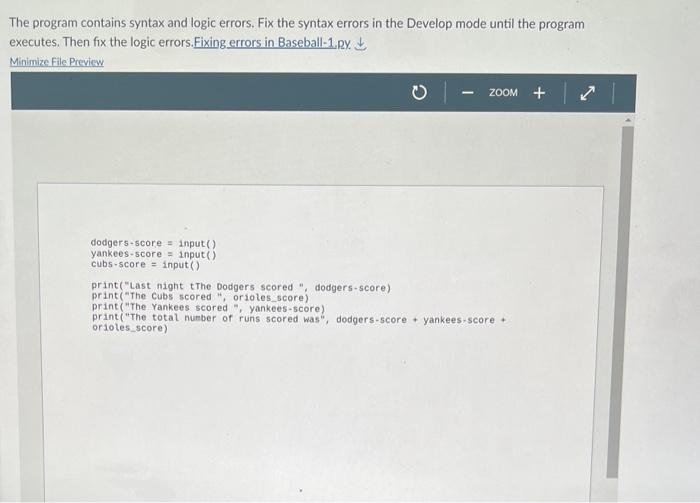
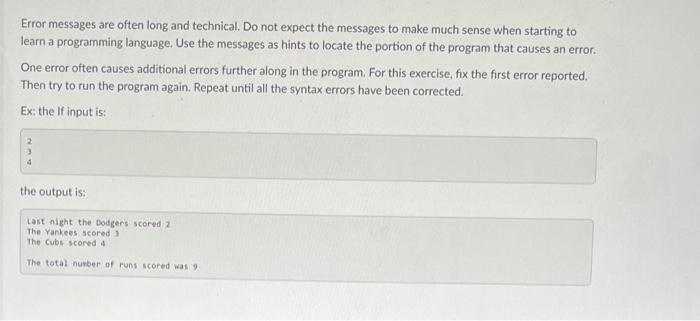
The program contains syntax and logic errors. Fix the syntax errors in the Develop mode until the program executes. Then fix the logic errors. Fixing errors in Baseball-1. py. Minimize File Preview dodgers-score = input() yankees-score = input() cubs-score = input() print("Last night the Dodgers scored ", dodgers-score) print("The cubs scored ", orioles_score) print("The Yankees scored , yankees-5core) print("The total nunber of runs scored was", dodgers-score + yankees-score + orioles_score) Error messages are often long and technical. Do not expect the messages to make much sense when starting to learn a programming language. Use the messages as hints to locate the portion of the program that causes an error. One error often causes additional errors further along in the program. For this exercise, fix the first error reported. Then try to run the program again. Repeat until all the syntax errors have been corrected. Ex: the If input is
Step by Step Solution
There are 3 Steps involved in it

Get step-by-step solutions from verified subject matter experts
 Study Help