







Question: Python File input/output step ranges and in operator with CSV. def print_list_reversed(n): Use range to create list and print all the elements: Finish this
Python File input/output step ranges and "in" operator with CSV.
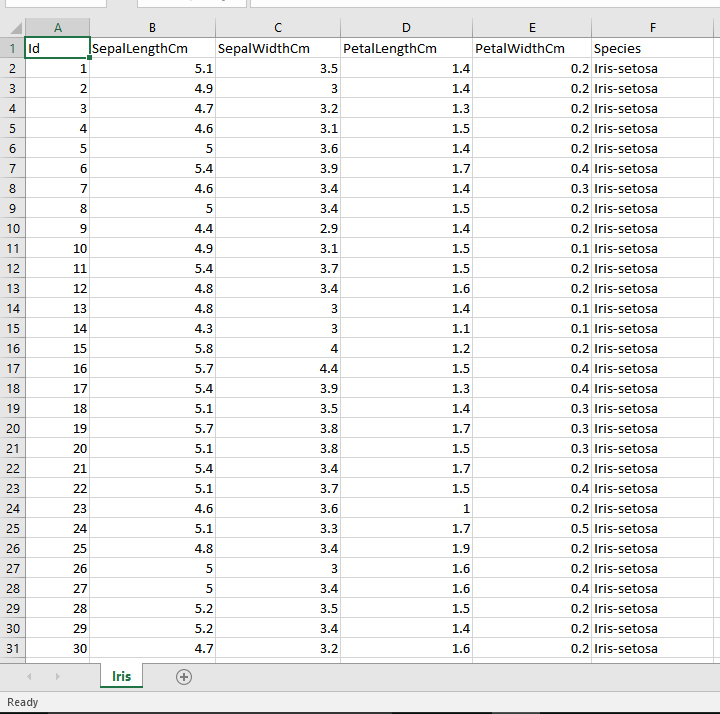
def print_list_reversed(n): """ Use range to create list and print all the elements: Finish this function which takes a parameter n and use this n to create a range from 0 (inclusive) to n (exclusive). Then cast this range into a list and print all the elements in reverse order. This function has no return value. """ def print_one_skip_two_reversed(n): """ Use range to create a list, then print the elements in reverse order, print one skip one: Finish this function which takes a parameter n and use this n to create a range from 0 (inclusive) to n (exclusive). Then print each other element in this list, in revers order. This function has no return value. For example, if n is 99, a range from 0 to 98 (both inclusive) should be created. Then the printed number should be 98, then 96, then 94... """ def load_dataset_in(): """ Load a multidimensional raw data into memory: This is a function related to file I/O. Finish this function which loads the Iris.csv and creates a nested list to store the data. The first line of this file should be ignored. Starting from the 2nd line, you should create a sub-list for each line of the data set. The first column should be stored as an integer, the 2nd, 3rd, 4th and 5th column should be sored as floats. The last column should be stored as a string. For example, the first sample of the data, after processing, should be stored as: [1, 5.1, 3.5, 1.4, 0.2, "Iris-setosa"] The return value should be the processed nested list. """ #======================================= # test print_list_reversed(10) print_list_reversed(66) print("--"*10) # test print_one_skip_two_reversed(19) print_one_skip_two_reversed(20) print("--"*10) # test print(load_dataset_in()) Here is a screen shot of the file and here is a link to the iris.csv file, if it helps: http://www.sharecsv.com/s/38617498e9a413b9f0b08ae00af3b639/Iris.csv
PetalWidthCm Species SepalLengthCm SepalWidthCm PetaengthCm 0.2 Iris-setosa 0.2 Iris-setosa 0.2 Iris-setosa 0.2 Iris-setosa 0.2 Iris-setosa 0.4 Iris-setosa 0.3 Iris-setosa 0.2 Iris-setosa 0.2 Iris-setosa 0.1 Iris-setosa 0.2 Iris-setosa 0.2 Iris-setosa 0.1 Iris-setosa 0.1 Iris-setosa 3.5 5.1 4.9 2 3.2 3.1 3.6 3.9 3.4 3.4 4 1.5 4.6 1.7 5.4 4.6 1.5 10 4.9 5.4 4.8 4.8 3.1 3.7 3.4 1.5 1.5 10 12 12 14 15 16 17 0.2 Iris-setosa 1.2 1.5 4 16 17 18 19 20 21 5.8 5.7 5.4 5.1 5.7 5.1 5.4 5.1 4.6 5.1 4.8 0.4 Iris-setosa 0.4 Iris-setosa 3.9 3.5 3.8 3.8 3.4 3.7 3.6 3.3 3.4 0.3 Iris-setosa 1.7 1.5 1.7 1.5 1 1.7 0.3 Iris-setosa 0.3 Iris-setosa 0.2 Iris-setosa 0.4 Iris-setosa 0.2 Iris-setosa 19 21 23 0.5 Iris-setosa 0.2 Iris-setosa 0.2 Iris-setosa 0.4 Iris-setosa 0.2 Iris-setosa 0.2 Iris-setosa 0.2 Iris-setosa 25 26 27 27 3.4 3.5 3.4 3.2 1.5 5.2 5.2 30 Iris Ready
Step by Step Solution
There are 3 Steps involved in it

Get step-by-step solutions from verified subject matter experts
 Study Help