







Question: Python for everyone Description: calculate the date of Easter for any year in the twentieth or a positive year and exit when the year is
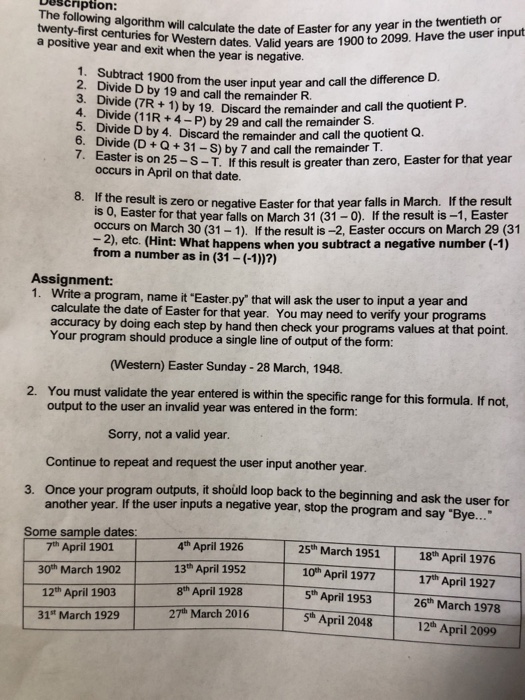
Description: calculate the date of Easter for any year in the twentieth or a positive year and exit when the year is negative. ern dates. Valid years are 1900 to 2099. Have the user input 2. Divide D by 1o from the user input year and call the difference D. Divide D by 19 and call the remainder R. 2. 4. 5. vide (7R+1) by 19. Discard the remainder and call the quotient P Divide (11R +4-P) by 29 and call the remainder S Divi e D by 4. Discard the remainder and call the quotient Q 6. 7. Divide (D+Q+31 -S) by 7 and call the remainder T Easter is on 25-S-T. If this result is greater than zero, Easter for that year occurs in April on that date. the result is zero or negative Easter for that year falls in March. If the result Is 0, Easter for that year falls on March 31 (31-0). If the result is-1, Easter occurs on March 30 (31-1). If the result is -2, Easter occurs on March 29 (31 8. If 2), etc. (Hint: What happens when you subtract a negative number (-1) from a number as in (31 -(-1))?) Assignment: e a program, name it 'Easter.py' that will ask the user to input a year and calculate the date of Easter for that year. You may need to verify your programs accuracy by doing each step by hand then Your program should produce a single line of output of the form: check your programs values at that point. Western) Easter Sunday - 28 March, 1948. You must validate the year entered is within the specific range for this formula. If not, output to the user an invalid year was entered in the form: 2. Sorry, not a valid year. Continue to repeat and request the user input another year. ram outputs, it should loop back to the beginning and ask the user for Once your prog another year. If the 3. user inputs a negative year, stop the program and say Bye... Some sample dates 7th April 1901 30th March 1902 12th April 1903 31st March 1929 4th April 1926 13th April 1952 8th April 1928 27th March 2016 25th March 1951 18th April 1976 17th April 1927 5th April 195326th March 1978 12 April 2099 10th April 1977 5th April 2048
Step by Step Solution
There are 3 Steps involved in it

Get step-by-step solutions from verified subject matter experts
 Study Help