







Question: PYTHON for very BEGINNERS Need help with fixing my wrong code as per the assignment bellow: 1) Design your output drawing such that it contains
PYTHON for very BEGINNERS
Need help with fixing my wrong code as per the assignment bellow:
1) Design your output drawing such that it contains at least 3 different shapes. Your name should be printed in the output as part of the draw() function.
2) Write 2 " driver " functions :
a. a function called initDraw(), which creates the turtle object
b. a function caled draw(), which coordinate s th e drawing of your output by calling all the other functions that you've written.
The 2 driver functions should be at the end of the source file, after all the function definitions that you have.
from turtle import *
t=initDraw() # t is the turtle object name
draw (t)
-------------------------
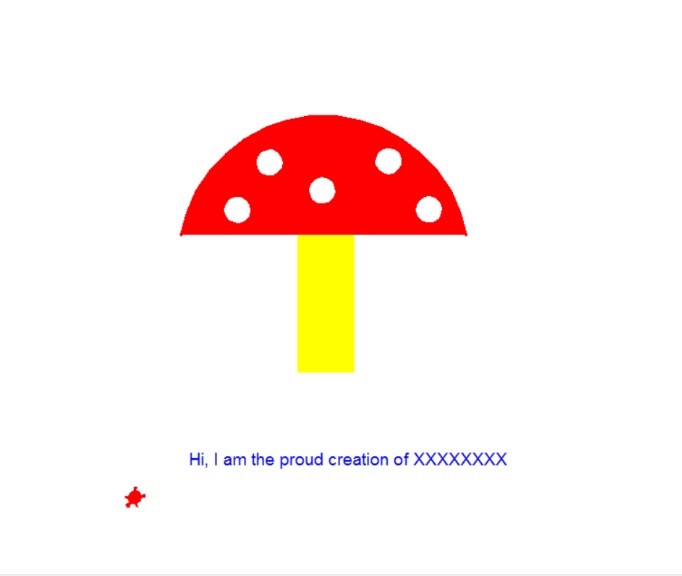
My intention is to use an arc, a recrangle and 5 circles to draw a mushroom.
The code runs, but is not orgnized as expected. --- only the call of t=initDraw() and draw (t) has to drive the whole thing. Though, the way I wrote it, def draw(t): does not do anythng, but it has to. This is what I have:
from turtle import *
def drawCircle(t, radius, input_color): ''' draw a circle of specified radius and color''' t.color(input_color) t.pensize(5) t.circle(radius) def fillCircle(t, radius, border_color, fill_color): '''fill a circle with specified radius and border color/fill color''' t.begin_fill () drawCircle (t, radius, border_color) t.fillcolor (fill_color) t.end_fill ()
def drawArc(t, radius, degree, fill_color): '''draw a semicircle with specific radius, arc, and fill color''' t.begin_fill() t.circle(radius, degree) # ??? I'm not sure if it is right. t.fillcolor (fill_color) t.end_fill()
def drawRectangle(t, length, width, fill_color): '''draw a triangle with specified lenght and color''' t.begin_fill() t.color (fill_color) t.fd (length) t.lt (90) t.fd (width) t.lt (90) t.fd (length) t.lt (90) t.fd (width) t.fillcolor (fill_color) t.end_fill()
def initDraw (pen_shape, pen_size, pen_color, pen_speed): '''create a turtle object with specific parameters ''' t.shape (pen_shape) t.pensize(pen_size) t.color (pen_color) t.speed (pen_speed) def draw(t): '''functions to draw a mushroom''' drawArc(t, radius, degree, fill_color) drawRectangle(t, length, width, fill_color) fillCircle(t, radius, border_color, fill_color)
# test driver code t = Turtle()
initDraw("turtle", 3, "red", 10)
t.up() t.goto(135, 60) t.lt(100) t.down () drawArc(t, 160, 160, "red")
t.up() t.goto(-50, 59) t.lt(10) t.down () drawRectangle(t, 150, 60, "yellow")
t.up() t.goto(-120, 100) t.lt(10) t.down () fillCircle(t, 12, "white", "white")
t.up() t.goto(90, 100) t.lt(10) t.down () fillCircle(t, 12, "white", "white")
t.up() t.goto(-30, 120) t.lt(10) t.down () fillCircle(t, 12, "white", "white")
t.up() t.goto(-90, 150) t.lt(10) t.down () fillCircle(t, 12, "white", "white")
t.up() t.goto(40, 150) t.lt(10) t.down () fillCircle(t, 12, "white", "white")
t.up() t.goto(- 170, -200) t.down ()
initDraw("turtle", 3, "blue", 10) t.write ("Hi, I am the proud creation of XXXXXXXX", font=("Calibri", 14, "normal"))
t.up() initDraw("turtle", 3, "red", 10) t.goto (-230, -230)
t=initDraw() draw(t)
Hi, am the proud creation of XXXXXXXX
Step by Step Solution
There are 3 Steps involved in it
To organize and correct your code according to the requirements follow these steps Define the Turtle Initialization in initDraw Create the turtle obje... View full answer

Get step-by-step solutions from verified subject matter experts
 Study Help