







Question: Python in Jupyter I need help fixing my code. The output should look like the picture below. AB 1 name measurem value 2 Jake n_dogs
Python in Jupyter
I need help fixing my code. The output should look like the picture below. 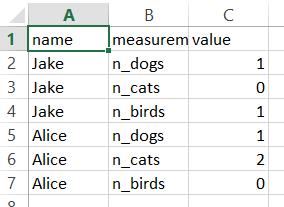
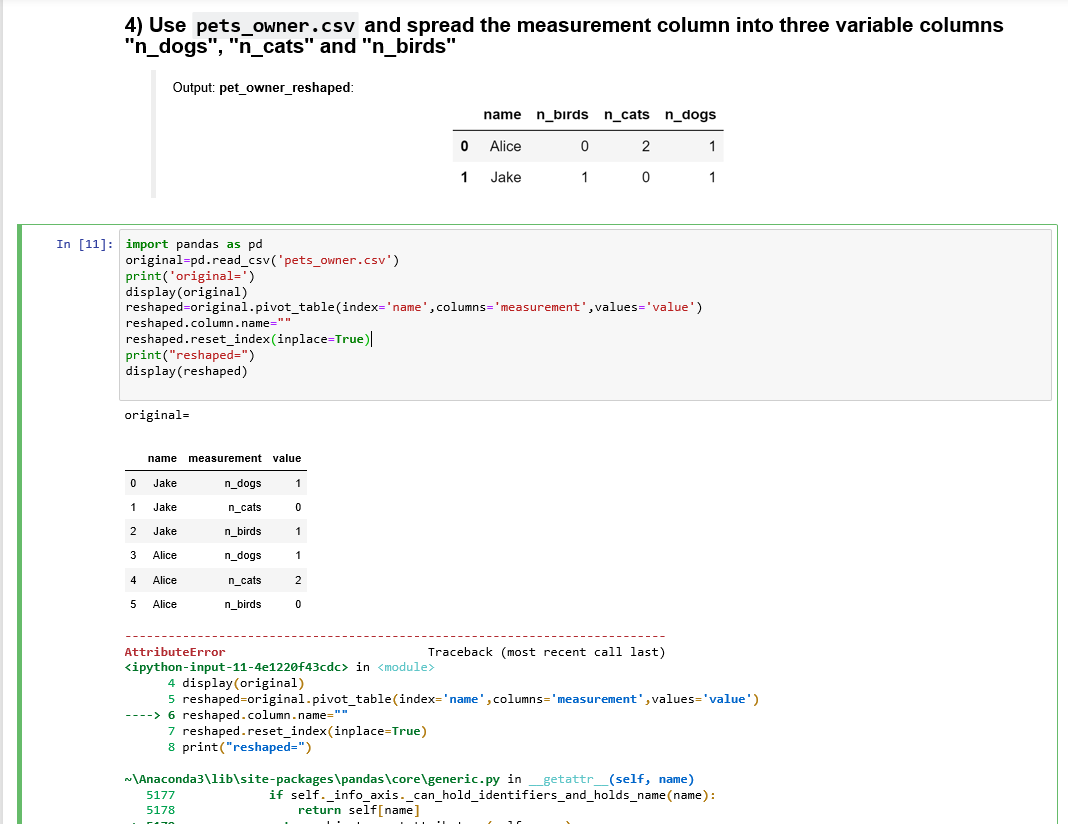
AB 1 name measurem value 2 Jake n_dogs 3 Jake n_cats Jake n_birds 5 Alice n_dogs Alice n_cats 7 Alice n_birds 4) Use pets_owner.csv and spread the measurement column into three variable columns "n_dogs", "n_cats" and "n_birds" Output: pet_owner_reshaped: 0 1 name n_birds n_cats Alice 0 2 Jake 1 0 n_dogs 1 1 In [11]: import pandas as pd original=pd.read_csv('pets_owner.csv') print('original=') display(original) reshaped=original.pivot_table(index='name',columns='measurement', values='value') reshaped.column.name="" reshaped.reset_index(inplace=True) print("reshaped=") display(reshaped) original= name measurement value 0 n_dogs n_cats n_birds Jake Jake Jake Alice Alice Alice 2 3 4 5 n_dogs 2 n_cats n_birds AttributeError Traceback (most recent call last)
Step by Step Solution
There are 3 Steps involved in it

Get step-by-step solutions from verified subject matter experts
 Study Help