







Question: Python is the program language Esercise 4: Program esercise for read and readline function Write a complete Python program including minimal comments (file name, your
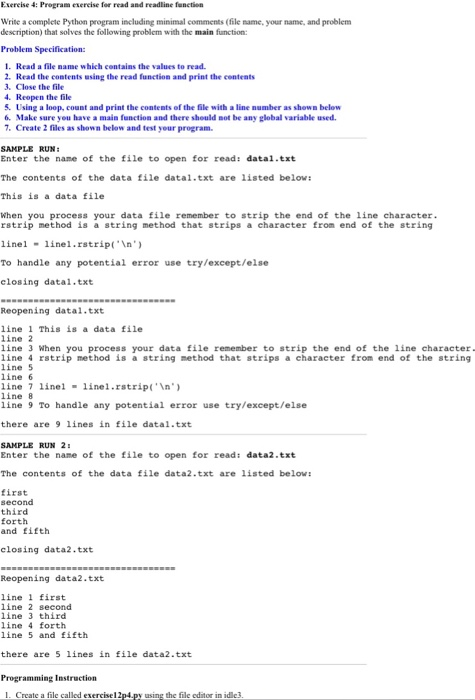
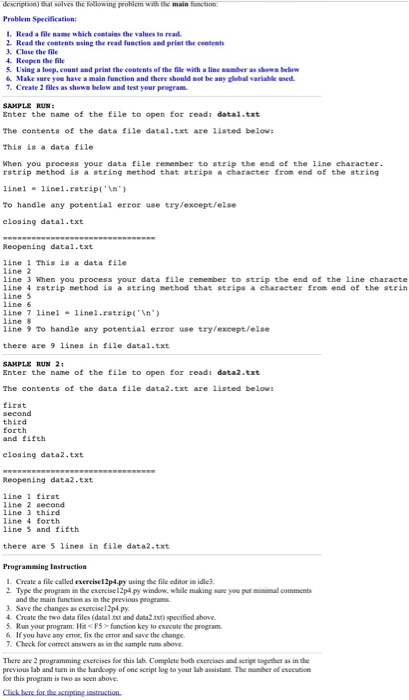
Esercise 4: Program esercise for read and readline function Write a complete Python program including minimal comments (file name, your name, and problem description) that solves the following problem with the main function Problem Specification: 1. Read a file nanme which centains the values to read 2. Read the contents using the read function and print the contents 3. Close the file 4. Reopen the file 5. Using a loop, count and print the contents of the file with a line number as shown below 6. Make sure you have a main function and there should not be any global variable used 7. Create 2 iles as shown below and test your program SAMPLE RUN Enter the nane of the file to open for read: datal.txt The contents of the data file datal.txt are listed below: This is a data file When you process your data file remember to strip the end of the line character rstrip method is a string method that strips a character from end of the string linellinel.rstrip('n To handle any potential error use try/except/else closing datal.txt Reopening datal.txt line 1 This is a data file line 2 line 3 When you process your data file remember to strip the end of the line character line 4 rstrip method is a string method that strips a character from end of the string line 5 line 6 line 7 linel linel.rstrip('n line 8 line 9 To handle any potential error use try/except/else there are 9 1ines in file datal.txt SAMPLE RUN 2 Enter the name of the file to open for read: data2.txt The contents of the data file data2.txt are listed below first second third forth and fifth closing data2.txt Reopening data2.txt line 1 first line 2 second line 3 third line 4 forth line 5 and fifth there are 5 1ines in file data2.txt l. Create a file called exercise12p4.py using the file editor in id c
Step by Step Solution
There are 3 Steps involved in it

Get step-by-step solutions from verified subject matter experts
 Study Help