







Question: Python language. urgent please complete the draw_letter(my_turtle, letter, size) and draw_string(my_turtle,s, size) and function in the file functions.py. When complete draw_string should draw all the
Python language. urgent please 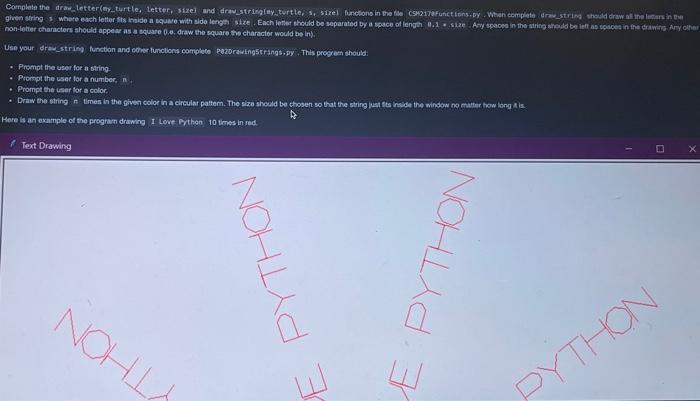
complete the draw_letter(my_turtle, letter, size) and draw_string(my_turtle,s, size) and function in the file functions.py. When complete draw_string should draw all the letters in the given string s where each letter fit inside a square with the side length size. Each letter should be separated by a space of length 0.1 * size. Any spaces in the string should be left as spaces in the drawing. Any other non-letter characters should appear as a square (i.e draw the square the character would be in).
use your draw_string function and other functions complete DrawStrings.py. This program should:
- prompt the user for a string
- prompt the user for a number
- prompt the use for a color
- Draw the string n times in the given color in a circular pattern. the size should be chosen so that the string just fits inside the window no matter how long it is.
Hints
- There is no animation in this program. Just draw the requested string n times, where n is given by the user.
- Make others functions to help you complete this project. For example, a function that computes the letyers size to ensure a string fits on the screen.
-Use draw_square to draw the square for non-letters characters.
- Use a loop over the string to draw each letter.
non-letiter chancters ahould appeas as a square 0.e. draw the square the charactor would be ing, - Prompt the user for a string. - Prompt the user tor a number, in. - Prompt the user for a color. - Draw the etring if times in the given codor in a circular pattem. The size shodid be chosen so that the string usat fte inside the windew no matter how long A is. Here is an example of the progrien drawing I Leve Prthon 10 tows in red
Step by Step Solution
There are 3 Steps involved in it
1 Expert Approved Answer
Step: 1 Unlock

Question Has Been Solved by an Expert!
Get step-by-step solutions from verified subject matter experts
Step: 2 Unlock
Step: 3 Unlock
 Study Help