







Question: PYTHON my_id = 12345678 num_let=6 Assignment 2 - Arithmetic Make sure you have read and understood both m odules A and B this week, and
PYTHON
my_id = 12345678
num_let=6
Assignment 2 - Arithmetic
Make sure you have read and understood
both modules A and B this week, and
module 2R - Lab Homework Requirements
before submitting this assignment. Hand in only one program, please.
Some Easy Arithmetic
Every programming assignment is as much a test of English language comprehension as it is a test of programming or mathematical skills. This week, the explanations of the formulae below are given clearly in plain English if you read carefully. However, if there is any question about what is being asked, you are urged to ask for clarification in the public forums.
Understand the Application
You will create two int variables into which you will store
Your student ID. (This is normally an 8-digit number; don't confuse it with your social security # or a password, which it is not.)
The number of letters in your family (last) name.
In order to receive any credit for this assignment, these two values must match what I have for you on my class roster.
Your program will compute some values based on these two numbers, so each student will have a unique output.
The Program Spec
The following five expressions assume that you have stored your student ID into the variable myId, and the number of letters in your last (family) name into the variable numLet. (However in keeping with Python style, you would use variable names like my_id or num_let in your actual code.) You can manually enter both of these using assignment statements in your program source. No user input allowed. Compute the following five values:
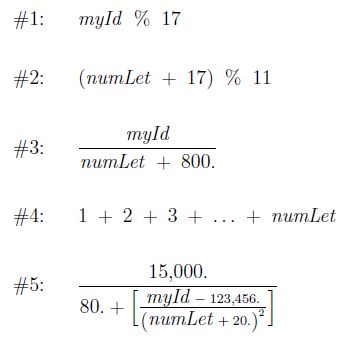
First do the math on paper so you know what answers your program should generate (but don't hand this stage in). Write a program that computes and displays these five values. Your run should look something like this (although the values will differ for each student):
""" --------------- RUN ----------------- My family name is Locey My Student ID is 22222222 The number of characters in my last name is 5 Expression #1 ------------ : 9 Expression #2 ------------ : ... ... -------------------------------------- """
Note that the first three lines are output from your program, not added after the run. This should all be done in one run of a single program, not several runs.
Here are some tips and REQUIREMENTS:
Don't limit the precision of the expected float output in any way. (E.g., Avoid using advanced formatting to make the result look shorter or neater than they would by using the simpler default formatting.) We want to see as many decimal places for the float results as possible.
The "..." is called an "ellipsis" and means "and so forth." So, in expression #4 if your numLet is 8, the expression 1 + 2 + ... + numLet really means 1 + 2 + 3 + 4 + 5 + 6 + 7 + 8. Since we have not covered loops, just use this latter expression to compute result in expression #4.
Do not try to take short cuts. For expression #4, I want to see every number in the computation. As an example, in hint #2 directly above, you see that I listed the entire addition when describing the expression 1 + 2 + ... + numLet, so your program should also use the full expression. Remember that long source code lines (> 80 chars) are illegal according to my style rules.
Your personal info is not supposed to be entered by the user at run-time. You should make assignments to the variables in your program.
Only one run, please, which means you must produce all five answers in your program in a single source file.
Expressions #1, #2 and #4 should use ordinary int arithmetic, which means using the int variables without any special tools. However, expressions #3 and #5 are meant to display thefull float accuracy that the divisions will produce, You should take appropriate action to do that.
Use as few variables as possible. You can, for example, use one result variable for all five expressions. Don't use five separate result variables.
As you see in the sample run, the first thing your program needs to do is print out your last (family) name, your student ID, and the number of characters, including special symbols, if any which you are using as a basis for these computations.
Do not use any power or exponential operators or functions to compute #5. It is inefficient to use a pow() function or a ** opearator to compute small integral powers likes squares or cubes. Instead, use multiplication to compute the power(s) you need.
Each incorrect result or expression will incur a penalty of -3 to -4, depending on the severity of the error that caused the problem, so be sure to check your work.
Step by Step Solution
There are 3 Steps involved in it

Get step-by-step solutions from verified subject matter experts
 Study Help