







Question: Python! One simple Python exercise! anyone can help me to solve it and show me the code screenshot? Thank you sooooo much! ACTIVITY: Placing files
Python! One simple Python exercise! anyone can help me to solve it and show me the code screenshot? Thank you sooooo much!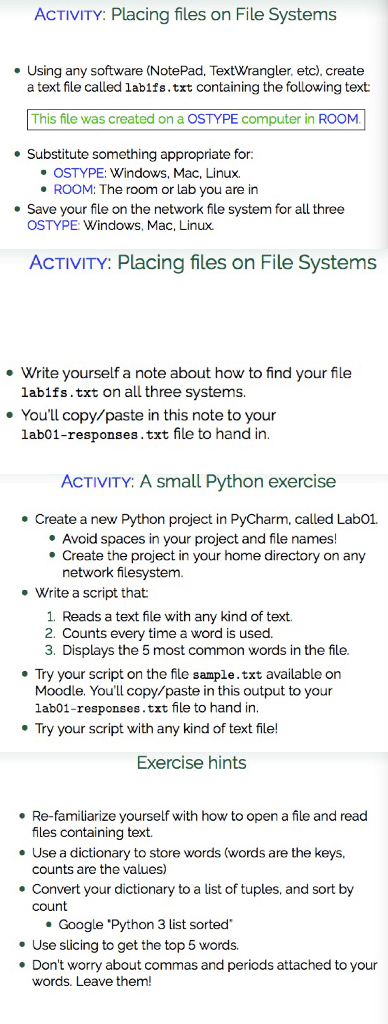
ACTIVITY: Placing files on File Systems . Using any software (NotePad, TextWrangler, etc), create a text file called labifs.txt containing the following text: This file was created on a OSTYPE computer in ROOM Substitute something appropriate OSTYPE: Windows, Mac, Linux. e ROOM: The room or lab you are in . Save your file on the network file system for all three OSTYPE: Windows, Mac, Linux. ACTIVITY: Placing files on File Systems Write yourself a note about how to find your file labifs.txt on all three systems. You'll copy/paste in this note to your lab01-responses.txt file to hand in ACTIVITY: A small Python exercise Create a new Python project in PyCharm, called Lab01. *Create the project in your home directory on any .Avoid spaces in your project and file names! network filesystem. Write a script that 1 Reads a text file with any kind of text. 2. Counts every time a word is used. 3. Displays the 5 most common words in the file. Try your script on the file sample.txt available orn Moodle. You'll copy/paste in this output to your lab01-responses.txt file to hand in. Try your script with any kind of text file! Exercise hints . Re-familiarize yourself with how to open a file and read files containing text. e Use a dictionary to store words (words are the keys, counts are the values) . Convert your dictionary to a list of tuples, and sort by count Google 'Python 3 list sorted .Use slicing to get the top 5 words. Don't worry about commas and periods attached to your words. Leave them
Step by Step Solution
There are 3 Steps involved in it

Get step-by-step solutions from verified subject matter experts
 Study Help