







Question: Python please In this activity, we'll create a class for managing a pantry of food ingredients. This class will interact with the recipe class from
 Python please
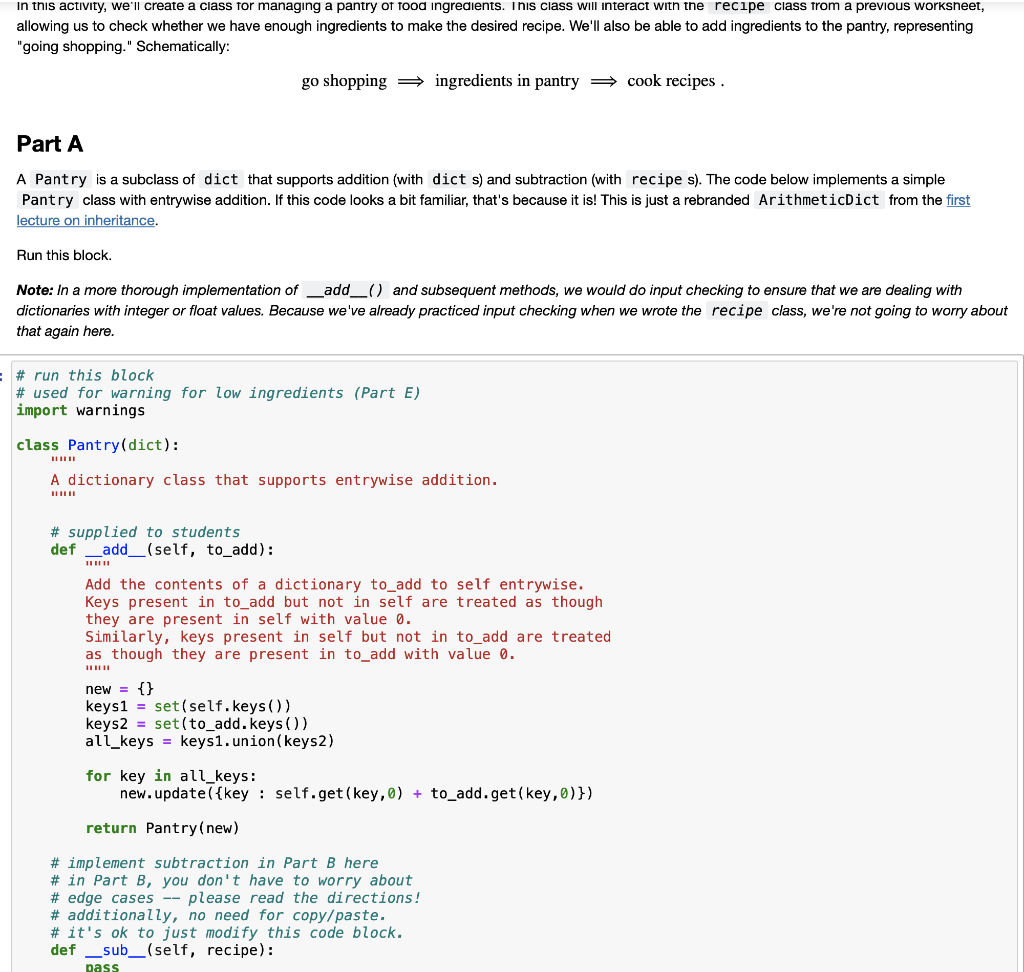
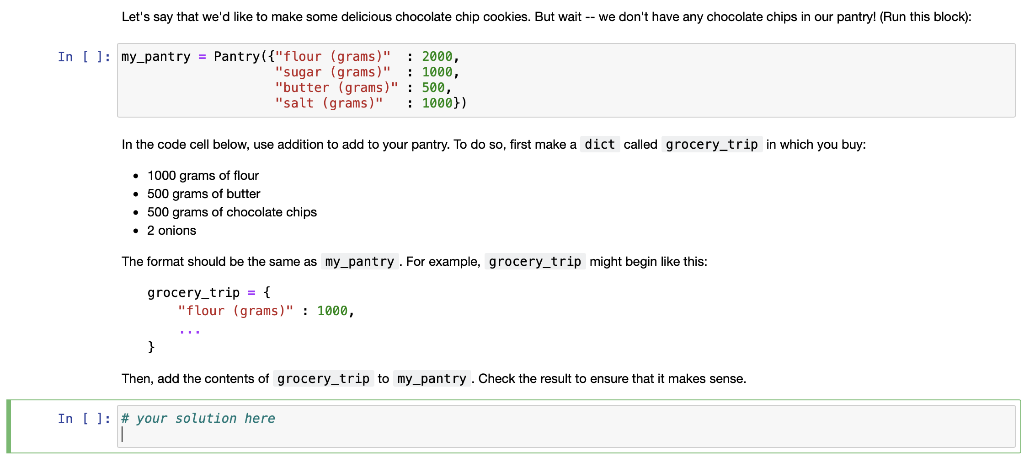
In this activity, we'll create a class for managing a pantry of food ingredients. This class will interact with the recipe class from a previous worksheet, allowing us to check whether we have enough ingredients to make the desired recipe. We'll also be able to add ingredients to the pantry, representing "going shopping." Schematically: go shopping ingredients in pantry cook recipes . Part A A Pantry is a subclass of dict that supports addition (with dict s) and subtraction (with recipe s). The code below implements a simple Pantry class with entrywise addition. If this code looks a bit familiar, that's because it is! This is just a rebranded ArithmeticDict from the first lecture on inheritance. Run this block. Note: In a more thorough implementation of _add_() and subsequent methods, we would do input checking to ensure that we are dealing with dictionaries with integer or float values. Because we've already practiced input checking when we wrote the recipe class, we're not going to worry about that again here. # run this block # used for warning for low ingredients (Part E) import warnings class Pantry(dict): A dictionary class that supports entrywise addition. # supplied to students def _add__(self, to_add): Add the contents of a dictionary to add to self entrywise. Keys present in to_add but not in self are treated as though they are present in self with value 0. Similarly, keys present in self but not in to_add are treated as though they are present in to_add with value 0. new = {} keys1 = set(self.keys()) keys2 = set(to_add. keys ()) ali_keys = keys1.union(keys2) for key in all_keys: new.update({key : self.get(key,0) + to_add.get(key,0)}) return Pantry(new) # implement subtraction in Part B here # in Part B, you don't have to worry about # edge cases -- please read the directions! # additionally, no need for copy/paste. # it's ok to just modify this code block. def __sub_(self, recipe): pass Let's say that we'd like to make some delicious chocolate chip cookies. But wait -- we don't have any chocolate chips in our pantry! (Run this block): In [ ]: my_pantry = Pantry[{"flour (grams)" : 2000, "sugar (grams)" : 1000, "butter (grams)" : 500, "salt (grams)" : 1000)) In the code cell below, use addition to add to your pantry. To do so, first make a dict called grocery_trip in which you buy: 1000 grams of flour 500 grams of butter 500 grams of chocolate chips 2 onions The format should be the same as my_pantry. For example, grocery_trip might begin like this: grocery_trip = { "flour (grams)" : 1000, } Then, add the contents of grocery_trip to my_pantry. Check the result to ensure that it makes sense. In [ ]: # your solution here In this activity, we'll create a class for managing a pantry of food ingredients. This class will interact with the recipe class from a previous worksheet, allowing us to check whether we have enough ingredients to make the desired recipe. We'll also be able to add ingredients to the pantry, representing "going shopping." Schematically: go shopping ingredients in pantry cook recipes . Part A A Pantry is a subclass of dict that supports addition (with dict s) and subtraction (with recipe s). The code below implements a simple Pantry class with entrywise addition. If this code looks a bit familiar, that's because it is! This is just a rebranded ArithmeticDict from the first lecture on inheritance. Run this block. Note: In a more thorough implementation of _add_() and subsequent methods, we would do input checking to ensure that we are dealing with dictionaries with integer or float values. Because we've already practiced input checking when we wrote the recipe class, we're not going to worry about that again here. # run this block # used for warning for low ingredients (Part E) import warnings class Pantry(dict): A dictionary class that supports entrywise addition. # supplied to students def _add__(self, to_add): Add the contents of a dictionary to add to self entrywise. Keys present in to_add but not in self are treated as though they are present in self with value 0. Similarly, keys present in self but not in to_add are treated as though they are present in to_add with value 0. new = {} keys1 = set(self.keys()) keys2 = set(to_add. keys ()) ali_keys = keys1.union(keys2) for key in all_keys: new.update({key : self.get(key,0) + to_add.get(key,0)}) return Pantry(new) # implement subtraction in Part B here # in Part B, you don't have to worry about # edge cases -- please read the directions! # additionally, no need for copy/paste. # it's ok to just modify this code block. def __sub_(self, recipe): pass Let's say that we'd like to make some delicious chocolate chip cookies. But wait -- we don't have any chocolate chips in our pantry! (Run this block): In [ ]: my_pantry = Pantry[{"flour (grams)" : 2000, "sugar (grams)" : 1000, "butter (grams)" : 500, "salt (grams)" : 1000)) In the code cell below, use addition to add to your pantry. To do so, first make a dict called grocery_trip in which you buy: 1000 grams of flour 500 grams of butter 500 grams of chocolate chips 2 onions The format should be the same as my_pantry. For example, grocery_trip might begin like this: grocery_trip = { "flour (grams)" : 1000, } Then, add the contents of grocery_trip to my_pantry. Check the result to ensure that it makes sense. In [ ]: # your solution here
Step by Step Solution
There are 3 Steps involved in it

Get step-by-step solutions from verified subject matter experts
 Study Help