







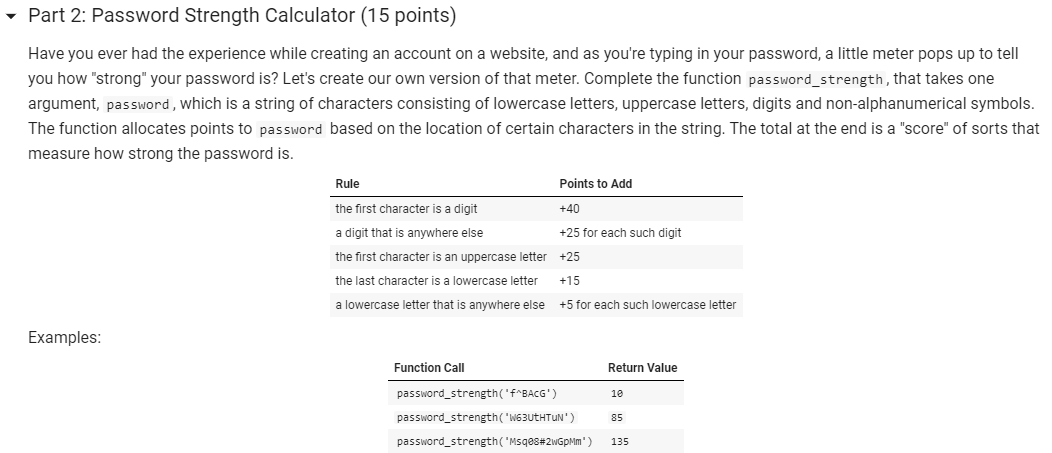
Question: python please Part 2: Password Strength Calculator (15 points) Have you ever had the experience while creating an account on a website, and as you're

python please
Part 2: Password Strength Calculator (15 points) Have you ever had the experience while creating an account on a website, and as you're typing in your password, a little meter pops up to tell you how "strong" your password is? Let's create our own version of that meter. Complete the function password_strength, that takes one argument, password, which is a string of characters consisting of lowercase letters, uppercase letters, digits and non-alphanumerical symbols. The function allocates points to password based on the location of certain characters in the string. The total at the end is a "score" of sorts that measure how strong the password is. Rule Points to Add the first character is a digit +40 a digit that is anywhere else +25 for each such digit the first character is an uppercase letter +25 the last character is a lowercase letter +15 a lowercase letter that is anywhere else +5 for each such lowercase letter Examples: Function Call Return Value password_strength('F BACG') 10 85 password_strength('W63UCHTUN') password_strength("Msqe8#2wGpMm') 135 40 110 password_strength('HjTt9yQ') password_strength('gw74X512") password_strength('9@%B9T(jZ') password_strength('y*n (qXxxvp2') password_strength('!fxus) 70 50 30
Step by Step Solution
There are 3 Steps involved in it

Get step-by-step solutions from verified subject matter experts
 Study Help