







Question: *******PYTHON PROGRAM********* Write a program that prompts the user to enter a string. Your program should then: Display the number of lowercase letters in the
*******PYTHON PROGRAM*********
Write a program that prompts the user to enter a string. Your program should then:
- Display the number of lowercase letters in the string.
- Display the number of uppercase letters in the string.
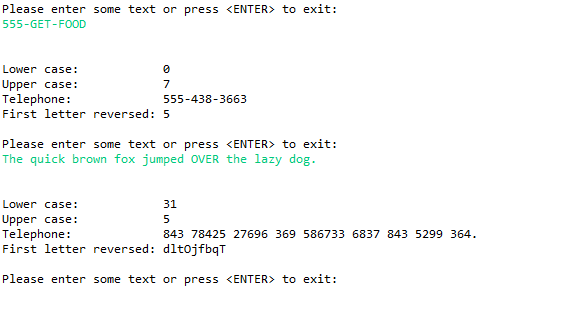
- Translate the letters in the string into numbers using the system on a standard American telephone. For example, 555-GET-FOOD becomes 555-438-3663. Both upper and lower case letters should be translated into numbers. All non-letters should be printed as is. The mappings are:
- A, B, and C become 2
- D, E, and F become 3
- G, H, and I become 4
- J, K, and L become 5
- M, N, and O become 6
- P, Q, R, and S become 7
- T, U, and V become 8
- W, X, Y, and Z become 9
- Display the first letter of each word in the string, but display in reverse order.
Allow the users to keep entering strings until they enter an empty string. Be sure to display all appropriate messages and prompts.
In this chapter we are learning to analyze strings one character at a time. Use only the functions that we learned in class. Do not use new library functions for this.
You can use an array in chapter 12 (project #2) if you want to, but you do not have to. I didn't in my version, and I suggest that you don't. If you do make sure you follow all the rules from chapters 8 and 9.
EXAMPLE HOW IT SHOULD LOOK
Notes
- This assignment can be correctly done with 1, 2, 3, or 4 loops.
- Your loops should look at the characters in the input string one character at a time, just like the loops we did in the demo programs this week.
- Like homework #9, you can only use the techniques that we learned in the class and you must always follow the coding standards page, especially the Do Not Use section. Do not use lists. Do not use built in functions that we did not learn in class. Undoubted there are easier and better ways to solve this problem in Python. But as I said before, this is not a Python class. It's a class in programming, logic, and technique.
- You cannot use the replace() function, even though we learned it in chapter 6.
Please enter some text or press
Step by Step Solution
There are 3 Steps involved in it

Get step-by-step solutions from verified subject matter experts
 Study Help