







Question: python Programming exercise 1: Triangular numbers Write a program called triangular.py that takes a number as an argument when the program is run and prints
 python
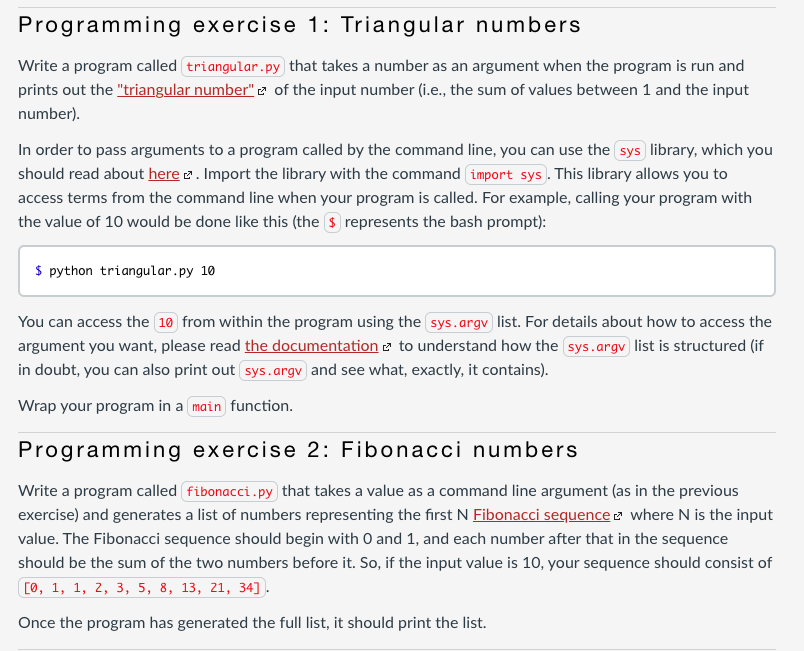
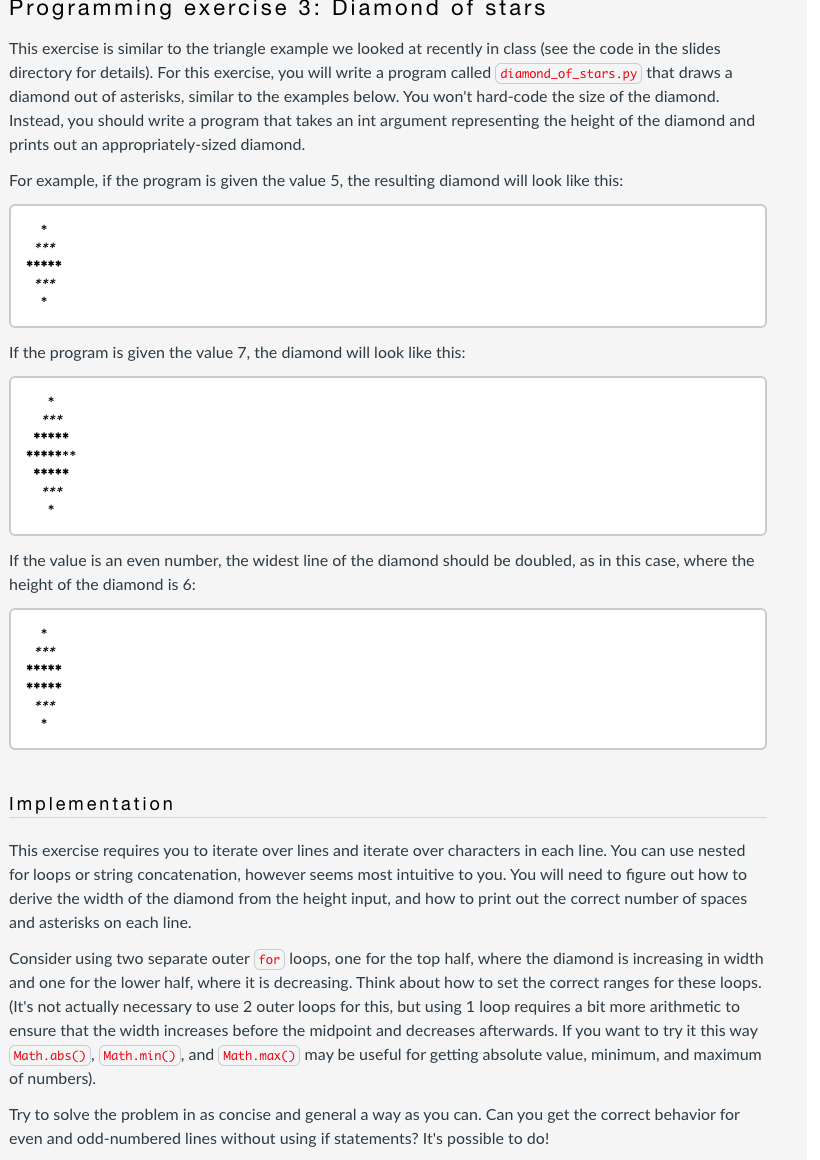
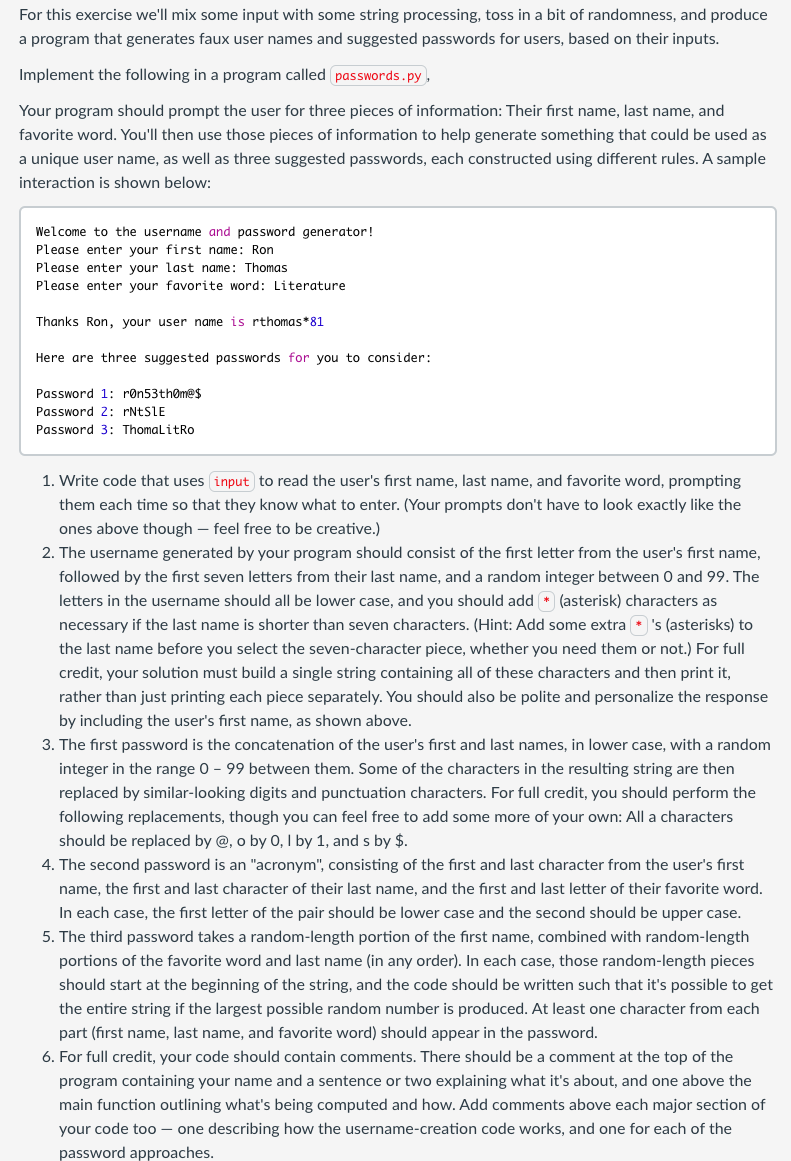
Programming exercise 1: Triangular numbers Write a program called triangular.py that takes a number as an argument when the program is run and prints out the "triangular number" e of the input number (i.e., the sum of values between 1 and the input number). In order to pass arguments to a program called by the command line, you can use the sys library, which you should read about here e. Import the library with the command import sys . This library allows you to access terms from the command line when your program is called. For example, calling your program with the value of 10 would be done like this (the $ represents the bash prompt): $ python triangular.py 10 You can access the 10 from within the program using the sys.argy list. For details about how to access the argument you want, please read the documentation e to understand how the sys.argv list is structured (if in doubt, you can also print out sys.argv and see what, exactly, it contains). Wrap your program in a main function. Programming exercise 2: Fibonacci numbers Write a program called fibonacci .py that takes a value as a command line argument (as in the previous exercise) and generates a list of numbers representing the first N Fibonacci sequence e where N is the input value. The Fibonacci sequence should begin with 0 and 1, and each number after that in the sequence should be the sum of the two numbers before it. So, if the input value is 10, your sequence should consist of [0, 1, 1, 2, 3, 5, 8, 13, 21, 34]. Once the program has generated the full list, it should print the list. Programming exercise 3: Diamond of stars This exercise is similar to the triangle example we looked at recently in class (see the code in the slides directory for details). For this exercise, you will write a program called diamond_of_stars.py that draws a diamond out of asterisks, similar to the examples below. You won't hard-code the size of the diamond. Instead, you should write a program that takes an int argument representing the height of the diamond and prints out an appropriately-sized diamond. For example, if the program is given the value 5, the resulting diamond will look like this: If the program is given the value 7, the diamond will look like this: ***** If the value is an even number, the widest line of the diamond should be doubled, as in this case, where the height of the diamond is 6: ***** Implementation This exercise requires you to iterate over lines and iterate over characters in each line. You can use nested for loops or string concatenation, vever seems most intuitive to you. You will need to figure out how to derive the width of the diamond from the height input, and how to print out the correct number of spaces and asterisks on each line. Consider using two separate outer for loops, one for the top half, where the diamond is increasing in width and one for the lower half, where it is decreasing. Think about how to set the correct ranges for these loops. (It's not actually necessary to use 2 outer loops for this, but using 1 loop requires a bit more arithmetic to ensure that the width increases before the midpoint and decreases afterwards. If you want to try it this way Math.abs(), Math.min(), and Math.max() may be useful for getting absolute value, minimum, and maximum of numbers). Try to solve the problem in as concise and general a way as you can. Can you get the correct behavior for even and odd-numbered lines without using if statements? It's possible to do! For this exercise we'll mix some input with some string processing, toss in a bit of randomness, and produce a program that generates faux user names and suggested passwords for users, based on their inputs. Implement the following in a program called passwords.py, Your program should prompt the user for three pieces of information: Their first name, last name, and favorite word. You'll then use those pieces of information to help generate something that could be used as a unique user name, as well as three suggested passwords, each constructed using different rules. A sample interaction is shown below: Welcome to the username and password generator! Please enter your first name: Ron Please enter your last name: Thomas Please enter your favorite word: Literature Thanks Ron, your user name is rthomas*81 Here are three suggested passwords for you to consider: Password 1: ron53thm@$ Password 2: rNESIE Password 3: ThomaLitro 1. Write code that uses input to read the user's first name, last name, and favorite word, prompting them each time so that they know what to enter. (Your prompts don't have to look exactly like the ones above though feel free to be creative.) 2. The username generated by your program should consist of the first letter from the user's first name, followed by the first seven letters from their last name, and a random integer between 0 and 99. The letters in the username should all be lower case, and you should add + (asterisk) characters as necessary if the last name is shorter than seven characters. (Hint: Add some extra * 's (asterisks) to the last name before you select the seven-character piece, whether you need them or not.) For full credit, your solution must build a single string containing all of these characters and then print it, rather than just printing each piece separately. You should also be polite and personalize the response by including the user's first name, as shown above. 3. The first password is the concatenation of the user's first and last names, in lower case, with a random integer in the range 0 - 99 between them. Some of the characters in the resulting string are then replaced by similar-looking digits and punctuation characters. For full credit, you should perform the following replacements, though you can feel free to add some more of your own: All a characters should be replaced by @, o by 0,1 by 1, and s by $. 4. The second password is an "acronym", consisting of the first and last character from the user's first name, the first and last character of their last name, and the first and last letter of their favorite word. In each case, the first letter of the pair should be lower case and the second should be upper case. 5. The third password takes a random-length portion of the first name, combined with random-length portions of the favorite word and last name in any order). In each case, those random-length pieces should start at the beginning of the string, and the code should be written such that it's possible to get the entire string if the largest possible random number is produced. At least one character from each part (first name, last name, and favorite word) should appear in the password. 6. For full credit, your code should contain comments. There should be a comment at the top of the program containing your name and a sentence or two explaining what it's about, and one above the main function outlining what's being computed and how. Add comments above each major section of your code too - one describing how the username-creation code works, and one for each of the password approaches
Step by Step Solution
There are 3 Steps involved in it

Get step-by-step solutions from verified subject matter experts
 Study Help