







Question: Python Programming: maze.py: from turtle import * setup(900,900) bgpic('maze.png') shape('turtle') color('green') width('7') # Write your code here done() maze.png: (3 points) Download the maze.py and
Python Programming:

maze.py:
from turtle import * setup(900,900) bgpic('maze.png') shape('turtle') color('green') width('7')
# Write your code here done()
maze.png:
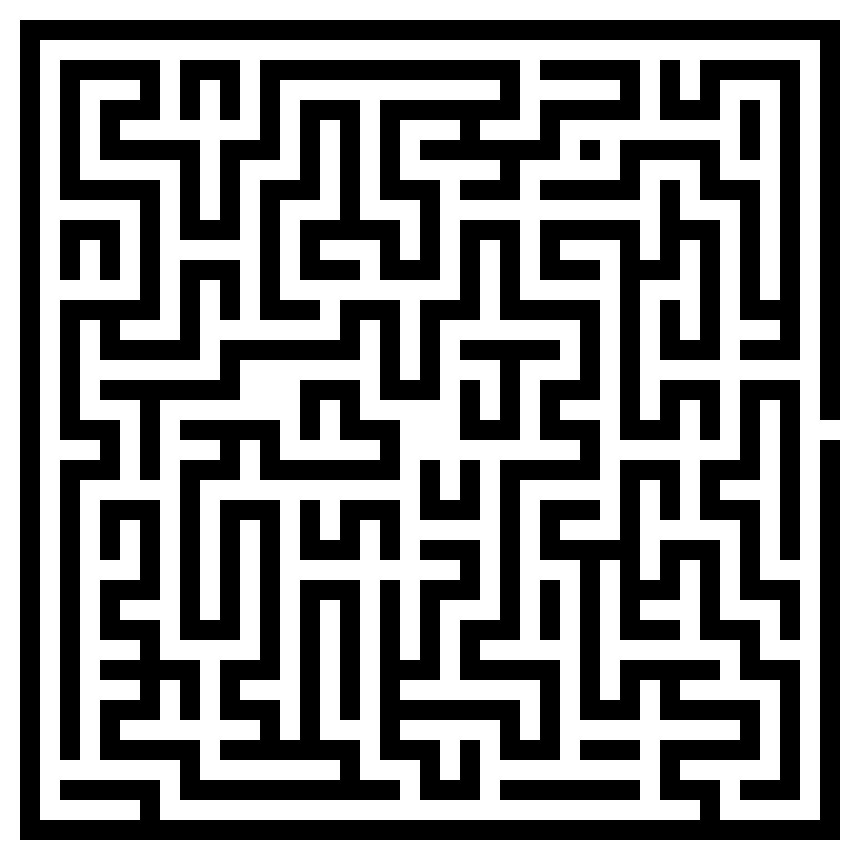
(3 points) Download the maze.py and maze.png files and place them in the same folder. Then, starting with the code provided in maze.py. Add turtle commands to the code to move the turtle from the center of the maze to the exit on the right hand side. Make sure your turtle never crosses a wall (black lines). Save your program as maze.py
Step by Step Solution
There are 3 Steps involved in it
1 Expert Approved Answer
Step: 1 Unlock

Question Has Been Solved by an Expert!
Get step-by-step solutions from verified subject matter experts
Step: 2 Unlock
Step: 3 Unlock
 Study Help