







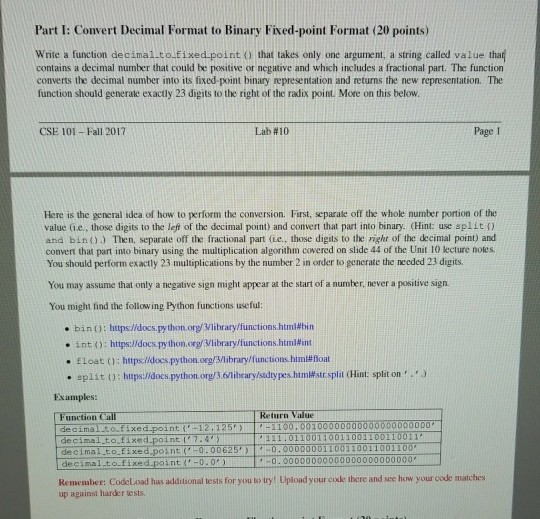
Question: Python programming Part I: Convert Decimal Format to Binary Fixed-point Format (20 points) Write a function decimal-to-fixed-point() that takes only one argument, a string called
Python programming
Part I: Convert Decimal Format to Binary Fixed-point Format (20 points) Write a function decimal-to-fixed-point() that takes only one argument, a string called value tha contains a decimal number that could be positive or negative and which includes a fractional part. The function converts the decimal number into its fixed-point binary representation and returns the new representation. The function should generate exactly 23 digits to the right of the radix point. More on this below. CSE 101-Fall 2017 Lab #10 Page 1 Here is the general idea of how to perform the conversion. First, separate off the whole number portion of the value (ie., those digits to the left of the decimal point) and convert that part into binary. Hint: use splito and bino) Then, separate off the fractional part (ie., those digits to the righr of the decimal point) and convert that part into binary using the multiplication algorithm covered on slide 44 of the Unit 10 ecture noles You should perform exactly 23 multiplications by the number 2 in order to generate the needed 23 digits. You may assume that only a negative sign might appear at the start of a number. never a positive sign. You might find the following Python functions useful bin(): https//docs.python.org.Viibrary/functions.html#bin . into: https://docs.python.org/Vlibrary/functions.html#mt . float (); httpslakospython.org/3/library/functions him float . split () : https://docs.python.org/3 6 library stdypes.html#str split (Hint: split on , , , ") Examples Function Call Return Value decimalto.Fixed-point (12.125-1100,001 decimal to.fixed point7.4 decimal to.Eixed point (-0.00625 decimalto-fixed-point 0.0' ) 111 01100110011001100110011 001100110011001100 0.000000+0000000000000000, Remember: CodeLoad has additional tests for you to try! Upload your code there and see how your code matches up against harder tests
Step by Step Solution
There are 3 Steps involved in it

Get step-by-step solutions from verified subject matter experts
 Study Help